Cavalry
Administrators
-
Joined
-
Last visited
Files posted by Cavalry
-
From (simple) multiple accounts detection to isp/connection fingerprinting with score-based moderating/rejecting logic. These are very effective low-hanging fruit at reducing spam.
Supports migration configuration from the following XF1 add-ons;
TPU Spam Detect
Alter ego Detector
See the FAQ Known Issues for known limitations. This is not a turn-key solution, and each site may require customization!
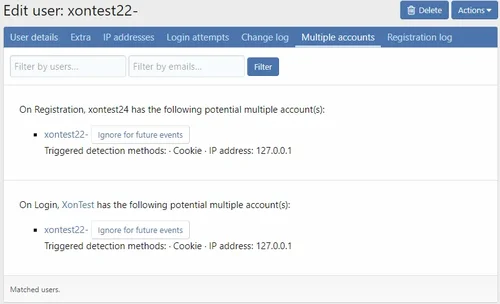
For multiple account detection, supports reporting to reports/threads. And will send reports to the same report/thread. To send to thread you must select the "Multi-account to thread" extra.
For connection fingerprinting more additional information is collected and recorded on the account.
Note; Configuration defaults are conservative, aimed at blocking VPNs and proxies. There are a large number of configuration options for this add-on!
Link content spam checking
Instead of adding the spam phrases http:///https:// which generate lots of false positives; this allows controlling how links are treated by the content spam checker;
Explicitly allow URLs with a given domain
Explicitly moderate URLs with a given domain
Explicitly reject URLs with a given domain
Default allow/moderate/reject for unclassified URLs
Multiple account handling permissions
Bypass multiple account checking
Can enable / disable alerting for user
Can enable / disable alerting for log
View reportings.
- Free
- 0 Downloads
-
Item Upgrader
Item Upgrader is a Minecraft plugin that allows players to upgrade their items to other items.
Features
Minecraft Version Support: Compatible with Minecraft 1.8 - 1.21.4.
Supports Custom Textured Items: Compatible with Oraxen and ItemsAdder for custom item textures.
Supports EcoItems: Compatible with items from the EcoItems plugin.
Economy Integration: Supports popular economy plugins via the Vault API.
Highly Customizable: Includes fully customizable messages and settings.
Chained Upgrades: Item upgrades are dependent on other upgrades.
Required Items: Option to set a list of items required before upgrading.
Upgrade Chances: Option to set different success rates for various item upgrades.
Customizable Permissions: Set specific permissions required to open the Upgrade Menu.
Confirmation Menu: Customizable menu for confirming item upgrades.
World-Specific Access: The Upgrade Menu can only be opened in specific worlds.
Upgrade Restrictions: Option to specify which items can and cannot be upgraded.
Sound Effects: Option to play sounds for various actions, such as insufficient balance,, item breaking and more
Upgrade Pricing: Option to set prices for different item upgrades (works with economy plugins).
Customizable Upgrades: Option to set the upgraded item's name, lore, and enchantments.
Enchantments Reset: Option to remove previous item's enchantments in the upgraded item.
Item Flags and Durability: Option to set item flags for upgraded items and make them unbreakable.
Disallowed Enchantments: Option to specify enchantments that prevent an item from being upgraded. If the item contains any of these enchantments, the upgrade will be blocked.
Enchantment Merging: Previous item's enchantments can be merged with the upgraded item, applying the higher level if the same enchantments are present.
Custom Enchantment Support: Compatible with custom enchantments from other plugins, such as EcoEnchants.
Smithing Template Support: Compatible with Smithing Templates (requires Minecraft 1.20 and higher).
Hex Color Code Support: Compatible with hex color codes (requires Minecraft 1.16 and higher).
PlaceholderAPI Support: Integration with PlaceholderAPI.
- Free
- 0 Downloads
-
SpleefX is a regularly updated and maintained, heavily customizable plugin for running spleef, splegg and bow spleef games! It comes with a built-in economy, perks, shops, abilities, upgrades, statistics and leaderboards to blast up your player experience!
High-performance and optimization
Built-in spleef, splegg, and bow spleef modes, each with its own set of settings
Fully configurable messages
Post-game statistics summary
In-game power-ups (with Holographic Displays)
Per game-mode configuration
Grace periods and scheduled commands
Game abilities, such as double-jump and triple-arrows
Teams & FFA support
Post-death arena spectating
Player statistics with a GUI
Leaderboards for your players to flex!
Multi-world support
Multi-arena support
Fast and automatic arena regeneration
Special SpleefX economy (Vault supported), with shops, upgrades and perks
Extremely simple to setup and configure
An extensions system to allow you to create your own minigame modes
Clean and easy-to-understand documentation
Support for many plugins:
Vault
Multiverse-Core
MultiWorlds
WorldEdit + AsyncWorldEdit
FastAsyncWorldEdit
WorldGuard + WorldGuard Extra Flags
PlaceholderAPI
- Free
- 0 Downloads
-
How to use?
For Commands, Configs, Install Steps, please view wiki here: https://flipcard.superiormc.cn/.
Credits
EasyPlugin: https://github.com/CarmJos/EasyPlugin
EasySQL: https://github.com/CarmJos/EasySQL
Terms
You are not allowed to leak/resell/share this plugin to other person.
You are not allowed to modify this plugin without our permission.
One purchase for one server.
No refunds.
Report bugs in our Discord.
- Free
- 0 Downloads
-
XenoWorldReset Premium plugin instructions:
Restore/restart the world at a specific time without deleting players from the server! You no longer have to endure the hassle of manually reinstalling the world.
The features of XenoWorldReset Premium plugin:
1.13-1.18. x supports Spigot/Aper
Easy to use/configure - Use the worlds.yml command or file to quickly configure and edit world configurations. The Complete tab will help you quickly install/edit world configurations.
GUI interface - easily and quickly adjust, reinstall, and keep the world from a clean game menu.
Scheduled backup - Back up your world at specific times to maintain progress.
Fully customizable download - edit certain worlds to restart at a speed that the server can handle. Useful for developers.
Random teleportation - Players can perform random teleportation after restarting or through commands.
Additional language settings - add line spacing and gradients to the langy.yml line!
WorldGuard Regions - Save specific regions that will be saved after restart!
Backup - Save a backup of the world for later recovery and restart!
Reset according to plan - When you want to reset your world, plan a specific time. No manual operation required! Interval is also supported!
Quick - The plugin attempts to use the least amount of RAM. Data is stored in cache and quickly available when needed.
Optimization - Configure constant load based on CPU power or number of players. The minimum descent of TPS when loading recursive constants.
Continuous experience - continue playing on the server during the world reset period with minimal TPS drop/delay - simply send all players to a safe world reset world.
Customizable - Prevent accidental resetting of the world by confirming your command.
Fully customizable lang. yml - configure all messages in any language you like!
Automatic configuration update - The configuration will be automatically adjusted every time it is updated! There is no need to reconfigure the configuration file every time it is updated.
Supports Java 8+and higher versions (including Java 11 and 16).
XenoWorldReset Premium plugin:
The important details of the XenoWorldReset wiki are currently being developed. Currently, all settings can be made through the graphical interface, commands, or configuration files (recommended) in the game/xwr menu.
Once completed, the wiki will cover most of the features provided in the plugin.
World Setting
The installations from all over the world are included in the Worlds.yml file. Each setting is' bound 'to a specific world. There are two types of settings: "TP World" and "Reset World". Resetting the world is also considered as the TP world.
TP World: TP/RTP setting is a setting that is not intended to be reset. It is only used for TP/RTP. This setting allows the default world that cannot be reset to still have random transfer functionality.
It can also be used for remote transmission away from the reset world (using the automatic option in another setting). If the player does not have the corresponding permissions, he will not be able to use commands to teleport to this world.
Reset World: Reset World allows you to manually or at specified intervals reset the world and provides various configuration options. This setting also comes with TP/RTP settings, which can be further disabled.
This type of installation may be why you first purchased this plugin. However, if you want to handle player teleportation appropriately, using TP world settings may also be useful.
Create/Edit World Settings
Configuration file (fastest)
All settings, regardless of which option you choose to edit them with, are stored in these files. The default configuration includes detailed explanations of input and output for each aspect of the plugin.
For more experienced server owners, we strongly recommend using this method to edit settings. It saves time and is easy to replicate.
GUI (simplest)
The graphical user interface (GUI) is available in the game through the/xwr menu command. When you point the cursor at a menu item, you will receive a brief setting explanation. Most configurations can be completed through a graphical interface.
To create a custom world, simply type in the graphical interface and click on the world you want to create a custom for. If you want to create a new world, XWR will do it for you if you install Multiverse.
Note: Files such as config. yml and lang. yml cannot be edited in the graphical interface in version 2.0.0.
Command (most available)
The "Create", "Edit", "Information", "List", "Restart", and "Save" commands are another option for editing world settings. Most of these commands are explained in the commands and permissions section of the wiki page.
It is not recommended to use commands to customize the world, but it can still be executed. If you need another plugin to run the XWR command, or if you just enjoy running commands, enable this feature.
To create settings, first use/xwr create<world>[<environment>], and then use/xwr edit<world><operation><settings><value>to customize each setting.
How to upgrade from CyberWorldReset to XenoWorldReset
This wiki page explains how to switch from CyberWorldReset to XenoWorldReset.
When it comes to new configuration files, updating plugins can cause many headaches. Fortunately, XWR has a converter that can transfer data from all previous versions (standard and advanced)!
Warning: The converter has been tested within my capabilities and should be able to convert any previous version of CyberWorldReset Standard and Premium. Please save your old files until you are completely certain that all data has been successfully transferred.
Transform
Completely stop your server.
Delete any old canister files you may have from CyberWorldReset. If you still install CWR, XWR will not start. Do not delete the CyberWorldReset folder!
Add the latest JAR XENOWORLDRESET file to the plugin folder.
Start the server.
Start/xwr convert. XWR must automatically recognize your previous versions and convert all data.
- Free
- 0 Downloads
-
Zenitho is a modern, responsive, and customizable theme specifically designed for XenForo 2.3.x. Developed by , this theme gives your forum a professional and stylish look while providing a user-friendly experience. With both Light Mode and Dark Mode options, it caters to user preferences and ensures excellent display on all devices.
If you want to elevate your forum's look and create an amazing experience for your users, Zenith is the theme you need!
Purchase Zenith now and take your forum to the next level!
Dual Mode Support (Light and Dark Modes)
Zenith provides a flawless experience in both modes. Your users can choose the mode they prefer for forum use to protect their eye health. The Light (Light) and Dark (Dark) mode options work seamlessly with XenForo's new theme variant support. Users can customize their forum experience according to their personal preferences.
Zenith offers a clean and stylish appearance by avoiding complex and unnecessary visual elements. Every element is in its right place, allowing users to focus easily on the forum content. The interface, shaped according to modern web design standards, combines simplicity and functionality.
Zenith adapts to every screen size, from mobile devices to desktop computers. Its responsive design ensures your forum displays perfectly on all devices, creating an environment where users can always browse comfortably. Zenith optimizes the user experience regardless of the device.
With Zenith's powerful theme editor, you can easily customize many features, from color palettes and fonts to page widths and node layouts. This editor, which allows you to design your forum uniquely, offers personalized experiences tailored to your community's needs.
Zenith is a speed-focused theme that minimizes page loading times. Users enjoy a seamless experience with fast transitions and quick loading times as they navigate the forum. Thanks to its optimized structure, the performance of your forum always stays at the highest level.
Zenith offers an attractive homepage design to welcome new users. It includes elements like a rocket icon and clean layout arranged to leave a professional impression on visitors. Latest members and login/register options encourage user interaction. The welcome screen provides users with an impressive experience when they first encounter the forum.
Zenith presents forum categories in an organized and clean way. Users can easily access topics of interest. Forums can also be adjusted as two-column via the admin panel, making the structure of your forum more tidy. In addition to forum categories, browsing content is very simple.
Topic pages can elegantly display user information in a custom carousel slider in the postbit area. Two different message layout options offer suitable views for different types of content.
The advanced search function allows users to filter forums by name, which makes it easier for users searching for specific content.
Zenith works seamlessly with XenForo's admin panel. Theme settings, global settings, welcome message, breadcrumb, sidebar, messages, legal notices, forum statistics, and footer can all be easily customized. This flexibility allows administrators to configure the forum exactly the way they want.
Google Web Fonts Support: Customize typography with Google Web fonts to make your forum more personalized.
Node Background: Add custom backgrounds to forum categories to enhance visual appeal.
Guest Message: Create personalized welcome messages for visitors and encourage them to register.
Footer Navigation Control: Remove or customize the footer navigation bar as desired.
Collapsible Categories: Users can collapse and expand forum categories to focus on content that interests them.
Simplified Node Statistics: Present forum statistics in a simplified way for a cleaner appearance.
"New" Indicator Label: Customize "New" tags to highlight new content.
Sidebar Features: Customize the sidebar's position, enable sticky sidebar to keep it visible as the page scrolls, and collapse and expand the sidebar for more efficient space utilization.
Separate Sticky Topics: Display sticky topics in a separate section to highlight important discussions on your forum.
- Free
- 0 Downloads
-
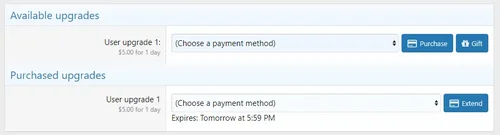
Gift Upgrades allows your members to easily and quickly purchase upgrades for other members. It is tightly integrated with XenForo's core user upgrade features allowing seamless gifting of upgrades you have already created. This is a free upgrade if you already own an active license to the original Gift Upgrades.
Features:
Integrates in to the default XenForo User Upgrade system allowing upgrades and downgrades to be handled by XF itself.
Integrates with XenForo's statistics system giving you a daily, weekly and monthly breakdown of gifts purchased.
Integrates with XenForo's criteria system allowing you to award trophies to users based on the amount of gifts they have given or received.
Support for Expiring User Upgrades by @Xon. Used together with this Gift Upgrades, you can encourage a gifted user to extend their user upgrade when it has almost expired and increase your revenue as a result.
Administrators can track upgrades that were gifted through the active / expired user upgrades area.
Alert users when they receive a gift.
These alerts can indicate who sent the gift or optionally, the gifter can choose to remain anonymous.
Installation:
Extract the contents of the .zip file provided upon successful purchase.
Upload the contents of the 'upload' folder to your root XenForo directory.
Install the add-on through the XenForo Admin Control Panel.
By default, all current user upgrades will be marked as giftable. This can be edited through the User Upgrades area.
- Free
- 0 Downloads
-
DragonByte Shop is the most advanced shop mod to date. Giving you unprecedented control over what items you can sell, DragonByte Shop is the perfect mod to go along with virtually any points modification.
With features like overriding any usergroup permission, including those of custom modifications, DragonByte Shop raises the bar for what you will come to expect from a shop mod.
Uses
Most other shop modifications add support for overriding certain stock actions, like increased PM space, increased avatar size, super moderator permissions, etc...
DragonByte Shop takes this to the next level and offers you 100% control over every single usergroup permission conceivable, including those of modifications we've never even heard of!
Usergroup permissions is not all it can do, however. It can also let members buy styling for your user title like bold, italics and colors, user title changing, username changing, and more!
It also offers a simple points system that you can use if you do not wish to add a points modification to your forum.
Feature List
DragonByte Credits integration: All of your DragonByte Shop purchases will show up in DragonByte Credits, allowing you to fully utilise the power of the Credits mod to support your Shop! New event triggers are automatically created when an action is taken within the Shop mod.
Multiple currencies: You can create multiple different currencies, and optionally integrate all or some of them with DragonByte Credits. This allows you to sell items in a wide variety of different currencies, each with their own rate of earning.
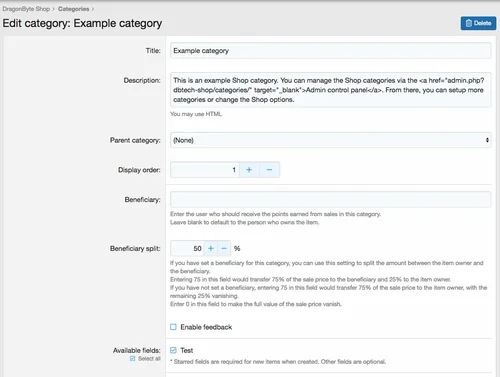
Categories: As an administrator you can create multiple categories that sells different (or the same) items. Categories can be organised in a tree structure for easy browsing. Categories can also have user group permissions, allowing you to fine-tune who can create items within each category.
Categories can also have a "Beneficiary", meaning someone other than the item owner can optionally receive all or part of the proceeds from selling each individual item. Beneficiary amounts can be split in any amount of 0-100%.
Items: A powerful item system allows you to create a wide array of different items with different configurations. Like categories, items can have their own individual user group or user permissions.
Items can have the following properties:
Giftable
Only giftable
Start conversation when gifted
Can re-gift
Unique (can only purchase one of this item)
Exclusive (can only purchase one of this item type)
Always hidden (item is not displayed in the postbit)
Stealth item (item is not displayed in a user's inventory or postbit)
Allow re-configuration
Automatically discard after configuration
Duration
Permanent
Temporary
Automatically discard after expiry
Inventory
Item price / currency
Sell-back price / currency
Sell-back time limit
Stock
Sell-back replenishes stock
Stock refill interval
Purchase notifications
Configure notifications
Reviews: Members are able to rate & review items, with optional requirements of entering review text and requiring purchase before a review can be left.
- 6.00 USD
-
This is an RSS feature disabling plugin specifically designed for XenForo forums, which can completely remove the forum's RSS subscription function.
one
✅ Automatically remove RSS icon links at the bottom of the page
✅ Clear RSS meta tags from all pages
✅ Remove RSS links from forum lists, section pages, featured content, etc
two
✅ Disable direct access to all RSS URLs
✅ Return 404 error when accessing any. rss address
✅ Including:/forums/index.RSS,/forums/section.rss,/features/index.RSS, etc
three
🛡️ Template level: Remove RSS related elements from HTML
🛡️ Controller level: Rewrite RSS method returns 404
🛡️ Event monitoring: Intercept all RSS requests
✅ Applicable scenarios
Do not want users to subscribe to forum content through RSS
Reduce server resource consumption (RSS generation)
Prevent content from being automatically captured
Simplify the page interface and remove unnecessary features
⚠️ Precautions
After installation, the RSS function will be completely unavailable
To restore RSS, you need to uninstall the plugin
Suggest notifying users of RSS feature changes before installation
🚀 User visible changes
The page is more concise - the RSS icon at the bottom disappears
Source code cleaner - no RSS meta tags
Access Protection - RSS URL Returns 404
- Free
- 0 Downloads
-
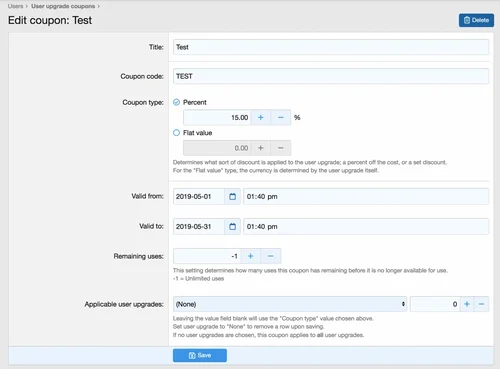
DragonByte User Upgrade Coupons is a powerful tool for incentivising people to sign up for user upgrades.
Coupons can be limited to individual user upgrades, and even be given different values for different user upgrades. Fully supports recurring subscriptions, allowing users to be "grandfathered" into their existing coupons for as long as their subscription lasts.
Uses
User Upgrades are a great way to monetise your site, and with User Upgrade Coupons from DragonByte, they are taken to the next level. You can optionally add temporary user group changes on new user creation (even supports manually created users via the AdminCP!) that expire after a set period, as well as create powerful coupons that let you fine-tune the price of your user upgrades.
Feature List
Powerful Coupons: Choose coupon type (percent discount or flat discount), start/end dates, remaining uses (or unlimited uses), as well as applicable user upgrades. The value of the coupon type can be overridden per upgrade, so if one upgrade should receive 20% off whereas every other upgrade receives 15% off, this is possible.
Coupon Permissions: Coupons use the permissions system in XenForo, allowing you to ensure that only certain user groups, or certain individual users can access any given coupon.
Recurring Subscription Support: Coupons support recurring subscriptions, with "grandfathering". This means that even if a coupon runs out of remaining uses, people who have already purchased a subscription will still receive their discount and their subscription proceeds uninterrupted.
Coupon Usage Log: Each time a payment is received, an entry is generated in a browsable and searchable log. Search by user name, coupon, or user upgrade, and more.
- Free
- 0 Downloads
-
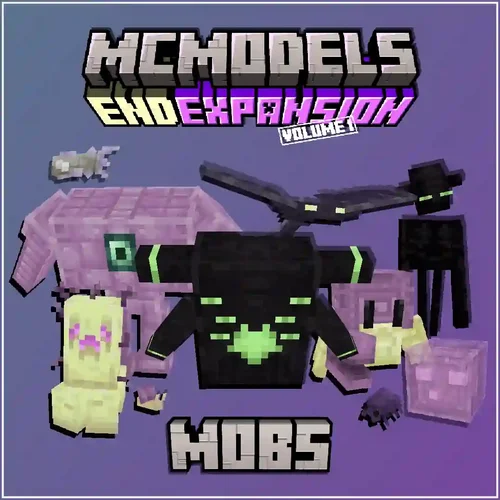
Features 10 vanilla friendly mobs each with unique gameplay mechanics.
Includes:
Drag and drop folder with model files with animations, MythicMobs configurations, textures and JSON for furniture.
Does not include randomspawns for the mobs, buildings, blocks, items, or any bosses.
Ambient
Neutral
Hostile
Endermite Redesign
Swapper
Void Ooze
Ghostfish
Shulkrab
Mobulus
End Snail
Purpur Sentry
Defiled Watcher
Distorted Watcher
- Free
- 0 Downloads
-
Product Description
Excavate the earth for rare resources, craft Ancient tools and decorations, and fight the Fossil Mobs that try to get in your way! Included: (Resource Pack 1.19.3 Compatible)
5 Custom Mobs (Tameable – MCPets configs included)
12 Furniture Models (Crucible furniture configs included)
6 Archaeologist Tools, used to gather new crafting materials and spawn/tame fossil mobs
4 Custom ancient tools (Ruby Pickaxe, Amber Fishing Rod, Obsidian Axe, Amber Mosquito Sword)
9 New crafting materials
Requirements:
Model Engine 3
Mythic Mobs (Latest Dev Build)
Mythic Crucible (Latest Dev Build)
MCPets
- Free
- 0 Downloads
-
Updated for 1.21.4+!
This pack includes -
42 New brew-able drinks!
3 New machines!
1 New furniture! (bar stool)
- Free
- 0 Downloads
-
Product Description
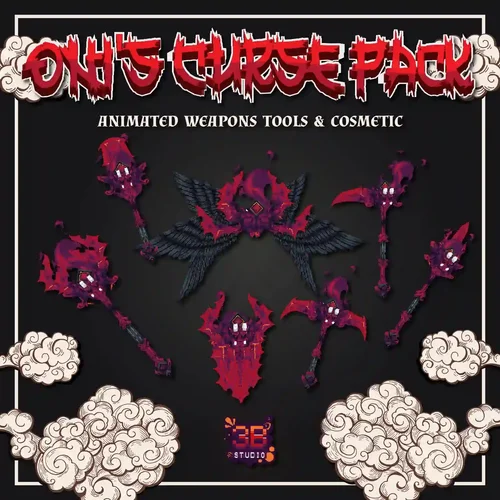
Oni's Curse Pack Animated Weapons Tools & Cosmetic
This Collection contains
Weapons
– Sword
– Bows (3 Steps)
– Shields (2 Steps)
– Spear
– Halberd
– Battle Axe
- Sickle
– Staff
Tools
– Axe
– Hoe
– Pickaxe
– Shovel
Equipment
– Helmet
– Chestplate
– Legging
– Boots
– Wings
Other
– Chest ( AquaticCrates )
– Key
Drag & Drop Supported
ItemsAdder Configuration
Oraxen Configuration
AquaticCrates Configuration
Custom Armor Resolution 32x
- Free
- 0 Downloads
-
Kingster – Education WordPress Theme For University, College and School is a premium WordPress theme, well created, especially for LMS, creating online course for selling, school, college, academy, university and education business website. It comes with necessary features such as course post type and course search which allows student to search through courses. Kingster also allow to create custom filter so you can use the advantage in course searching filter.
Kingster comes with the 3rd version of super powerful & customizable framework by GoodLayers. We have been developed our theme’s core, gathered every feedbacks from customers and put everything into this framework. It also comes with the most powerful drag drop page builder. It is super flexible with tons of great features such as background wrapper options, custom skin color for specific item wrapper, three view modes(live, preview, block), ajax page builder saving, pre built pages and blocks and much more. Financity also featured with Revolution Slider($19 Value included for free!), the most powerful drag-drop slider creator. Also bundled with LightGallery plugin($18 value!).
Core Features
- LMS supported!
- Course post type
- Create course and sell online
- Manage Quizzes and Questions easily
- Paypal payment
- Course search / filter
- Save $37 Plugins Value – included with Revolution Slider $19 and LightGallery $18!
- Demo Importer – With super powerful demo importer, you can have demo content on your site with a single click. We also have developed the multi-thread images importing technique to make it even faster!
- Powerful & Customizable Admin Panel - Full / Boxed Layout
- 100% Fluid Layout – You can set 100% of site’s content width to fit your screen size.
- Page items space can be customized – You can set space for each page item right in admin panel
- Top Bar – You can choose to enable top bar on top of all headers styles
- Top Bar Social – Enable social links in top bar easily
- 19 Header Layouts – With ability to control logo, navigation spaces.
- Secondary Navigation – You can choose style of secondary navigation as slide style or overlay style.
- Floating Navigation
- 6 Footer Layouts – You will also have option to disable footer/copyright section in specific pages too.
- Google Fonts
- Unlimited Sidebars – Create sidebar and assign to individual pages/posts easily.
- Choose sidebar layout from specific pages, posts
- Font Uploader – Upload your own font in EOT or TTF format
- Custom Skin Color – You can create custom skin color to use in page builder wrapper. For example, if you have three sections of wrapper in a page, you can create skin and use them in each section.
- Create Thumbnail Size – allow to you create custom thumbnail size to be used in portfolio, blog, gallery and in many other image elements.
- LightGallery – We provide two options for lightbox for you. LightGallery and Strip.
- Additional CSS – Put your custom css easily via theme option. We also have custom css box for mobile view too.
- Additional Javascript – Put your custom javascript easily.
- Maintenance / Coming Soon Page – Turn your site to maintenance or coming soon mode easily with a single click.
- Import / Export – Ability to import and export theme options, widget, custom page template easily.
- Post Format – 8 post formats – Standard, Aside, Image , Video, Quote, Link, Gallery, Audio
- Page Builder In Single Post – You can manage layouts freely in your single post with page builder
- Ability to set header background in single post
- Page Builder In Portfolio Single
- Ability to set header background in single portfolio
- Powerful Drag & Drop Page Builder
- Unlimited Color
- SEO Optimization
- WPML Fully Supported
- WooCommerce Fully Supported
- 14 Blog Layouts
- 9 Portfolio Layouts
- 6 Gallery Layouts
- Fully Responsive
- Automatic Theme Updates
- Live Customizer
- Free
- 0 Downloads
-
King NULLED is a Viral Magazine WordPress Theme designed to help your content go viral… King theme has unique features, allows community users to submit news, videos, images, lists, polls and trivia quizzes, and it comes with user profile pages, follow system, sharing buttons, hot, trending listings and multiple ad locations and much more… all included in theme , not required plugins. If you want to make your website more interactive, King Theme has many good features in this area. King theme is a modern masterpiece that will transform your website into an ideal viral website. Be Original with King Viral Theme…
King – Viral Magazine WordPress Theme Features
100% responsive design
Retina ready
Viral User Profiles
Post like system
Post Reactions
Comments Reactions
Front-end post edit
Easy translation
User Groups
User Badges
User Leaderboard
Verified Users
12 Post list templates
6 Header Templates
Categories and Tags follow
Mini slider
Editor’s Choice
Gallery Lightbox view
Different categories for different post format
Live Search
Live Notifications
Save Posts as Draft
Night Mode
Youtube Widget
Social Logins ( facebook, google+ )
Social Share buttons and share counter
Views counter
Slider
Supports NSFW
Viral Frontend submission
Cross browser compatibility
User follow system
Users, Dashboard, Hot, Trending, pages
SEO optimized
Compatible with SEO plugins
Optimized for Google PageSpeed
Translation ready
Support for multi page articles
Custom widgets,
AND MUCH MORE FEATURES…
- Free
- 0 Downloads
-
This app allows using Widget to display the statistic in your site. Members could see and update the newest information on that.
IPS version
5.0+
Features:
DISPLAY STATS IN TAB VIEW
DISPLAY STATS IN GRID VIEW
Manage stats in widget's settings:
Easy to add/delete stats.
Drag & drop to reorder the position quickly.
Clicking on stats to options: title, categories, thumbnails.
Supports IPS official apps: Forums, Downloads, Pages, Nexus, Gallery, Calendar. And 3rd party apps that meets the requirement for IPS4 Content, such as: Videobox, Musicbox, Tutorials, etc.... with the following stats:
New content
New comments
New reviews
Most viewed
Hot Topics
New Members
Top Reputations
.....
Other:
Auto-update stats every X seconds.
Widget title.
Thumbnail style (square or round).
Fully support AJAX.
Fully support responsive design.
- Free
- 20 Downloads
-
Using BetterDocs to accelerate the knowledge base functionality,
Effectively create and manage knowledge base documents to reduce support work orders, improve productivity, enhance user experience, and expand customer support operations.
Why choose a knowledge base:
Display detailed information about products and services
Instantly answer customer questions through self-service
Reduce continuous conversations on the support platform
- Free
- 0 Downloads
-
DiscordLink Plugin Description:
DISCORDLINK is a plugin for integrating Minecraft with Discord. It allows you to link accounts, synchronize ranks, manage 2FA protection, and issue rewards to server boosters.
DiscordLink plugin features:
MySQL and SQLite support
Syncing LuckPerms Ranks with Discord
2FA authorization
Rewards for Nitro Boosters
Logging Events in Discord
Fully customizable configuration and messages
Optimized performance without lags
DiscordLink plugin commands:
/link – linking an account
/unlink – unlink an account
/2fa – 2FA management
/profile – view profile
/boostrewards – receive booster rewards
/discordlink reload – reloads the plugin
/discordlink forceunlink – forced unlinking of an account
/discordlink forcereset – reset awards
/discordlink forcesyncupdate – rank sync update
/discordlink migration – data migration from another plugin
DiscordLink Plugin Permissions:
discordlink.link – allows you to link an account
discordlink.unlink – allows you to unlink an account
discordlink.2fa – Manage Two-Factor Authentication
discordlink.profile – view profile information
discordlink.boostrewards – Get rewards for Nitro-Boost
discordlink.admin.reload – reload plugin
discordlink.admin.forceunlink – forced unlinking of an account
discordlink.admin.forcereset – reset user awards
discordlink.admin.forcesyncupdate – rank sync update
discordlink.admin.migration – data migration from another plugin
Installing the DiscordLink plugin:
Download the plugin.
Shut down the server
Move the .jar file to the /plugins/ folder of your server.
Start the server.
Done.
- Free
- 0 Downloads
-
The anti spam feature of Invasion Community can protect your website from spam senders and spam bots.
- Free
- 2 Downloads