Cavalry
Administrators
-
Joined
-
Last visited
Files posted by Cavalry
-
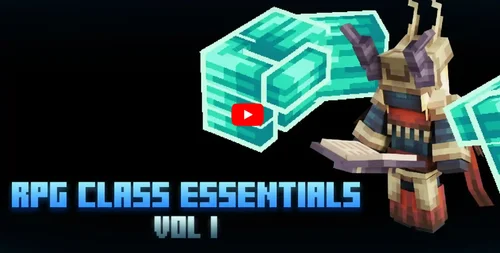
Add 6 avatars, 18 custom animations, 6 NPCs, 12 cosmetic items and 7 weapons to your game!
This package contains:
6 Avatars after release
Avatar Assassin / Avatar Warrior / Avatar Archer / Avatar Maga / Avatar Shaman / Avatar Summoner
LogoutAvatars Configuration
6 LogoutAvatars menu icons
18 User animations
Assassin / Warrior / Archer / Wizard / Shaman / Summoner
6 Animations Entry / Teleportions to / Rest
6 Animations Output / Teleporting
6 AFK Animations
Configuring AnimationsCore
6 NPCs
Assassin NPC / Warrior NPC / Archer NPC / Wizard NPC / Shaman NPC / Summoner NPC
6 Interaction animations: PCM for interaction
MythicMobs NPC Configuration
12 Cosmetics & 7 Weapons
6 Cosmetic Items (Head): Assassin's Hood / Warrior's Helmet / Archer's Hat / Mage's Hat / Shaman's Mask / Summoner's Helmet
6 Cosmetic Items (Body): Assassin's Knives / Warrior's Chains / Archer's Collar / Mage's Cloak / Totem Shaman / Summoner's Armor
7 Weapons: Assassin's Knife / Warrior's Sword / Warrior's Shield / Archer's Bow / Dry Mage / Shaman's Skipper / Summoner's Totem
HMCCosmetics Configuration
CosmeticsCore Configuration
MagicCosmetics Configuration
MythicMobs Item Configuration (Weapon)
Emissive textures
Instructions on how to get equipment in the game
The resource pack is included
ItemsAdder Configuration – Easy Drag & Drop!
Oraxen Configuration – Easy Drag & Drop!
User avatars after release require: LogoutAvatars (Original |BM), ModelEngine (Original |BM)
Custom animations require: AnimationCore (Original|BM), ModelEngine (Original|BM), MythicMobs (Original|BM)
NPCs require: ModelEngine (Original|BM), MythicMobs (Original|BM)
Cosmetics requires: Any of these three – HMCCosmetics (Original|BM) / CosmeticsCore (Original|BM) / MagicCosmetics (Original|BM)
Weapons required: None
Verified on versions 1.20.4, MythicMobs (5.7.2), ModelEngine (4.0.7), AnimationsCore (2.1.2), LogoutAvatars (1.2.0), HMCCosmetics (2.7.3), CosmeticsCore (1.3.0), MagicCosmetics (3.0.5), Resource Pack included
- Free
- 0 Downloads
-
- Free
- 0 Downloads
-
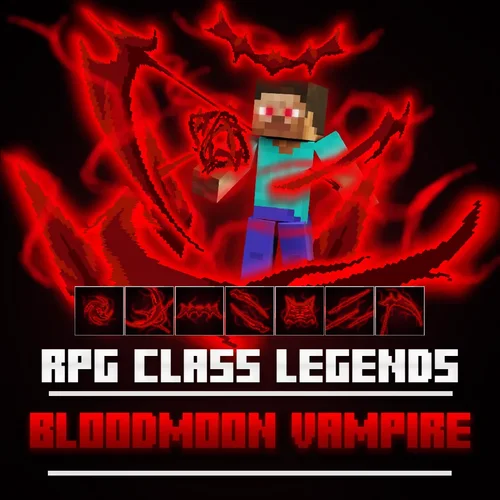
Add 7 Custom Skills and 2 Equipment to your game!
The Bloodmoon Vampire class is a Legendary Mage/Summoner class that uses blood abilities with his bloodmoon orb.
The Bloodmoon Vampire class is a melee/ranged physical/magical damager that bloodbends different weapons to execute different abilities.
This pack contains:
Bloodmoon Orb of Bloodmoon Vampire (Item Model/MMOItem/MythicCrucible): 13 skills bound
Ethereal Orb of Bloodmoon Vampire (Item Model/MMOItem/MythicCrucible): 13 skills bound
Blood Impact VFX (Skill Model)
Blood Blades VFX (Skill Model)
Blood Grimoire VFX (Skill Model)
Blood Needle VFX (Skill Model)
Blood Scythe VFX (Skill Model)
Blood Slash VFX (Skill Model)
Blood Thrust VFX (Skill Model)
Blood Dash VFX (Skill Model)
Small/Medium/Big Blood Spikes VFX (Skill Model)
Blood Meteor VFX (Skill Model)
Blood Rupture VFX (Skill Model)
Blood Needle Stacks VFX (Skill Model)
Spinning Blood Scythe VFX (Skill Model)
7 skill icons
MythicLib custom skill configs
MMOCore class & skill configs
MMOItems & MythicCrucible item configs
Emissive skill VFX textures
Instruction on how to get the equipment in-game
Resource pack included
ItemsAdder config - Easy Drag & Drop!
Oraxen config - Easy Drag & Drop!
Skill upgrade function for MMOCore: Upgrade your skill level for higher damage, reduced cooldown, longer duration, etc
Ex) Customizable base damage, per-level damage, minimum / maximum damage
Party/Guild function:
Damages and debuffs only apply to non-party/guild members
Heals and buffs only apply to party/guild members
Skills:
Passive - Bloodbending (Passive): Bloodbend into 4 different types of weapon forms. Available forms are Blades, Grimoire, Needles, and Scythe.
Basic Attack - Bloodmoon Combo (Left):
[Blades] Crimson Slash
Execute a 3 step combo. Lash out an X slash - Rapid thrust - Dash back and forth, thrust and slash sideways.
[Grimoire] Bloodspike Arcanum
Execute a 3 step combo. Summon a series of blood spikes - Repeat - Summon a blood orb meteor that falls towards the location you're looking at, creating a blood spike rupture that damages enemies inside.
[Needles] Scarlet Quills
Fire blood needles that stack onto the enemy (Max 5).
[Scythe] Reaper's Spiral
Execute a 4 step combo. Dash forwards with a spinning slash, knocking back enemies - Repeat - Dash upwards with a spinning slash, knocking up enemies - Dash downwards with a spinning slash, knocking down enemies.
Skill 1 - Vampiric Surge (Right):
[Blades] Vampiric Dash
Perform an explosive dash, slashing through all enemies and draining their health.
[Grimoire] Bat Swarm
Fire blood bats, draining the health of all hit enemies.
[Needles] Bloodburst
Explode all stacked needles on nearby enemies, more needles dealing more damage and draining more health.
[Scythe] Soul Harvester
Throw your spinning blood scythe, knocking back and draining the health of hit enemies. Your thrown blood scythe slows down and comes back to you, this time pulling enemies in.
Skill 2 - Bloodborne Blades (Shift + Shift): Bloodbend into Blades form. The Blades are fast, multi-striking, short radius weapons. You gain speed I while in Blades form.
Skill 3 - Bloodborne Needles (Shift + Right): Bloodbend into Needles form. Needles are fast, long ranged weapons.
Skill 4 - Bloodborne Grimoire (Hold Shift): Bloodbend into Grimoire form. The Grimoire is a normal speed, long ranged, AOE focused weapon.
Skill 5 - Bloodborne Scythe (Shift + Left): Bloodbend into Scythe form. The Scythe is a slow, heavy, big radius weapon. You gain slowness I while in Blades form.
You only need one of the three - MMOItems, MMOCore, OR MythicCrucible to make the pack work. You don't need all of them.
Dependencies: MythicMobs, ModelEngine
Tested on version 1.20.4, MythicMobs (5.7.1), MMOItems (6.9.4), MythicLib (1.6.1), MythicCrucible (2.1.0), MMOCore (1.12), ModelEngine (4.0.7), Resource pack included
- Free
- 0 Downloads
-
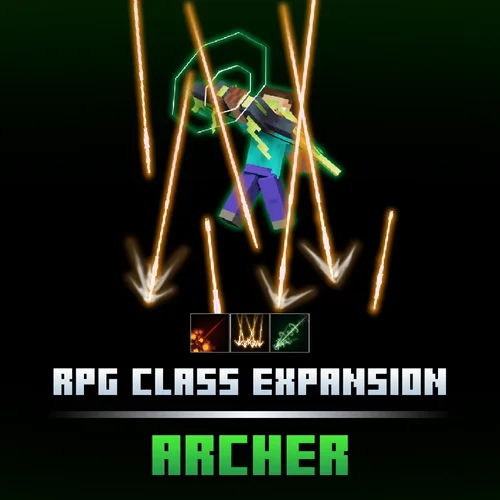
Add 3 Custom Skills, 3 Skill Icons, and 4 Skill VFX to your game!
This pack is an expansion of RPG Class Series | Archer, adding 3 new skills to the class.
Trap enemies in an Arrow Shower, push them away with a Hurricane Shot, finish them off with an Explosive Arrow!
The bow model is NOT INCLUDED in this pack
You can find the bow model and the 7 original archer skills here: RPG Class Series | Archer
This pack contains:
Arrow Charge/Impact VFX (Skill Model)
Arrow VFX (Skill Model)
Hurricane Shot VFX (Skill Model)
Explosion VFX (Skill Model)
3 skill icons
MythicLib custom skill configs
MMOCore class & skill configs
MMOItems & MythicCrucible item configs
Emissive skill VFX
Instruction on how to get the equipment in-game
Resource pack included
ItemsAdder config - Easy Drag & Drop!
Oraxen config - Easy Drag & Drop!
Skill upgrade function for MMOCore: Upgrade your skill level for higher damage, reduced cooldown, longer duration, etc
Ex) Customizable base damage, per-level damage, minimum / maximum damage
Party/Guild function:
Damages and debuffs only apply to non-party/guild members
Heals and buffs only apply to party/guild members
Skills:
Explosive Arrow (Right): Fire an explosive arrow that causes a small explosion on every enemy it penetrates, and a huge explosion when landed on a block.
Arrow Shower (Shift + Right): Fire multiple arrows at the sky and rain down a barrage of arrows at the location you are looking at.
Hurricane Shot (Shift + Left): Charge and fire a hurricane arrow that knocks back and deals huge damage to enemies.
You only need one of the three - MMOItems, MMOCore, OR MythicCrucible to make the pack work. You don't need all of them.
Dependencies: MythicMobs, ModelEngine
Tested on version 1.20.4, MythicMobs (5.6.2), MMOItems (6.9.4), MythicLib (1.6.1), MythicCrucible (2.0.0), MMOCore (1.12), ModelEngine (4.0.6), Resource pack included
- Free
- 0 Downloads
-
Add 1 Item, 2 Custom Skills, 2 Skill Icons, and 6 Skill VFX to your game!
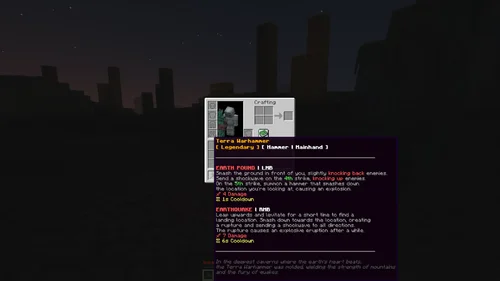
The Terra Warhammer is an RPG style item with unique rarity, equipment slot, and skills.
Perfect for any server, especially with RPG systems and loots, can also be used together with our RPG Class Series!
Send a shockwave to knock up enemies, smash them down with your warhammer, finish them off with an Earthquake!
This pack contains:
[Legendary] Terra Warhammer (Hammer | Mainhand): 2 skills bound
Earth Pound VFX (Skill Model)
Warhammer VFX (Skill Model)
Ground Wave VFX (Skill Model)
Earthquake Rupture VFX (Skill Model)
Ground Smash Dust VFX (Skill Model)
Earthquake Explosion VFX (Skill Model)
2 skill icons
MythicLib custom skill configs
MMOCore class & skill configs
MMOItems & MythicCrucible item, lore configs
Emissive skill VFX
Instruction on how to get the equipment in-game
Resource pack included
ItemsAdder config - Easy Drag & Drop!
Oraxen config - Easy Drag & Drop!
Skill upgrade function for MMOCore: Upgrade your skill level for higher damage, reduced cooldown, longer duration, etc
Ex) Customizable base damage, per-level damage, minimum / maximum damage
Party/Guild function:
Damages and debuffs only apply to non-party/guild members
Heals and buffs only apply to party/guild members
Skills:
[Legendary] Terra Warhammer (Hammer | Mainhand):
Earth Pound (LMB): Smash the ground in front of you, slightly knocking back enemies. Send a shockwave on the 4th strike, knocking up enemies. On the 5th strike, summon a hammer that smashes down the location you're looking at, causing an explosion.
Earthquake (RMB): Leap upwards and levitate for a short time to find a landing location. Smash down towards the location, creating a rupture and sending a shockwave to all directions. The rupture causes an explosive eruption after a while.
You only need one of the three - MMOItems, MMOCore, OR MythicCrucible to make the pack work. You don't need all of them.
Dependencies: MythicMobs, ModelEngine
Tested on version 1.20.4, MythicMobs Premium (5.6.2), MMOItems (6.9.4), MythicLib (1.6.1), MythicCrucible (2.0.0), MMOCore (1.12), ModelEngine (4.0.6), Resource pack included
- Free
- 0 Downloads
-
Revive +
Revive + | Skript configs.
This Skript makes you lay down on the floor. When you die, the doctor can use medicine items to revive you!
This pack includes :
- Required plugins (Skript, SkBee, Skript-reflect, Citizens) *all free
- Skript configs files
Drag & Drop supported!
Full commands and how to use in description!
- Free
- 0 Downloads
-
may the odds be ever in your favor! Never lose your stuff to looting players again! When you die, an AngelChest is created. The chest will be locked for a configurable amount of time, and then just drops its contents. You can also unlock your chest, for example if you died in company of a friend, or have it unlock automatically after a specified amount of time. The chest will hold your complete inventory including armor slots. Experience or experience levels can also be stored. You can also set the duration per player, just see the groups.example.yml file.
When you rightclick the AngelChest, your inventory will be restored. If not all items can be stored (because you picked something up after respawning), the remaining items will be left in the chest and you can decide which items you want to take/leave behind. You can also directly open the chest via shift-rightclick if you wish to take only some items (see screenshots at the bottom of the description). Once the chest is emptied or the duration is reached, it will despawn and drop the remaining items.
Players can have more than one AngelChest. They can teleport themself to their chests, or fetch the chests to oneself (see permissions below). You can also set a custom price for spawning, opening, teleporting to or fetching the chest to use with economy plugins (only if you have Vault installed).
It is also possible to limit the cases when a chest spawns, e.g. you can disable it for lava deaths or during PvP, or disallow it from being locked or collecting XP during PvP, in certain WorldGuard regions, etc.
All messages are 100 % customizable. Also the config file includes more than 130 options!
- Free
- 0 Downloads
-
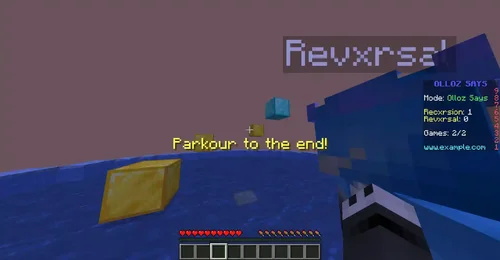
Olloz Says is a revival of a familiar, fun, enjoyable yet simple minigame that we all have enjoyed in our childhood, schools and even popular Minecraft servers! Providing 40+ games and missions, full minigame automation, extremely simple setup, clean documentation and regular updates; all to make you taste the joy of living great memories and to get your players to feel them too!
Olloz Says is a fun minigame for all types of servers, regardless of size, type or complexity. Don’t miss the fun!
Features:
A Simon Says game adapted for Minecraft: Players are given a task, and must do it to earn points. The player with the most points wins. Each task rewards different points, and can either reward based on who finished first, or equally reward all players who finished
Multi-arena support: You can create as many arenas as you want! Arenas do not require separate worlds
Death Match mode: Olloz Says has a built-in Death Match mode, where players have a specific amount of lives that decrease every time they fail a task. Last player standing wins
Spectating: Olloz Says has a built-in spectating feature. Players can teleport to others, fly around and spectate the match freely.
40+ different minigames: Olloz Says offers more than 40 different tasks / missions for the game, varying in the objective, difficulty and reward.
Custom tasks support: You can duplicate a task, rename it and give it different settings. Through Olloz Says API you can also create completely customizable tasks with your very own criterias.
Per task reward: Each task can reward with custom points. It can also reward based on who finished first.
After-game rewards, and per-arena rewards: It is possible to reward winners in a game by adding commands to run for the winners.
Extensive customizability: Olloz Says is very customizable! You can configure each task on its own, the messages are fully changeable, spectating and arena settings are also highly customizable. All in all, your copy of the plugin can be very unique just by configuring it!
Known bugs:
I've decided to add this section for transparency.
FIXED The "Click The Color" task does not work on newer versions of Minecraft
FIXED there seems to be a random bug where arenas do not save correctly. This should be fixed.
FIXED Players connecting using ViaVersion would not see titles.
FIXED Registry errors on 1.18.2
For a complete, extensive description of every command, check the wiki page.
User commands:
/ollozsays join [arena]
/ollozsays leave
/ollozsays forcestart not by default
Arena commands:
/ollozsays arena create <arena key> <arena display name> [-dm]
/ollozsays arena delete <arena>
/ollozsays arena regenerate <arena>
/ollozsays arena center <arena>
/ollozsays arena spectatingpoint <arena>
/ollozsays arena parkourspawnpoint <arena>
/ollozsays arena parkourfinish <arena>
/ollozsays arena settings <arena>
/ollozsays arena spawnpoint <arena> <index>
More arena commands:
/ollozsays editbuilding <arena>
/ollozsays whydisabled <arena>
/ollozsays blocks <arena>
/ollozsays listarenas
Tasks commands:
/ollozsays tasks add <arena> <task>
/ollozsays tasks remove <arena> <task>
/ollozsays tasks list <arena>
/ollozsays testparkour <arena>
Admin commands:
/ollozsays reload
/ollozsays debugplayer <player>
- Free
- 0 Downloads
-
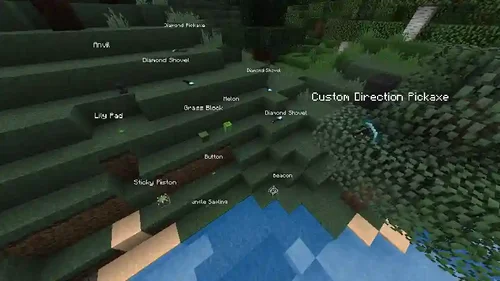
All dropped items will be shown as being held by invisible armor stands.
No lag. No duplication bugs.
Focused on performance, extremely low timings.
Custom item names (including renamed items) are supported.
Requires ProtocolLib.
Features
Supports Minecraft 1.8 to 1.21.
All 3D items are clientside. This means that there are no duplication bugs, because the drops still exist on the server and aren't being overridden, they're just being hidden from the client.
Since the armor stands are clientside, this means that you can still remove the drops using the same commands, such as "/remove drop 50". The items despawn after a few minutes as they usually would.
Does not cause any server lag, most of the plugin's work is done asynchronously, so it won't interrupt the main thread. The server does not tick the armor stands that this plugin uses, only the drops are ticked.
Items will merge. (This depends on Spigot's built-in item merge-radius in spigot.yml; item merging is detected, not performed by BetterDrops)
Items are affected by physics. (They can flow in water!)
Does not conflict with most other plugins (WorldGuard, MoneyMobs, etc) since it doesn't create or destroy any entities server-side. See "Incompatible Plugins" below.
You can configure limits for the maximum amount of 3D drops in an area in order to prevent clientside FPS lag.
Hex colors (1.16+) are supported, you can use them in item names. (#000000 - #FFFFFF)
Works with ProtocolSupport. Clients running 1.7.10 or below will see regular vanilla drops (Armor stands were added in 1.8)
If you want, you can disable the armor stands and name tags will be rendered above regular floating items.
Configuration
The configuration can be reloaded using /drops reload.
Changed settings will immediately take effect when the configuration is reloaded.
- Free
- 0 Downloads
-
Have you ever wanted to translate your server into multiple languages?
Well, look no further! Triton offers this among a whole host of other awesome features! This plugin uses a placeholder that will be replaced (dynamically, per player) with a message defined in the language file.
The documentation can be found on Triton's website.
NOTE: Triton is not an automatic/machine translator. All messages must be configured manually in the desired language.
Since v2.0.0, all plugins should be able to be translated, even if they don't have configurable messages. Please take a look at the limitations section below.
Translate any chat message, action bar, title/subtitle, inventory titles, holograms, NPC names, kick/ban messages, tab header/footers, custom tabs, item names/lores, signs, bossbars¹, books, MOTD, scoreboards², advancements³, and death screen.
BungeeCord support
Partial Velocity support (check docs)
Unlimited languages
API for developers
Language GUI selector with flags
Edit your messages online with TWIN (Triton Web INterface)
Reload your config in-game without restarting your server
Change how the placeholder looks depending on the type of message (chat, scoreboard, item, etc)
Change another player's language using commands (online and offline)
Run commands when a player changes their language
Dynamic values in translated messages and signs
Supports all stable Spigot versions since Spigot 1.8.8
Full MySQL support
Automatic generator tool to help bulk translate plugins
Doesn't allow players to type placeholders in the chat
Translate your terminal (console output) to the main language
Configurable internal messages
¹ Bossbar translation requires Spigot 1.9+
² Scoreboard translation might only partially work and requires Spigot 1.13+; full translation is possible through PlaceholderAPI, see the Limitations section below
³ Advancements translation requires Spigot 1.12+
Some awesome people have created add-ons using Triton's API, adding even more features!
Triton needs the following to run:
Spigot 1.8.8+ (Spigot 1.8 to 1.8.7 is not officially supported)
BungeeCord or Velocity proxy (optional)
Java 8+ (for Spigot 1.17+, Java 16 is required)
ProtocolLib 5.3.0 or newer
PlaceholderAPI (optional)
Note (2024-06-19): The latest dev builds of ProtocolLib seem to have broken support for Minecraft 1.8.8; you might need to use an older version of Triton that can work with an older version of ProtocolLib.
For better compatibility, please only use the latest version of every major version. Currently, (officially) supported versions are: 1.8.8, 1.9.2, 1.10.2, 1.11.2, 1.12.2, 1.13.2, 1.14.4, 1.15.2, 1.16.5, 1.17.1, 1.18.1, 1.19.4, 1.20.6 and 1.21.4.
Please do not buy this plugin if your server does not meet these requirements. It is your responsibility to ensure this plugin will work in your server environment. We do not offer refunds.
Spigot and BungeeCord forks, like Paper and Waterfall, will receive bug fixes as well, even though internal testing is done on vanilla Spigot and BungeeCord.
- Free
- 0 Downloads
-
Keep in mind this "remaster" was made with VR in mind! I have not tested it on a 3D TV and am not sure if those support 90FPS.
Dune (2021) is now available in 3D at 2160p 90FPS!
Upscaled with Topaz Video AI and interpolated with TensorRT RIFE v4.4
A sample is included, enjoy!
Quote:
AI-Powered Upscaling and Enhancement: Breathing new life into your media library with stunning visuals and enhanced clarity.
Seamless 90fps Conversion: Enjoy fluid motion and immersive action with state-of-the-art frame interpolation.
Unlocking the Full Potential of Your Content: Experience your favorite movies and TV shows like never before.
Embrace the future of home entertainment with AI-powered technology.
- DirtyHippie
Advocate for HFR! :)
General info:
Video:
3840x1600 resolution
90 frames per second
35935 kbps total bitrate
Audio:
Dolby Digital 5.1
6 channels
48.000 kHz sample rate
640 kbps bitrate
Language - English
Subtitles:
English
- Free
- 0 Downloads
-
This add-on uses Credis with a custom cache provider for Redis. For best performance, install the php extension: phpredis
You must have a Redis instance installed, this is likely not possible with shared hosting
While XenForo 2 has a redis connector, it requires phpredis. This add-on does not.
Feature overview
A pure php redis connector
High availability support
Exposes redis cache object for use for use by other add-ons
Implements some minor caching of forum thread counts
Redirect's XenForo's individual css template caching to hit redis as otherwise it causes unexpected write & deadlocking on the xf_css_cache table
Installation
Edit src/config.php and add:
PHP:
$config['cache']['enabled'] = true; $config['cache']['sessions'] = true; $config['cache']['provider'] = 'SV\RedisCache\Redis'; $config['cache']['config'] = [ 'server' => '127.0.0.1', 'port' => 6379, ];For details see the XenForo Manual: https://xenforo.com/docs/xf2/cache/
Troubleshooting
Please be aware that Redis is very sensitive to latency in a virtual environment. If repeated connection failures or protocol errors are experienced disable any Redis Persistence options.
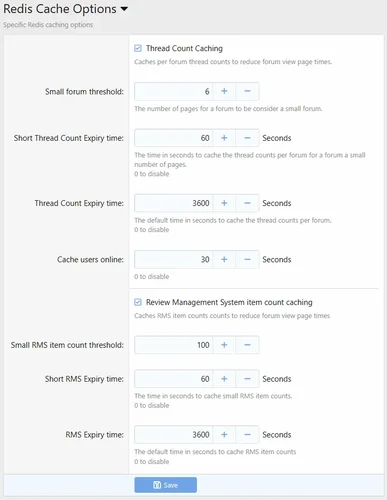
Options
By default, forum thread counts are cached. In general, this is observable when moving large number of threads from one forum to another, and the total page counts are wrong.
- Free
- 3 Downloads
-
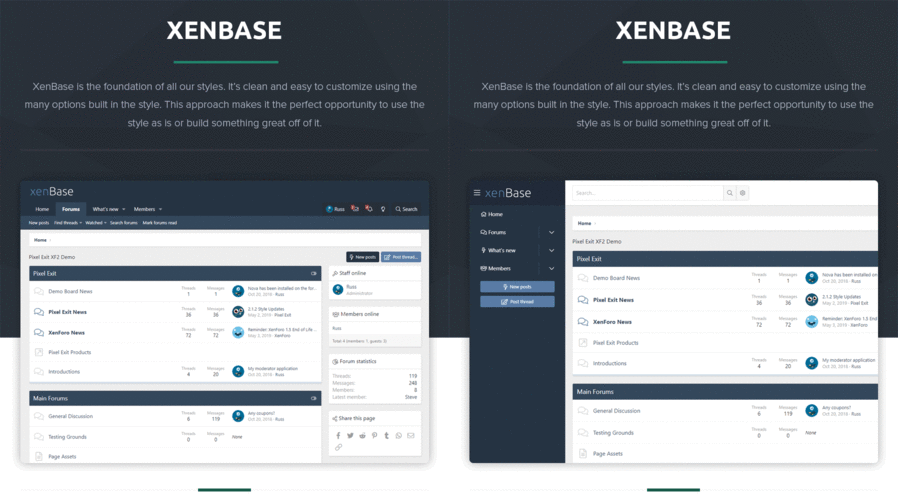
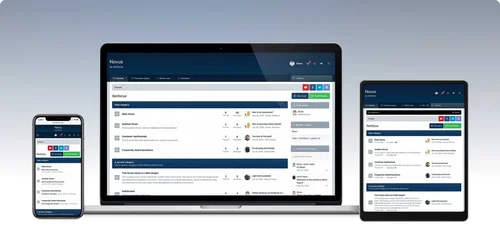
Novus is a clean, modern theme with a professional color scheme which is very simple to modify via Style Properties. The header area is large enough to accommodate for big logos and full width banners, and the navigation bar sticks to the top of the screen for easy access.
- Free
- 3 Downloads
-
Description:
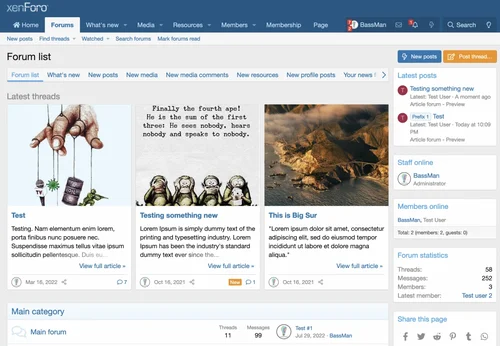
Use the New Threads widget as an article preview with some extra customization. This add-on extends the New threads widget to display threads in a more attractive way, to show them as featured threads or in any other way you might want to use.
Check the FAQ tab on how to set it all up.
This add-on is very similar to [cXF] Enhanced Search Forum Widget (screenshots below are the same).
A simple demo of thread blocks is available on our forum.
Features:
show threads from the New threads widget as article preview blocks
option to view thread blocks in a scroll container
set the number of thread blocks in a row
show or hide post snippet
set snippet length
option to set the image aspect ratio (4/3 or 16/9)
set a custom image for threads with no image in the first post
show or hide View full article link
show or hide thread block footer
options to show thread blocks on narrow screens (mobile)
two style configurations in style properties for enhanced widgets
set up to 3 widgets for each style
- Free
- 3 Downloads
-
Description
Do you have recurring questions from your users? The FAQ system is for you.
It allows you to create categories, frequently asked questions and answers to these questions.
Features
Fully style configurable
Add public categories and private categories
Add frequently asked questions with
Editor for answer
Attachment system
Drag and drop sorting system
Usergroup permissions
- Free
- 3 Downloads
-
Importing data from other software, XenForo can import information from other forums, including users, forums, topics, posts, and private messages, as well as various other data.
This would be very useful if you want to migrate your forum from another software package, or if your forum needs to merge or absorb another forum site.
The XenForo importer is now installed through a separate add-on that you can download from the client area.
XenForo 2 supports importing data from the following sources:
XenForo 2.x
VBulletin 3.6 to 5.3
IPS 4.x
PHPBB 3.2 to 3.3
Single mode fiber 2.0
My BB 1.8
Discourse 2. x
- Free
- 6 Downloads
-
This addon integrates your Discord server with your XenForo forums. It allows you to assign roles on your Discord server based on usergroups in XenForo, as well as post messages directly from XenForo to your Discord server.
Basic Features:
Allows registration/login on XenForo through Discord OAuth2
Assign roles on your guild/server based on usergroups in XenForo
Enforce username matching from XenForo to your guild/server
Enforce bans on your guild/server when someone is banned on XenForo
Post new threads, replies and status updates to channels on your guild/server
- Free
- 4 Downloads
-
AMS (Article Management System) is an article system that uses the same framework as the Showcase plugin. AMS
It includes many Showcase features, as well as its own "chip":
Nested categories
Complete permission control for categories
Additional fields of the article
Additional comment field
prefix
label
Search for other article fields
Multiple settings (over 500 settings available)
Ability to display various layouts of articles and create one's own layout
Fully integrated with XenForo core (search, navigation, conversation, liking, profile, spam cleaning, complaints, review, alerts, email, tracking, etc.)
Fully integrated with CTA FT portal, XFMG, and [bd] widget framework.
There are many other functions as well
- Free
- 4 Downloads