





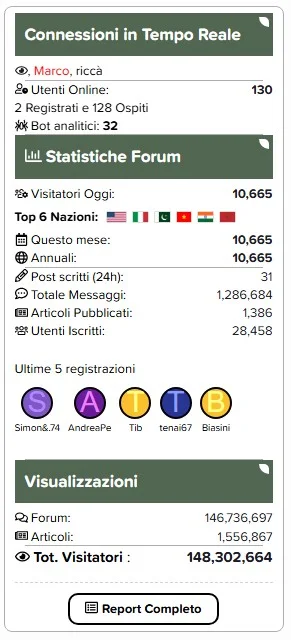
Eklenti, forum sidebara trafik ve istatistik widgeti oluşturmanıza olanak tanır.
Description:
This plugin allows you to create traffic and statistics widgets for the forum sidebar.
Features:
Monitor unique visitors with precise counters for the Last 24 Hours, Current Month, and Yearly Totals.
Daily and Monthly graphs now utilize fixed ranges (last 30 days / last 12 months), ensuring a consistent and gap-free visual experience.
Automatically detects and displays flags of the top visiting nations directly in the widget.
Highly customizable layout for new registrations. Choose between Avatar only, Username only, or a compact Avatar + Username column style.
Full support for Bob's Article Management System, displaying total articles and article views alongside forum stats.
Tracks and displays current online users, guests, and analytical bots separately.
A dedicated button links to a comprehensive statistics page featuring detailed tables and the new comparative historical graphs using Chart.js.
Optimized logic ensures minimal server load and mathematically precise visitor counting (no double-counting of archived logs).
please support the developers. If you have any other questions
please leave a comment and let us know!
Join the conversation
You can post now and register later. If you have an account, sign in now to post with your account.