






- Open Club
- 7 members
- 15.00 USD
About This Club
The club uses a paid membership system, and once joined, you can enjoy permanent downloading of all content within the club without any time limit on usage.
What's new in this club
-
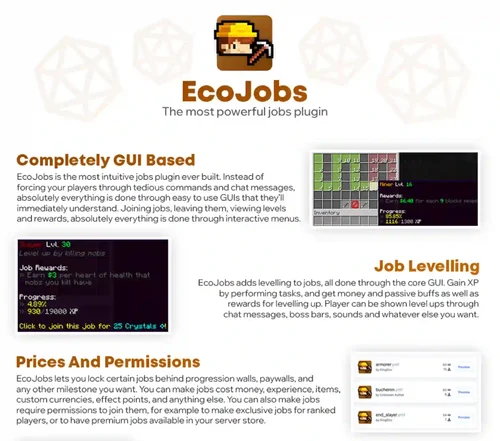 The Most Integrations When combined with the incredible capabilities of our plugin engine, eco, the libreforge effects system has more external plugin integrations than any other plugin ever released. Custom items, anticheats, protection/claim plugins, custom mobs, holograms - you name it, we support it. Mathematical Expressions with Placeholders Everywhere you can put in a number, you can put in a mathematical expression and use placeholders in it. Want to make a player's mining speed dependent on their y level? How about making their damage related to their economy balance? Any idea you have, no matter how insane, we support. Animations and Particles The effects system has native animation and particle systems so you can make your configs feel more reactive and alive. Visual and auditory feedback are just one effect away, allowing your creations to have a high budget feel without any of the cost. Open-Source with Developer API For developers and more advanced users, our effects system is completely open-source and extensible. Create your own effects, conditions, filters, slots, mutators, animations - if you've got custom plugins you want to hook up, you can do it with ease. Customise Everything Unlike other effect systems which lock you to simply mixing and matching effects and triggers, you'll be able to change literally every aspect to your liking. Blacklist and whitelist blocks, entities, items, and more, change messages, add cooldowns, delays, repeats, costs - you'll be blown away by how much you can make. Persistent Variables You can store data for players or for the server to use in effects or just to store in your database. You can create full currencies, mana systems, and anything else just by setting up the right effects. What's more, you can also store data inside item NBT, and we also include a full built-in item levelling system that you can customise to your liking. Custom Placeholders and Macros If you're worried about repeating yourself when making complex effect systems, we include full systems to make your own placeholders (fully integrated with PlaceholderAPI) and macros through our effect chain and effect argument systems. Even though all configs are written entirely in YAML with no special syntax, you can create entire programming systems without cluttering up your configs. Community Config Support You can import community-made configs directly into your server thanks to our config website lrcdb (click to visit). With over 1300 public configs and over 350,000 configs ever made, you'll be in good company when using our ecosystem.Free
 -
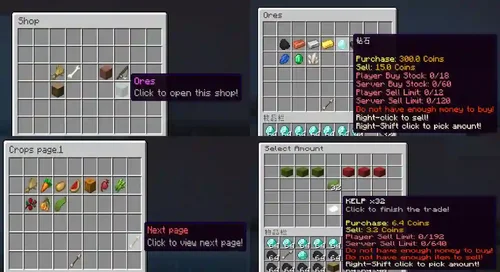 Info UltimateShop is a powerful shop plugin for Spigot, we just try added all premium shop plugins feature to this plugin. Multi-based shop plugin! The relationship between products and prices is many to many, and can be freely controlled by conditional systems. You want to player pay 500 points and 1 stack diamond to buy one powerful diamond sword and 5 days VIP permission group? This can be easy done in UltimateShop! Apply price system, you can make each times player buy a product need pay different prices! Dynamic price system, just like in real life, products price can change each time every players buy or sell them. Per player and global limit (or stock) system, and built-in an auto reset feature to help you fill the stock. Built-in Item Format which allow you make any item you desire, including custom food, custom tool, custom attribute, custom armor, and so on. Built-in powerful menu system, just help you create more nice shop menus, common menus and buy more menus! In premium version, we can auto translate the Java menus into Bedrock Form UI menus without any change from you! Built-in powerful action and condition system instead of commands and permissions only, and UltimateShop allows you can almost use them everywhere! Built-in powerful placeholders like math, random, compare, discount and allows you display product's placeholder in PlaceholderAPI! (Premium) All number option support dynamic value/symbol. You can use placeholder and math symbol in number type option, you can set dynamic stock, product amount, price amount, and so on! Want to the price based on player's level? This also can be easy done! So many custom item plugins, economy plugins support, also UltimateShop 100% support your hook plugin item even the items lore, displayname have changed. High flexibility brings infinite possibilities. Dynamic Price, Real Life Stock, Seasonal Price, Rotate Product, Daily Shop, Economy Exchange, Daily Reward, Steak Reward, Command Shop, Spawner Shop and so on, all of them can be done by UltimateShop! Highly configurable. You can freely set shop click events (like left click to sell 1 stack and right click to buy 1), customize price descriptions, and customize matching rules for product sellling. Sub button for products, you can display same product in different places, this allows you make villager-trade-GUI-like shop GUI. Custom price feature allows you easily create economy or item price even UltimateShop does not support that economy/item plugins! (Premium) Smart item give method, the plugin can automatically group the items purchased by the player and calculate the remaining space in the player's inventory. (Require you enable this feature in config.yml) Usability. For frequently used scenarios, the plugin provides sample configurations on Wiki, with some auto-settings to help you automate what you want to do. Auto transalte vanilla item name at plugin message, placeholder and so on. You don't need to manually set each product name for vanilla items. (Require 1.16+ server version, Premium) Built-in Sell Stick, Sell All GUI which out any other addon plugins! (Sell Stick requires Premium) Many, many, other things... Configs Please view Wiki. Terms For terms of this software, please view this page. Report bugs in our Discord.Free
 -
 Usage/Getting Started: CREATING A WORLD: Let the server start once with iris before you install anything into Bukkit, or try and create a world. The server Should restart, if not restart Manually /iris create <worldname> (This creates a world with the default pack) Then set it as your default world should you want to See more here: Docs: https://docs.volmit.com/doc/iris/ See more screenshots at volmit.com NOTE: Iris is version Dependent THE LATEST VERSION IS THE ONLY ACTIVELY DEVELOPED VERSION, ALL OLDER VERSIONS WILL NOLONGER RECIEVE UPDATESFree
 -
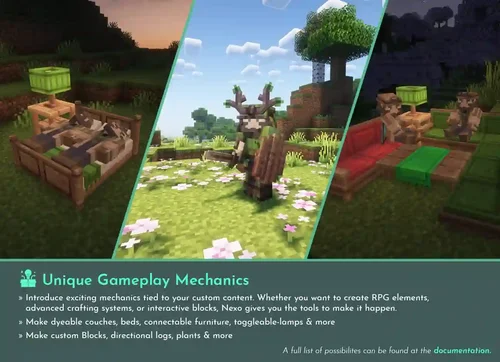 Nexo: The Perfect Plugin to Enhance Your Minecraft Server with Custom Models, Items, and Mechanics Nexo is designed to enhance your Minecraft server with custom models, items, and mechanics, making it the perfect plugin to turn your server into a unique, immersive world. Custom Items, Armor Blocks, and Furniture Easily create custom items, blocks, and furniture with custom models, textures, and animations. With Nexo, you can bring your server's creative ideas to life without sacrificing performance or compatibility with a wide range of configuration options! Create anything from custom food, tools, and armor to ores, trees, and glowing lights! Furniture, tools, and armor are included by default (crafted in Workshop 6). ⭐️ Unique Game Mechanics Introduce exciting mechanics related to your personalized content. Whether you want to create RPG elements, an advanced crafting system, or interactive blocks, Nexo has you covered. Here’s an example: furniture with paintable surfaces and lights that can be turned on and off. For a complete list of features, please refer to the documentation. Furniture and Lights with Paintable Surfaces and Switchable Lighting Built-in Converters for Furniture from Other Plugins Nexo comes with built-in converters to easily replace items from other plugins! Currently, Nexo automatically converts any Oraxen units completely. ItemsAdder support is coming soon! Powerful Integration with Nexo Resource Packs Nexo simplifies the process of delivering high-quality user-generated content by automatically generating, merging, obfuscating, and distributing your resource packs. Designed to make resource packs as simple as possible, Nexo allows you to merge multiple complex resource packs without manually merging individual files. Nexo also protects your files, making it harder for others to steal its contents! Custom GUIs, Ranks, and Emotes for Inventory With Nexo, you can create anything from custom fonts, chat ranks, emotes, to custom inventory screens. Let your players earn ranks, express themselves with custom emotes, and enjoy cool custom inventories!Free
 -
 This is posted as a premium resource to motivate the continued development of the plugin. If you would not like to contribute to development you are welcome to download the same versions for free here but please read 'Why premium?' below for more information. About Citizens is the original NPC plugin, adding everything from simple player statues to walking and talking NPCs and more advanced features using addons such as guards using Sentinel, scriptable NPCs using Denizen, NPC shops and more. Citizens contains a variety of commands and unlimited possibilities for expansion with an easy to use API. With advanced features such as scripting, AI and a helpful dev team, Citizens will continue to expand to make your server even better! For more information, please read the wiki, join the Discord or try it out for yourself. Features Customisable NPCs - conversations, click-commands, player statues, looking around, waypoints, and much more. Extensive developer API allowing aggressive NPCs, scripting, trader NPCs and more via Denizen/Sentinel. Issues / Requests Please file an issue here or ask on Discord. Why premium? Citizens has been developed actively for over 12 years, with hundreds of hours of development time spent on making it the best NPC plugin. Each new Minecraft release requires extensive changes to the codebase on top of time spent making new features. If you use or appreciate this plugin, please consider supporting it by purchasing the premium version.Free
 -
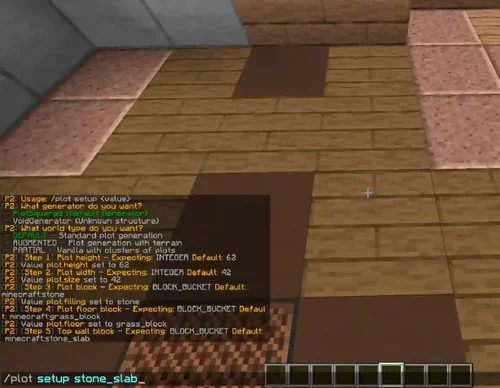 In built plot downloading + cross server saving and loading. Plot swapping / copying and cross world plot moving. Plot merging, your own plots or between friends Extensive flag system so you can decide what should be protected on a per world, or per plot basis Plot entry notifications / per plot time / weather / music etc with the flag system Add custom roads to existing maps to make them look nicer Configure additional messages however you want Dynamic world border to prevent excessive exploring Mob protection and per plot mob limiting Interactive commands such as plot listing Plot rating, ranking, complexity analysis, and auto clearing calibration Use javascript to add new commands or script simple things like auto merging all plots Plot schematic saving, loading and pasting Per player settings such as plot chat and entry notifications World creation either with multiverse, /plot setup, or manual yml configuration Plot commenting and inboxes World auto trimming which reduces the CPU and disk usage when people explore Pistons and Sand/TNT cannons are properly restricted Per plot redstone settings + plot redstone disablers Restrict the use of WorldEdit to plots only. Chunk processing to safely unload dangerous chunks (also processes WorldEdit commands) Component setting (floor, wall, border, etc.) Section off areas (e.g. an area for donors) with plot clusters, or add plot clusters to vanilla worlds Plot naming (for teleportation) Configurable command confirmation (e.g. for /plot clear) A lot of generators, and settings to choose fromFree
 -
 Description of the ACubelets plugin:ACubelets is a plugin similar to create. Each item that you get from the cubelet has its own rarity, this rarity determines the chances of winning the item. You can choose from a large number of animations to open the kubolet! Features of the ACubelets plugin:Unlimited number of slot machines Unlimited number of slot machine types Unlimited number of rare instances for each type Unlimited number of rewards of each type The plugin has a crafting system for Cubelets Customizable holograms You can translate it into your native language More than 20 animations The plugin perfectly supports databases such as MySQL and SQLite Tons of fireworks Customizable points for the economy. ACubelets Plugin Commands:/cubelets - View your balance / cubelets help - View help for the plugin. /cubelets gift <Player's nickname> - Send a case to the player /cubelets givekey <Player's nickname> <Type> <Quantity> - Issue a special case to the player / cubelets give <Player's nickname> <Type> <Quantity> - Give a special case to the player / cubelets clear <Player's nickname> - Delete all cases from the specified player. / cubelets remove <Player's nickname> <Type> <Quantity> - Remove a specific case from the player. / cubelets machine [create/edit/remove] - Create, delete, edit a specific machine. /cubelets info <Player's nickname> - Show all player's cases. / cubelets type remove - Remove a specific type of case. / cubelets type create <Type> < Name> - Create a new case type. / cubelets setup < Type> - Open the configuration of a specific case type. / cubelets setup crafting -Open the crafting setup / cubelets reload - Reload the plugin configuration. Economy commands in the ACubelets plugin:/points - View your lost points. /points give <Player's nickname> <Amount> - Give the player a certain number of points. /points remove <Player's nickname> <Number> - Remove a certain number of points from the player. /points set <Player's nickname> <Number> - Set a certain number of points for the player. ACubelets Plugin Permissions:acubelets.admin - access to admin commands. acubelets.animations.Alias Numbers - Grant access to an animation with a specific number. Placeholders of the ACubelets plugin:%acubelets_available% - Show the number of cases. %acubelets_available_type% - Show the number of cases of a certain type. %acubelets_points% - Show the number of points. Plugin Dependencies:HolographicDispays DecentHolograms Soft dependencies:Vault PlaceholderAPI Installing the ACubelets plugin:Download the plugin. Turn off the server Move the file .jar to the /plugins / folder of your server. Start the server. Done.Free
 -
 MineGPT Plugin Commands:There are a number of commands for MineGPT that allow you to interact with the plugin as a player or administrator. Most of these commands require permission to run Main command: /minegpt Aliases: [mg, gpt]. Format: < > = required value, [] = optional value Player's Commands/ minegpt <prompt> - If the appropriate command is not found, sends a prompt request. / minegpt help -Sends a help message to the sender. / minegpt prompt <prompt> - Attempts to ask a question to ChatGPT using the specified prompt. / minegpt info <type> <value> - An attempt to get information using predefined hints and specified variables. Admin Commands/ minegpt reload -Reloads the MineGPT plugin along with its files. / minegpt discord -Displays information about Discord. / minegpt plugin review [1/2/3/4/5] - Starts the process of leaving a review about the plugin. / minegpt plugin version -Retrieves and displays the latest available plugin version. / minegpt support help -Displays an interactive support help message. / minegpt support confirm -Confirms registration of support for this plugin version. (don't even try this) / minegpt support register <discord> - Registers the Discord tag for support in the Culley Studios discord (don't even try this). MineGPT Plugin Permissions:For MineGPT, there are a number of access rights that restrict interaction with the plugin only for those who are logged in. If you're looking for teams to interact with, visit the teams page. Team Permissionsminegpt.command.help -Allows the player to execute the help command. minegpt.command.info -Allows the player to execute the info command. minegpt. command.prompt -Allows the player to execute the prompt command. Admin Team Permissionsminegpt.command.admin.help -Allows the player to execute the admin help command. minegpt. command. admin.reload -Allows the player to execute the reload command. minegpt. command. admin.discord -Allows the player to execute the discord command of the administrative plugin. minegpt.command.admin.version -Allows the player to execute the command version of the administrative plugin. minegpt. command. admin. support -Allows the player to execute administrative support commands. Other permissionsminegpt. chat.translate. send - If chat_translate. enabled is set to true and the player has this permission, they will attempt to automatically translate their chat messages to the receiving players. minegpt. chat.translate.receive - If chat_translate. enabled is set to true and the player has this permission, this will allow the player to receive automatically translated messages. MineGPT Plugin Placeholders:MineGPT has a number of native placeholders that can be used both internally and externally using placeholder libraries such as PlaceholderAPI and MVdWPlaceholders. In addition to MineGPT-specific plugins, there are also a number of plugins provided by the CS-API for each of the registered plugins. External integrationIf you have PlaceholderAPI or MVdWPlaceholderAPI installed and running, all MineGPT placeholders will be automatically registered. You don't need any external extensions or add-ons for this functionality. MineGPT Placeholders%minegpt_interaction_menu_id%-ID of the interaction menu %minegpt_request_display_actions% - List of actions that are performed to display the response %minegpt_request_min_length% - Minimum request length in characters %minegpt_request_timeout% - The total amount of time, in milliseconds, before disabling requests. %minegpt_response_line_character_limit% - Total number of characters to display in the response string. MineGPT Response Placeholders%minegpt_response_prompt_id% - A unique identifier assigned to the request response %minegpt_response_prompt%-Hint used to generate the response %minegpt_response_response% - Full unformatted response string %minegpt_response_model%-Id of the model used to interpret the hint %minegpt_response_requested_by% - The person who made the request %minegpt_response_added% - First date of the hint request %minegpt_response_updated% - The most recent date of the hint request %minegpt_response_response_line=<line>% - A specific < string> of the formatted response. If the string does not exist, it is replaced with an empty string %minegpt_response_prompt_line=<line>% - A specific < string> of the formatted query. If the string does not exist, it is replaced with an empty stringFree
 -
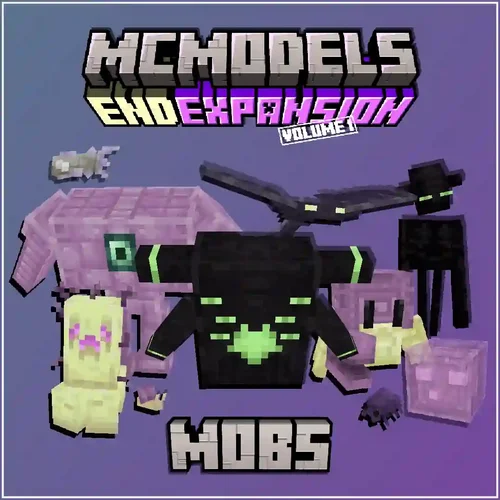 Features 10 vanilla friendly mobs each with unique gameplay mechanics. Includes: Drag and drop folder with model files with animations, MythicMobs configurations, textures and JSON for furniture. Does not include randomspawns for the mobs, buildings, blocks, items, or any bosses. Ambient Neutral Hostile Endermite Redesign Swapper Void Ooze Ghostfish Shulkrab Mobulus End Snail Purpur Sentry Defiled Watcher Distorted WatcherFree
 -
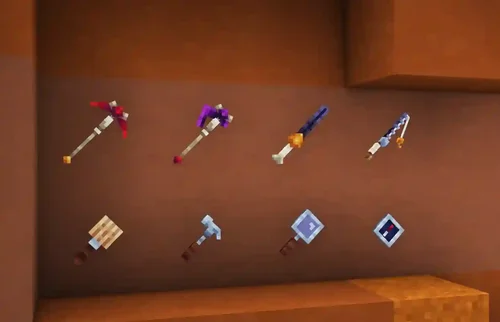 Product DescriptionExcavate the earth for rare resources, craft Ancient tools and decorations, and fight the Fossil Mobs that try to get in your way! Included: (Resource Pack 1.19.3 Compatible) 5 Custom Mobs (Tameable – MCPets configs included) 12 Furniture Models (Crucible furniture configs included) 6 Archaeologist Tools, used to gather new crafting materials and spawn/tame fossil mobs 4 Custom ancient tools (Ruby Pickaxe, Amber Fishing Rod, Obsidian Axe, Amber Mosquito Sword) 9 New crafting materials Requirements: Model Engine 3 Mythic Mobs (Latest Dev Build) Mythic Crucible (Latest Dev Build) MCPetsFree
 -
 Updated for 1.21.4+! This pack includes - 42 New brew-able drinks! 3 New machines! 1 New furniture! (bar stool)Free
 -
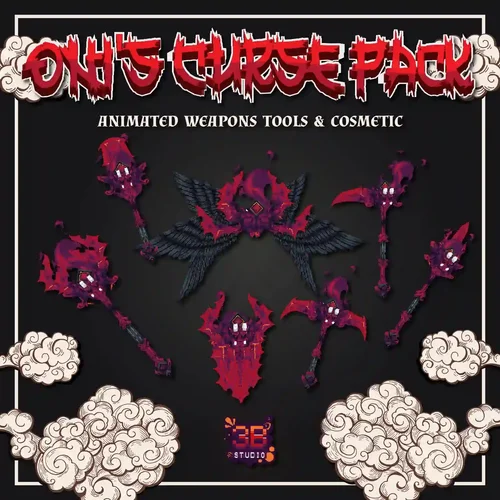 Product DescriptionOni's Curse Pack Animated Weapons Tools & Cosmetic This Collection contains Weapons – Sword – Bows (3 Steps) – Shields (2 Steps) – Spear – Halberd – Battle Axe - Sickle – Staff Tools – Axe – Hoe – Pickaxe – Shovel Equipment – Helmet – Chestplate – Legging – Boots – Wings Other – Chest ( AquaticCrates ) – Key Drag & Drop Supported ItemsAdder Configuration Oraxen Configuration AquaticCrates Configuration Custom Armor Resolution 32xFree
 -
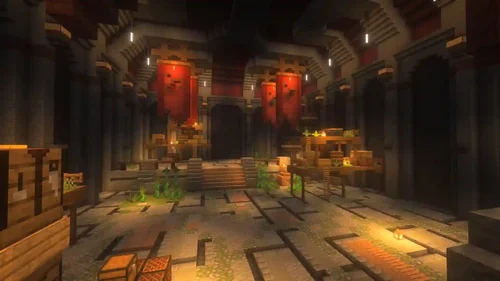 Abandoned haunted dungeon, which has multiple rooms Size: ≈ 275x205 Versions: 1.8 - 1.21+ Start corridorMultiple rooms to fightMany staircases, corridorsNatural parkour + treasure chestLava parkour + treasure chestBoss roomDownload Files 3D Model Support Build can be loaded on any version 1.8+ and higher, versions below are provided as there are new blocks in these versions Java Schematic: • 1.8 - 1.11 with 1.8 blocks • 1.12 - 1.15 with 1.12 blocks • 1.16 - 1.18 with 1.16 blocks • 1.19 - 1.21+ with 1.19 blocks Java World: • 1.8 - 1.11 with 1.8 blocks • 1.12 - 1.15 with 1.12 blocks • 1.16 - 1.18 with 1.16 blocks • 1.19 - 1.21+ with 1.19 blocks Minecraft Bedrock: • .mcworld fileFree
 -
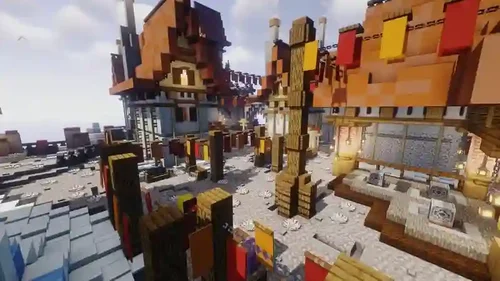 sleeping card version 1.16.5-1.21. It has everything you need, a lot of places for NPS, a stand for cases, a portal for RTP and a lot of interesting things.Free
 -
 SkyWarsReloaded Extension The official extension/addon for the popular SkyWarsReloaded plugin! Yes, this plugin was free, but we're trying to sell it for a low-tier price to make the time we spend on this project (including SkyWarsReloaded) somewhat more valuable. The money you spend on this project will also contribute to the work we put into the free, updated version of SkyWarsReloaded. We will continue to keep the source code on GitHub, so knock yourself out and compile it yourself, but please consider supporting us with as little as €2. We'll promise you that some cool things are coming in the future to get you the best Skywars experience possible. Things on our planning: - Auto join (PlayAgain) for games - MySQL support for AutoVote and PlayAgain - A lot more PAPI placeholders - Kit buying menu - More... This plugin adds some cool join features for SkywarsReloaded. For SkywarsReloaded tutorials, check our site: https://gaagjescraft.net/skywars/ We are an official supporter of SkywarsReloaded! Make sure to install the updated version of SkywarsReloaded instead of the official one! The UPDATED SkywarsReloaded plugin is required in order to let this plugin work. Make sure to download and install it. For more information about installing that plugin, go here: https://gaagjescraft.net/skywars/installing-plugin Features​ A super fancy in-game kit creator/editor menu! A new '/swkit delete' command A new '/swkit edit' command A new '/swkit list' command A new '/swkit create' command Specific arena join using a command Overrides join item actions of the SkywarsReloaded plugin NPCs (depends on Citizens) NPC creation command Random solo join Random team join Random join Import any world using a command Rename an arena using a command Automatically legacy loads when importing Open the join menu using '/sw join' Creator and DisplayName setter command for maps are supporting spaces A '/leave' command to easily leave a game A '/sw send' command to send players to a game Player option selection command '/sw select' Automatically select game options from the previous game AdditionsPlus Events integration PaperSpigot Support Citizens NPC integration Automatically select a default kit if set in the config Commands And Permissions​ /sw joinsw.join- Allows you to open the join menu/join a random game/send a message. /sw join [arena]sw.join.arena- Allows you to join a specific arena. /sw join solosw.join.solo- Lets you join a random solo arena. /sw join teamsw.join.team- Lets you join a random team arena. /sw select [type] [selected]sw.select- Lets you select a specific player option. In this command is [type] the option type (such as glasscolor) and [selected] the option you want to select. /sw send [player] [arena]sw.send- Sends other players to a game. /sw createnpc [action]- Creates a NPC using Citizens. The action could be either RANDOM_JOIN, RANDOM_SOLO_JOIN, RANDOM_TEAM_JOIN, OPEN_MENU or OPEN_CUSTOM_MENU /swm import [world]sw.map.import- Lets you import a world into Skywars as an arena. It does the legacy load itself, so do not use the legacy load command again. /swm creator [map] [creator]sw.map.creator- Lets you set the creator of the map. This overrides the actual command. This one allows you to use spaces in the creator's name. /swm name [map] [name]sw.map.name- Lets you set the display name of the map. This overrides the actual command. This one allows you to use spaces in the display name. /swm rename [map] [new mapname]sw.map.rename- Lets you completely rename an arena, including world and other files' names. /swkit create [name]sw.kit.create- Lets you create a new kit with the fancy new kit editor menu. /swkit edit [name]sw.kit.edit- Lets you edit a kit with the fancy new kit editor menu. /swkit delete [name]sw.kit.delete- Lets you remove a kit. /swkit listsw.kit.list- Shows a menu with a list of existing kits. Clicking an item in the menu will open the fancy new kit editor menu. /leavesw.quit- Lets you quit/leave an arena/ You can disable the auto-vote feature in the configuration file. Permissions for auto-selecting the following options: •sw.autovote.chest: Chest voting •sw.autovote.health: Health voting •sw.autovote.time: Time voting •sw.autovote.weather: Weather voting •sw.autovote.modifier: Modifier voting •sw.autovote.kit: Kit selectingFree
 -
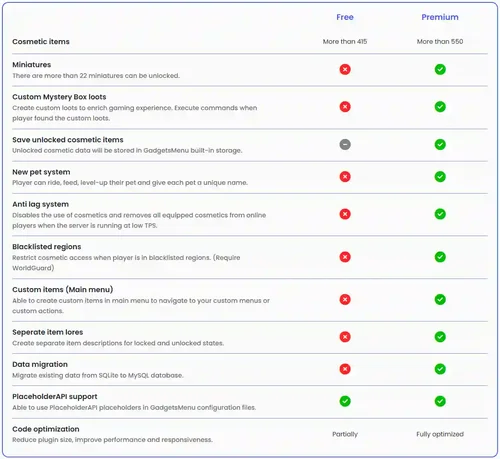 GadgetsMenu is an advanced cosmetics plugin that provide tons of the features & cosmetics. It has Hats, Animated Hats, Particles, Suits, Gadgets, Pets, Miniatures, Morphs, Banners, Emotes, Cloaks and Mystery Boxes. Cosmetic items can be gained by using Mystery Dust to purchase or open a Mystery Box. You can give specific cosmetics to players with a donor rank to make them feel special comparing to normal players. Most of the settings can be configured and customized in the corresponding files. With this plugin, you can do anything that you could think about it.Free
 -
 Lobby for skywarsFree
 -
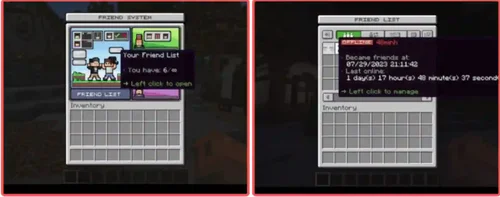 HyronicFriends is a plugin that adds to your friend system. With this plugin, you can send friend requests, receive notifications when your friends are online, teleport instantly to your friends, and most importantly, you can send mail to your friends, including items as attachments. Requires: Java 16 or above Server versions from 1.16 to 1.20.1 Features: Support multiple server versions. Support BungeeCord for cross-server Support clickable chat. Support custom texture for GUI. Support Oraxen and ItemsAdder. Support multiple languages (English, Simplified Chinese and Vietnamese are available, or you can translate into any other language) Add a new friend or unfriend a player. Send an email to your friend. You can also attach your item to email before sending. Immediately teleport to your friend. If your server is BungeeCord, you will be teleported across the server, then to your friend. Blocking any player from requesting friend, teleporting, or sending email. Each friend has different permissions. You can set it up on GUI. Manage your friend list (or what your friend can do with you) on GUI. Sending private message to your friend. If your server is BungeeCord, then it will be sent across the server. Quick reply to the most recent message. Fully customizable. And more... Soft-Dependencies: HyronicFriends-BungeeCord Oraxen ItemsAdder HeadDatabase PlaceholderAPIFree
 -
 Custom 3D Pets [16+ Pets Available] The plugin comes with over 16 pets available by default, providing players with a wide range of options to choose from. No resource pack, texture pack or mods required to run! Custom pets will work straight away, no tricks or hidden requirements. Ride pets! Players are able to ride pets. Rename pets! Players are able to rename pets. [New] Vanilla Mobs As Pets Starting with version 2.0.0, vanilla mobs can used as pets now - allows players to use familiar mobs, for example zombies or iron golems, as pets. Pet Abilities [60+ Different abilities available] Over 60 abilities are built into the plugin. AdvancedPets includes over 60 different abilities, giving players plenty of options for customizing their pets and making them more powerful and effective. Level Up Your Pets Pets in AdvancedPets can be leveled up, allowing players to increase their abilities and make them more powerful over time. Customize prices, messages, levels and level abilities Fully customizable GUI menus, messages and pets Ultimate control of GUI menus - customize everything and anything. It's up to you to decide layouts, menu sizes, item text etc. Remove items, add new items - do anything you wish. All messages, pets & pet names are customizable. Custom mobs from AdvancedPets, MiniaturePets & AdvancedMobs are supported! ModelEngine mobs are supported! Permissions & commands based ownership Give players access to pets with permissions or using commands assign pets. And everything else, like pet skins, assign using permissions - as easy as that. The Ultimate Performance - No Lag AdvancedPets is designed to be lag-free, using dynamic optimizations and multi-threaded movement to ensure that it doesn't impact server performance. Extensive Wiki and Huge Community We include an extensive Wiki and have a large community of users, making it easy to find help and support when needed. Join our 4,000+ members Discord Server if you need assistance.Free
 -
 Features of ChatControl Red: Six levels of spam protection destroys spam 7 days a week We have the most sophisticated spam protection you can only find in a chat plugin. It's ridiculously easy to set up, but incredibly difficult to get around. Prevent sending too fast messages/commands. Block similar messages/commands. Block repetitive messages such as "t", "hello", "t", "hello", etc. d. Time limit to limit the maximum number of messages in the last X seconds. Adaptive warning points to punish spam according to its severity. Create your own rules (without Java knowledge) to filter all kinds of spam (for example, "heeeello" or "he..llo") and any words like "this server is ****". XegLzVC In addition, our anti-spam works everywhere, even outside your server: DiscordSRV is supported! Prevent spam, slander and advertising on your Discord channels automatically!!! Non-English-speaking servers are supported. We even automatically remove bumps (áäô) to prevent bypassing checks. Even Russian, Japanese, Chinese, etc. d. languages will work with anti-spam. White and black lists. Each section can have exceptions, and you can turn them into both white and black lists. 3 Chat channels and beautiful chat format Fully customize every aspect of your chat. Change the appearance of each message. Display different parts in messages for different players and give your server a whole new look. Create chats to isolate your chat (e.g. admin channel, bungee channel, trade channel). Full support for BungeeCord and DiscordSRV. Two remote chat modes are supported: Talk to players at a distance around you, or Talk to all the players in your world (you can link multiple worlds together). Interactive formats that allow you to show tips, click text, run commands, or even open books. JSON support is included. 1,000 variables are supported. You can choose one of our own, install the PlaceholderAPI or create new ones directly in ChatControl – even if you barely know how to write! Start a message with a special character to send it to another channel, such as ""?help" or "!" to send it to global chat (using rules). Simple conditions for creating phenomenal chat formats that show different details - whether a player is writing to chat from Discord, from BungeeCord, if he is missing, spying, or when sending a message from the console! Admin chat and global chat crackers and many other examples of default channels!Free
 -
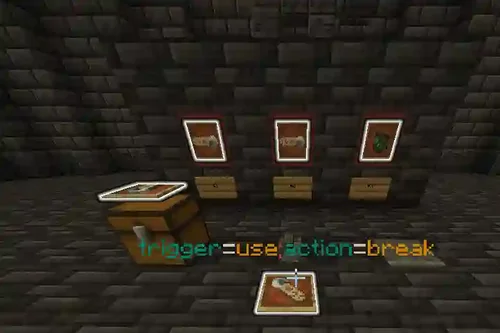 LiteDungeon allows you to create custom dungeons with in-game event-based configuration, eliminating the need for config files. Full GUI support makes management easy. The plugin supports generating unique loot using Oraxen/ItemsAdder, adding unique drop chances for each item. Difficulty settings include disabling health regeneration, requiring players to use potions. The internal team and portal systems allow for team creation and unique portals with customizable parameters.Free
 -
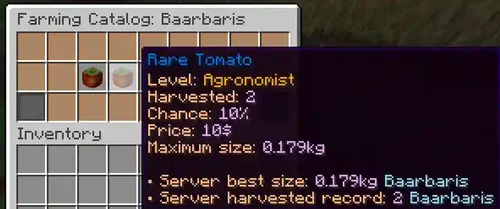 LiteFarm is a Minecraft plugin that transforms servers into immersive farming environments by allowing players to create and cultivate custom plants. The plugin processes plant growth even when chunks are unloaded, making farming efficient and seamless. Players can add growth modifiers like water and fertilizers to accelerate plant development. The plugin supports custom tools like watering cans with durability, and it allows for the use of custom growth stages and blocks from Oraxen/ItemsAdder. With LiteFarm, players can even farm mobs, adding a unique twist to traditional farming mechanics. An internal leveling system rewards players for their farming achievements, unlocking new plants and capabilities. A detailed Farming Index tracks player progress, encouraging competition and showcasing the best harvests. Comprehensive wiki documentation is available, offering easy-to-follow instructions to maximize the plugin's features.Free
 -
 Wanna let your player challenge the same kind of dungeon, but there is always only a single instance available? After 2 years of development, let me grandly introduce… FEATURES Multi-instance dungeon system, players can challenge the same dungeon at the same time in different instances, and all instances are located in the same world Auto terrain restoration, the dungeon only exists when that instance is running Multiple objectives support. Checkpoints reached, specific mobs killed, the specific amount of mobs killed Staged dungeon System, combines different actions with different objectives Different branch leads to different objectives and actions, create your own storyline Death limit support for team/each player, no more bad teammates! Mob reveals in the specified location or a radius of player, give challengers a shock! Charge the challengers money and items before entry Give the challengers money and/or items when complete the dungeon, they fight for the rewards Challenge timer, they fail the dungeon when the timer reaches, no more attrition war! Full-featured GUI, everything can be done with simple clicks Waiting room support, find yourself a party or become the party leader Vertical scrolling scoreboard, don’t miss any objectives Multiple language support, translate almost everything your player sees Support 1.16 all the way up to 1.21 Many more features cannot be listed in detail. For more information, please visit the Wiki. Lite vs Premium Features in the list are only exclusive on Premium Version. You may want to try Lite Version before purchasing. Features Lite Premium CMI Holograms Support ❌ ✅ FabledParties Support ❌ ✅ Heroes Support ❌ ✅ MMOCore Party Support ❌ ✅ NBTAPI Items Support ❌ ✅ HolographicDisplays Support ❌ ✅ Parties Support ❌ ✅ Stage Action Bar Display ❌ ✅ Stage Boss Bar Display ❌ ✅ Blacklist Item ❌ ✅ World Border ❌ ✅ Death Penalty ❌ ✅ Loot Table ❌ ✅ NPC Join/Leave Dungeon ❌ ✅ Sign Join/Leave Dungeon ❌ ✅ Anvil GUI Input ❌ ✅ Death Action SPECTATE, WAITROOM ❌ ✅ Dungeon Group Limitation 5 ∞ Stages Limitation 10 Per Dungeon Group ∞ Actions, Objectives, Completion Actions, Fail Action Limitation 5 for Each ∞ New Features ❌ ✅ Official Support ❌, Community Support Only ✅ MIGRATION GUIDE As of MythicDungeons 2.0.0, Staged Dungeon System is created to expand the flexibility in creating more complicated dungeons and in implementing new features. The whole dungeon flow including the way to spawn mobs create spawners, and checkpoint objectives has changed, the old way to create spawners, and bosses is deprecated and has been removed. TERMS OF SERVICE You are not permitted to redistribute any part of the resource in any form. You are not permitted to redistribute the resource as your work. You are not permitted to modify the code of the resource. You are not recommended to review the difficulties you face, like bugs, errors, and configuration problems. Premium resource does not provide a refund due to you purchased the copy, not the access to the plugin You will not be alerted if the "Terms of Use" are modified. You are recommended to give suggestions for the resource or technical support to improve the quality of the resourceFree
 -
 • [Plus] Extra Features · Fully customizable discord webhooks to notify about server restart/boot. • Easily schedule restarts · Create schedules like "Monday;23;00", "Friday;02;00", "Daily;12;00". · Configure commands to run on restart or x sec. before (or after). · Configure commands to run on specific days of the week. · Choose at which intervals sounds, messages will be sent. · Delay restarts if x users are playing on the server. · Execute Bukkit, Bungee, and Velocity commands (further setup required). · Schedule commands to run through your proxy (you can do stuff like send back players to their server after it's up, send global restart alerts, etc.). • Quality of Life Features · Command for your players to check when a restart will happen. · Command to override or delay the restart interval, and define a reason for it. · Works on all panels (Pterodactyl, Multicraft, some may require extra steps). · Many available translations (Visit wiki, translations section) • Norska Development Resource Quality · Auto-updating configurations on plugin updates. · Fully customizable messages including chat (option to auto-center), actionbars, and titles. (RGB Support) · Fully customizable sounds (option for power and pitch), for every command and event. · Placeholders to use wherever you want. (PlaceholderAPI). · Use any PlaceholderAPI placeholder in plugin messages. • Developer API // GitHub *Notes: Folia is supported from version 2024.06 and later.Free
 -
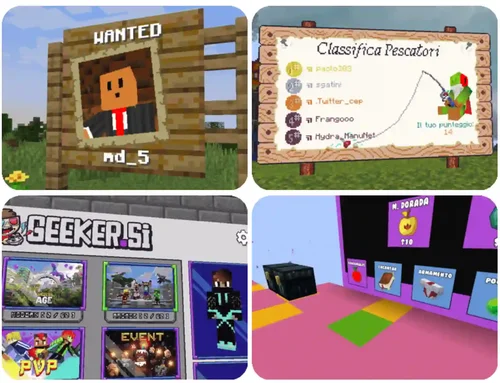 InteractiveBoard has an always expanding list of features. Contextual rendering - every player sees a different image specifically made for them at that moment. Scenes - you can have multiple scenes in a single board, so a single board can have a large assortment of uses. 3D Player Skin rendering - you can render the skin of the player on the board and position the arms/head/legs of the skin in any position you want. Buttons - clickable buttons with sub-pixel precision that can execute a variety of functions like opening a crafting table, switching a scene, scrolling, buying and selling items, etc. PlaceholderAPI support - you can use all the placeholders from PlaceholderAPI in object/function properties. All properties (text, color, image URL, etc.) can update automatically when the placeholder changes. Hover support - hovering is supported for all object properties, so you can easily change the image, outline, skin position or anything else when hovered. Shops - Vault API is supported, so you can create shops with the board. Completely packet based - Unlike other map image plugins, InteractiveBoard does not create any maps or item frames in your actual world. Maps and item frames in are completely virtual and sent through asynchronous packets. This guarantees optimal performance and great compatibility with other plugins that use maps. Fast and optimized rendering - all aspects of the plugin have been tweaked to ensure optimal performance. Using custom smart caching and packet systems, InteractiveBoard is extremely fast and very light, only updating boards when necessary. Images - you can upload any image you want to the board. Supported formats: .jpg and .png Animated GIFS - the plugin can display animated GIFS on any board you want. This can be used to teach players new mechanics which could only be shown easily with a video playing. View grouping - you can manage the default scene players see based on various conditions, like the permissions/ranks they have. Both group and individual views are supported, so it is possible to share the same view between players if needed (for example having 2 groups for red/blue team) Scrollpanes - you can use scrollpanes to let the player scroll in case all the things you want to show don't fit in your scene. BannerBoard compatibility - BannerBoard boards/configs can be loaded through InteractiveBoard by the BannerBoard compatibility for InteractiveBoard plugin. ViaVersion, ViaBackwards, ViaRewind support - InteractiveBoard supports all client versions from 1.8 to 1.21.6 and their features through Via plugins, no matter what server version you use. Geyser support - Geyser/floodgate is completely supported and Bedrock players do not have any issues interacting with the boards. Folia support - InteractiveBoard supports Folia, so it is a perfect choice for servers with hundreds of players. Music Support - InteractiveBoard has NoteBlockAPI support which allows you to play any .nbs song you want on a board. Virtual reality support - through the Vive Spigot Extensions plugin, players that connect using ViveCraft are supported. Virtual reality players can interact with boards using their controllers instead of head rotation. Command Description /ib create Create a new board. /ib delete Delete a board. /ib reload Reload all board configurations. /ib reset Reload a specific board. /ib teleport <display> Teleport to a board. <display> - The name of the display to teleport to. /ib cancel Cancel the currently active process. /ib trigger <display> <player> <identifier> Trigger an action listener. <display> - The name of the display to trigger the action on. <player> - The player to trigger the action on. <identifier> - The unique action identifier, as specified in the action listener. /ib fonts Get names of fonts loaded from the font folder. /ib name Get name of a board. /ib coordinates Get x and y coordinates of a pixel.Free
