




Flash Sale
Invision Community
57 files
-
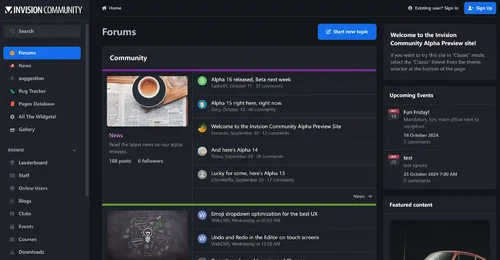
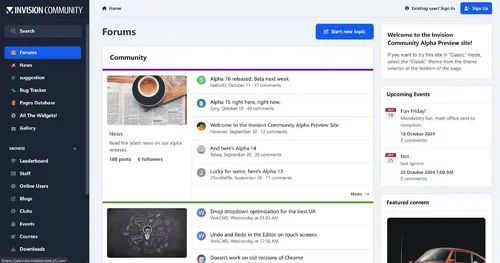
Invision Community 5 — A Fresh New Experience!
Invision Community 5 brings a modern design and powerful features to energize your community:
All-New Sidebar Layout
Enjoy streamlined navigation with a sidebar for quick access to apps, activity streams, search, and customizable shortcuts.
Versatile Forum Views
Discover the new Feed view with cover photos and featured colors, plus classic table, grid, and fluid modes for flexible content display.
Compact Topic Pages & Mini Profiles
Focus on content with a compact layout and mini profile cards for authors, making interactions easier and more engaging.
Mobile & Dark Mode Ready
Enhanced mobile UI for all devices and a native dark mode for comfortable browsing anytime.
Performance Optimized
Leaner code means faster loading and a smoother experience for everyone.
Invision Community 5 — Start your new community journey today and unlock more possibilities!
The cracking of this IPS version is very complete and secure, and now it has 100% blocked all communication to the IPS server, running completely offline.
✅ License verification completely bypassed
✅ Add a backend log deletion button
✅ All IPS products are fully activated
✅ License never expires
✅ URL verification disabled
✅ Exception report disabled (just fixed)
✅ Will not verify with IPS license server
✅ Will not send exceptions to the diagnostic server
✅ Fully offline operation
✅ All functions are fully functional and available
SystemLogs Batch Delete Button
Nexus invoice batch deletion button
The deletion operation was successfully executed and statistical information was displayed
- Free
- 195 Downloads
- 3 Comments
-
WeChatAlipay WeChat/Alipay code scanning payment plug-in
Plugin Introduction
The WeChat Alipay plugin provides convenient WeChat and Alipay scanning payment capabilities for the Intrusion Community (IPS) business system, supporting personal payment QR codes, suitable for mainland Chinese users and merchants, greatly enhancing the localized payment experience.
Main functions
Dual platform support: support WeChat and Alipay, two mainstream mobile payment methods, to meet the payment needs of most Chinese users.
Upload of personal collection code: WeChat and Alipay personal collection QR code images can be uploaded separately in the background, supporting JPG, PNG and GIF formats, up to 2MB.
Integration of checkout page: Display a QR code on the checkout page, and users can directly scan the code to complete the payment. The payment process is clear and intuitive.
Custom gateway title and description: customizable payment method name and description to enhance brand image and user trust.
Payment confirmation process: After scanning the code to make payment, the user needs to check "I have completed payment" to confirm. The order will enter a pending status, and the administrator will manually confirm the order after verifying the receipt to ensure transaction security.
Concise backend settings: All configuration items are centralized on the plugin settings page, making the operation simple and easy to understand, without the need for complex development.
Applicable scenarios
Individual webmaster, community, content payment, member recharge, commodity sales and other IPS sites that need WeChat/Alipay payment.
No enterprise qualification required, supports personal QR code payment.
Technical highlights
Compatible with IPS 5. x and above versions.
Pure front-end scanning, no need to interface with official payment APIs, no need for filing or enterprise certification.
Supports multiple languages, user-friendly interface, and easy localization.
Usage tips:You can upload your other payment QR codes on the image upload page of the gateway, instead of having to upload Alipay and WeChat.
- 50.00 USD
- 1 Downloads
-
The Hide it application allows hiding content from posts in Forums, Pages and Downloads. It supports selectively hiding specific sections or entire posts.
This application does not work on IPS Cloud because it requires editing PHP files.
Features:
Select databases and categories for hidden content.
Specify user groups for hidden content.
Options for hiding specific content: links, images, attachments, code, or the entire post.
Options to unhide content:
Give a reaction
Leave a comment
Reaction or comment
Reaction and comment
Reload content in ajax after giving reaction to unhide content without reloading page.
- Free
- 9 Downloads
- 1 Comments
-
- Free
- 6 Downloads
- 1 Comments
-
IPS-OKSEO Pro is a professional SEO optimization and content management extension designed specifically for Invision Community (IPS). It integrates multiple features including broken link monitoring, content suggestions, automatic Sitemap submission, bulk Meta optimization, SEO scoring, and backend internationalization, helping websites efficiently improve search engine indexing and content quality.
Main Features
Broken Link Monitoring and Bulk Fixing
Automatically logs 404 broken links and supports one-click redirection fixes, improving user experience and site authority.
Content Suggestions
Smart analysis of page structure, automatically suggesting H2/H3 subheadings and content optimization directions, making content easier to index.
Sitemap Management and Automatic Submission
Automatically generates and periodically submits sitemaps (sitemap.php) to major search engines like Google, Bing, Baidu, 360, Sogou, Yandex, Seznam, DuckDuckGo, Naver, Yahoo Japan, etc., without manual intervention, greatly improving the efficiency of new content indexing. Push logs are automatically recorded in uploads/logs/okseo_autopush.log for easy tracking of each push result.
Bulk Meta Optimization
Supports bulk detection and suggestions for page Title, Description, and Keywords to enhance overall site SEO performance.
SEO Scoring
Automatically analyzes page SEO scores and provides targeted optimization suggestions to help site owners quickly identify issues.
Consistent Backend Interface
The backend pages maintain a consistent design with the official IPS style, supporting multilingual internationalization for an enhanced experience.
Suitable For
IPS site administrators aiming for efficient SEO and content management
Community, portal, or corporate websites that require automated indexing, broken link repair, and content structure optimization
Operators seeking to improve site authority and search engine friendliness
Application Advantages
Fully automated submission with minimal configuration, ready to use right after installation
Compatible with IPS's official task scheduling and permission system
Highly efficient code, optimized performance, and traceable logs
Multi-language support, aesthetically pleasing interface, and easy maintenance
- Free
- 11 Downloads
- 1 Comments
-
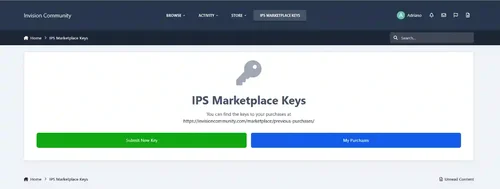
This application will allow users to redeem keys for purchases made on the IPS Marketplace.
Requirement:
Downloads app (with your files)
Commerce app
Usage:
Go to Admin CP -> Community -> IPS Marketplace Keys -> Keys and click on Import Keys from CSV button.
Select a Download file in the File field.
Upload the CSV provided by IPS for that Downloads file in the CSV File field.
Repeat the steps above for every file you have on IPS Marketplace.
You can also manually add a key to Admin CP -> Community -> IPS Marketplace Keys -> Keys.
Note:
This is a developer tool and should be used only by IPS Contributors.
- Free
- 0 Downloads
-
Animal Crossing is inspired by the friendly neighbourhood series of the same name, and could pair well with town roleplays or other farming/village games!
Highlights
Nice Mediums
This theme offers a "day" and "night" version that are both simple and easy on the eyes, neither are too bright nor too dark, for a relaxing feel.
Inspired without overwhelm
Even if you're unfamiliar with the series, this theme can be used to provide a comfy homey aesthetic that's easy to navigate.
Built for Invision Community v5
Developed using v5’s updated template structure, ensuring modern design standards, improved responsiveness, and compatibility with all core apps.
What’s Included
Complete Invision Community v5 theme
Styled widgets and forum containers
Custom backgrounds, forum icons and accents
- Free
- 0 Downloads
-
This app will display a popup or redirect user to a page reminding them to update their information before browsing the website.
Features:
Enable/Disable the feature.
Select user groups required to fill in the information.
Choose required information fields, including:
Profile photo
Cover photo
Signature
Profile fields
- Free
- 5 Downloads
-
- Free
- 12 Downloads
-
- Free
- 9 Downloads
-
Theme Selection – If the theme already has similar functionality, you can now choose where to activate the plugin.
Icon selection — Choose from 5 "standard icons" or use a Font Awesome icon of your choice.
Color, size, transparency, and position can also be freely chosen.
New feature: You can now choose custom colors for Dark Mode.
- Free
- 0 Downloads
-
IPS-OKSEO Pro is a comprehensive SEO plugin deeply integrated with the IPS framework. It covers the complete pipeline from content publishing to search engine indexing — giving site admins everything they need to manage and optimize site-wide SEO without any third-party tools.
Features
Multi-Engine Auto Push
Push URLs to Google Search Console, Bing Webmaster, Baidu Active Push, and Yandex (via IndexNow) automatically on content publish — no manual submission to any webmaster platform required.
Open Graph & Schema.org Injection
Automatically injects complete OG tags and JSON-LD structured data (WebSite / WebPage / Article) on every page, improving social share appearance and search result rich snippets.
SEO Health Score
Analyzes any page URL in real time across 10+ dimensions — title length, meta description, H1, image alt, canonical tag, structured data, Open Graph completeness — and returns a score out of 100 with actionable recommendations.
Meta Override Manager
Set custom Title / Description / Keywords for any URL directly from the ACP, without touching any theme templates. Supports a site-wide title suffix rule with automatic appending.
Bulk Meta Analyzer
Input multiple URLs at once to audit all pages for core SEO metrics in a single pass — quickly identify site-wide gaps.
Dead Link Monitor & 301 Redirect Manager
Automatically logs all 404 requests. Supports search, paginated browsing, CSV export, and one-click conversion to 301 redirect rules to prevent link equity loss.
Robots.txt Manager
Edit, download, and restore your robots.txt online. Changes take effect immediately.
Image Alt Scanner
Scans all post content across the site to find images missing alt attributes, with direct links to the source content for easy remediation.
Compatibility
Invision Community 5.x
Zero third-party dependencies — pure native IPS implementation
- 5.00 USD
-
This is a cryptocurrency payment gateway tailored for businesses, enabling your IPS website to effortlessly accept payments in digital currencies such as Bitcoin. It's easy to install, secure to use, and fully automated in processing.
Core Advantages:
- Supports over 100 cryptocurrencies and over 200 fiat currencies
- Military-grade HMAC-SHA256 encryption ensures transaction security
- The service will be automatically activated upon payment completion, without any manual intervention
## Main functions
Smart Payment Processing
After the user selects cryptocurrency payment, the system automatically creates an order and redirects to the CoinPayments payment page. It supports real-time exchange rate conversion to ensure accurate amounts.
Fully automatic callback processing
After the user completes the payment, CoinPayments will automatically notify our server. Once the system verifies the signature, it will automatically approve the transaction and activate the corresponding service. The entire process requires no human intervention.
Comprehensive security mechanism
Each request is authenticated using HMAC-SHA256 signature verification to prevent forgery attacks. API keys are stored encrypted, supporting protection against replay attacks.
## Applicable Scenarios
- E-commerce website - Accepts cryptocurrency for purchasing goods
- Membership Services - Purchase membership levels with Bitcoin
- Digital content - cryptocurrency purchase for download, viewing rights
- Enterprise Services - Cryptocurrency Settlement for B2B Services
- 30.00 USD
-
This is not the NULLED version, but the original version of the Invasion Community
- Free
- 6 Downloads
-
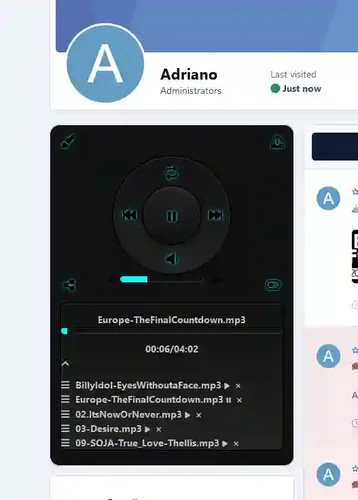
The program will allow your participants to download music tracks to play in their profiles using a nice, accurate audio player.
- Free
- 1 Downloads
-
One-Click Flash Sale to Boost File Sales Conversion by 300%+
A limited-time promotion plugin designed specifically for the Invision Community 5.0+ download center, making your paid resource sales as hot as e-commerce flash sales!
✨ Features
📊 Smart Promotion Management
⚡ Instant Setup: Enter the file ID, discount percentage, and time period—3 steps to complete promotion creation.
🎯 Precise Control: Supports any discount between 1%-99%, with minute-level control over promotion timing.
🔄 Automated Operation: Scheduled tasks automatically activate/end promotions, and prices restore automatically without manual intervention.
🛡️ Concurrency Protection: Transaction-level race condition protection ensures the original price is never lost.
🎨 Stunning Front-End Display
⚡ Dynamic Badge: Gradient lightning icon with pulse animation and 3D shadow effects, highly attention-grabbing.
⏱️ Real-Time Countdown: Millisecond-accurate countdown to create a sense of urgency, with red alerts within 1 hour.
💰 Price Comparison: Strikethrough original price + large discount price for a double stimulation, instantly doubling conversion rate.
📱 Responsive Design: Perfectly adapts to PC, tablet, and mobile, running smoothly on any device.
🎛️ Flexible Display Control
5 Backend Switches for Full Control:
✅ Master Switch: Enable/disable the entire promotion system with one click.
🏷️ Promotion Badge: Control the display of the lightning discount label.
💵 Original Price Display: Choose whether to display the strikethrough price based on your operational strategy.
⏰ Countdown Timer: Control the countdown timer switch to create a sense of urgency.
📋 Order Expiry: Automatically marks unpaid orders as expired when the promotion ends.
💼 Business-Class Features
🔐 Granular Permissions: 5 levels of permissions for managing/creating/editing/deleting/setting.
💳 Renewal Synchronization: Automatically applies the same discount ratio to renewal prices.
🚫 Conflict Detection: Prevents multiple active promotions on the same file at the same time.
📈 Performance Optimization: Query cache + N+1 optimization, zero pressure on large sites.
- 15.00 USD
-
Keystore is an authorization and issuance solution based on Invision Community 5 (IPS 5), covering a complete loop of "product management → card password issuance → authorization verification → order tracking". It will deeply integrate verification services with backend management, providing a plug and play commercial infrastructure.
-Composition
-Verification server: The built-in interface is responsible for authorizing decryption and integrity verification, time window verification, device/domain binding, and certificate signing.
-Client verification: The distribution has a built-in reinforcement verification process (HTTPS enforcement, domain whitelist, fixed UA, Base64URL packaging).
-Backend management: issuing products (without price fields), card vault, order flow and log auditing, focusing on issuing cards and authorization itself.
-Workflow
1) Create the issued product and configure the card password → 2) Deliver the card password to the end user → 3) Initiate encryption verification on the client side
→ 4) The server returns the authorization result and constraints (including signature/certificate) → 5) The backend can view the real-time order and authorization status.
##Key characteristics
-Secure Communication: AES-256-CBC Encryption+Base64URL Packaging+HMAC Integrity Verification
-Anti tampering: Fixed HTTPS authentication domain whitelist, built-in UA, disable plaintext rollback
-Authorization constraint: Supports domain/device binding and fingerprint verification to prevent dissemination and abuse
-Flexible card issuance: batch import/generation of card codes, inventory visibility and status management
-Order Tracking: Order List, Status Flow, and Audit Information
-Lightweight backend: integrated management of issued products, card codes, and orders (no product price field, more suitable for external store settlement)
-Compatibility: Compatible with IPS 5.0. x, following framework specifications, easy to switch on and off
##Applicable scenarios
-Forum/Community Business Plugin and Theme Distribution
-Theme and feature extensions for IPS 5, authorized by domain/site; Can limit the installation of terminals and the number of migrations.
-SaaS/Local Hybrid Authorization
-Online strong verification+short-term offline grace period; The combination of instance fingerprint, replay protection, and time window enhances reliability and anti abuse capabilities.
-Internal distribution and compliance audit of enterprises
-Unified issuance of cards for multiple sites/departments, binding domain names/devices, authorization can be migrated and revoked, and audit trails can be retained.
-Channel distribution and bulk issuance of cards
-Batch generation/import of card codes, channel identification and inventory/status management, supporting large-scale distribution and recycling.
-Regular trial and upgrade release
-Time limit card encryption, grayscale release, version upgrade pass; Automatically expires upon expiration, supports renewal/regularization.
-Connect with external stores/payment platforms
-Price and settlement are handled externally (such as Paddle/Stripe/domestic card issuing platforms, etc.), while Keystore focuses on authorization verification and card issuance closed-loop.
-Risk control and after-sales service
-Abnormal domain name/multiple migration warning; Blacklist/Revocation of Authorization; Orders, devices, and binding changes can be tracked throughout the entire chain.
##Why choose Keystore
-Stronger security baseline: time window verification, server authentication token (serverless), whitelist domain name
-Less configuration: Verify that the server address is built-in and reinforced, no need for users to configure it themselves
-Update process: Hand over the "price/amount" to an external store, with the backend only focusing on card issuance and authorization
##Safety Design Description (Brief)
-Encryption: AES-256-CBC, request/response symmetric encryption
-Packaging: timestamp+nonce+ciphertext → Base64URL, resistant to middleware rewriting
-Integrity: HMAC-SHA256 signature (including hour/date factor)+daily authentication with server _cert
-Transmission: Enforce HTTPS, fix domain whitelist, reject plaintext and untrusted addresses
##Installation and Getting Started (IPS 5)
1. Upload and install Keystore application in ACP application management
2. Open "Card Issued Products", "Card Password Management", and "Order Management" for basic configuration
3. Connect the client (plugin that requires authorization verification) to the authorization verification interface (encapsulated inside the plugin)
4. Import the card password and start selling it
Tip: The backend does not involve setting product prices; Please maintain the price in the external store/payment system.
##Frequently Asked Questions (FAQ)
-Q: Does it support offline?
A: Reasonable time windows and caching strategies can be configured to reduce the impact of short-term network fluctuations.
-Q: Can I customize the verification server?
A: Customization has been disabled for security and consistency, with built-in official verification address and reinforcement.
-Q: How to conduct secondary development?
A: Following the IPS application structure, the controller/model is clear and can be expanded as needed.
- Free
- 2 Downloads
-
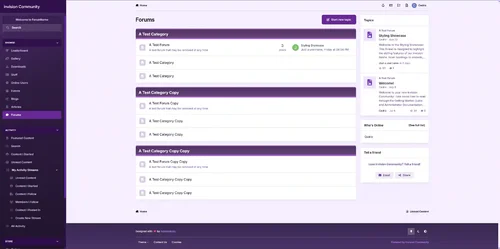
Lavender is calm and stylish for Invision Community v5, which combines soft purple colors, barely noticeable gradients and sophisticated interface touches. Lavender is designed for forums that want to feel both modern and relaxing, with a soft aesthetic that doesn’t disappear in the background.
- Free
- 0 Downloads










Top Downloads
No files have been downloaded yet this week.
-
Invision Community
Free
Invision Community 5 — A Fresh New Experience! Invision Community 5 brings a modern design and powerful features to energize your community: All-New Sidebar Layout Enjoy streamlined navigation with a sidebar for quick access to apps, activity streams, search, and customizable shortcuts. Versatile Forum Views Discover the new Feed view with cover photos and featured colors, plus classic table, grid, and fluid modes for flexible content display. Compact Topic Pages & Mini Profiles Focus on c- 4 Downloads
- 3 Comments
-
Quick Search
Free
Quick Search is a small application that instantly brings an intuitive search form and smart autocomplete. Results are displayed with eye-catching thumbnails, providing a seamless browsing experience across all applications. Make finding content easier and faster with Quick Search! Settings: Enable/Disable. Permissions for member groups. Max results. Search incomplete words Find results in Content titles only | Content titles and body Search Mode: OR / AND Set default search type for all- 2 Downloads
- 0 Comments
-
[OzzModz] Advanced Forms
Free
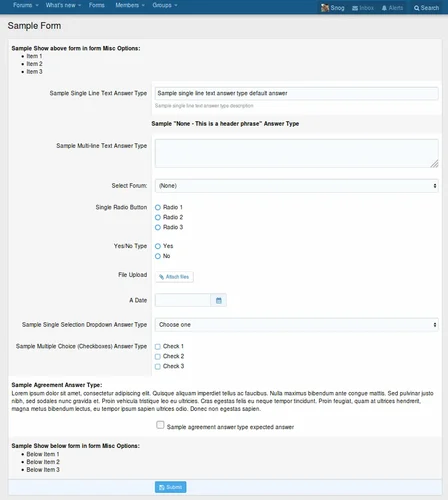
There is a 10% tax added to our products. We do not offer invoices, you need to use your PayPal Receipt for your accounting or VAT needs. Tax will be added at checkout. Advanced Forms can be used for just about any type of form you need! Full documentation is here Advanced Forms Documentation Introduction What is a form Front-End example of this addon Where to find all the options of Advanced Forms Settings User group permissions Widget Understanding the architecture Types, Forms, Questions Des- 1 Downloads
- 0 Comments
-
Invision Community-Developer Tools
Free
These files are necessary for using developer mode in IPS Community Suite.- 1 Downloads
- 0 Comments



-
Invision Community
Free
Invision Community 5 — A Fresh New Experience! Invision Community 5 brings a modern design and powerful features to energize your community: All-New Sidebar Layout Enjoy streamlined navigation with a sidebar for quick access to apps, activity streams, search, and customizable shortcuts. Versatile Forum Views Discover the new Feed view with cover photos and featured colors, plus classic table, grid, and fluid modes for flexible content display. Compact Topic Pages & Mini Profiles Focus on c- 191 Downloads
- 3 Comments
-
Invision Community-Developer Tools
Free
These files are necessary for using developer mode in IPS Community Suite.- 42 Downloads
- 0 Comments
-
The7 - Website and eCommerce Builder for WordPress
Free
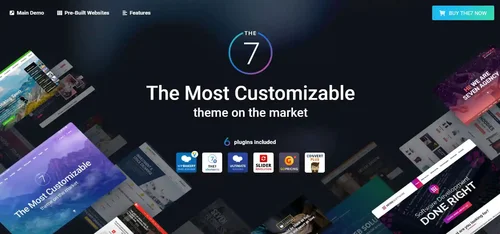
The7 features full and seamless integration with WPBakery Page Builder (formerly Visual Composer) and Ultimate Addons. Most our buyers agree that The7 is the best theme to be used with these plugins, up to date! Its 1000+ Theme Options allows to craft almost any imaginable design. And Design Wizard feature lets you create a boutique-grade website design in mere minutes. Both Wizard and advanced Theme Options can work in visual WP Theme Customizer-like and old-school backend editing modes. The7- 38 Downloads
- 0 Comments
-
MaterialXen
Free
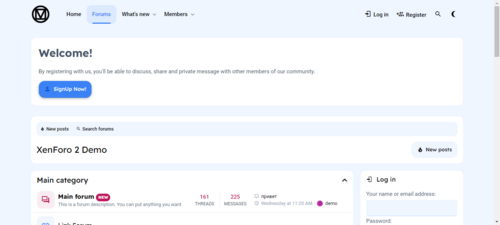
Material design is basically a result of Google’s set of guidelines for better designing, keeping in mind mobile users. It supports better browsing by enhancing the visual and motion experience. This theme is almost Material-based to make a better user experience. RE-ME Framework Features List You don’t just get a simple theme; you’ll get settings that will change the default framework into your own. It’s your website; make it yours! Google Web font is easily configured. Node Background Avata- 34 Downloads
- 0 Comments
-
Better Statistics Pro
Free
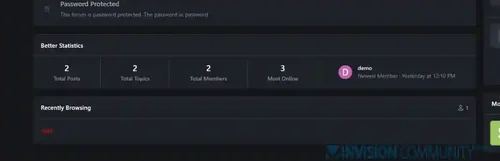
The Better Statistics application for Invision Community 5 combines the statistics from the two widgets, "Member Statistics" and "Forum Statistics," into one. The application uses the original code from both widgets.- 33 Downloads
- 0 Comments
-
Invision Community
Free
Invision Community 5 — A Fresh New Experience! Invision Community 5 brings a modern design and powerful features to energize your community: All-New Sidebar Layout Enjoy streamlined navigation with a sidebar for quick access to apps, activity streams, search, and customizable shortcuts. Versatile Forum Views Discover the new Feed view with cover photos and featured colors, plus classic table, grid, and fluid modes for flexible content display. Compact Topic Pages & Mini Profiles Focus on c- 193 Downloads
- 3 Comments
-
Invision Community-Developer Tools
Free
These files are necessary for using developer mode in IPS Community Suite.- 42 Downloads
- 0 Comments
-
The7 - Website and eCommerce Builder for WordPress
Free
The7 features full and seamless integration with WPBakery Page Builder (formerly Visual Composer) and Ultimate Addons. Most our buyers agree that The7 is the best theme to be used with these plugins, up to date! Its 1000+ Theme Options allows to craft almost any imaginable design. And Design Wizard feature lets you create a boutique-grade website design in mere minutes. Both Wizard and advanced Theme Options can work in visual WP Theme Customizer-like and old-school backend editing modes. The7- 38 Downloads
- 0 Comments
-
MaterialXen
Free
Material design is basically a result of Google’s set of guidelines for better designing, keeping in mind mobile users. It supports better browsing by enhancing the visual and motion experience. This theme is almost Material-based to make a better user experience. RE-ME Framework Features List You don’t just get a simple theme; you’ll get settings that will change the default framework into your own. It’s your website; make it yours! Google Web font is easily configured. Node Background Avata- 35 Downloads
- 0 Comments
-
Better Statistics Pro
Free
The Better Statistics application for Invision Community 5 combines the statistics from the two widgets, "Member Statistics" and "Forum Statistics," into one. The application uses the original code from both widgets.- 35 Downloads
- 0 Comments