




XenForo
146 files
-
XenForo is a powerful community forum software that provides users with a simple and easy-to-use interface and rich communication features. Users can easily communicate through posting, sending private messages, using tags, and other methods.
Its interface design is responsive, suitable for various devices, and has good customizability. Administrators can expand functionality and beautify interfaces through plugins and theme customization, while utilizing powerful management tools to manage users, content, and forum settings, ensuring order and activity in the community.
- Free
- 22 Downloads
-
HuoNiu Credits System - Points System is a powerful virtual currency plugin for XenForo 2.x that provides a complete points economy system for your forum. It supports features such as multi-currency management, user-to-user transfers, file renewals, red envelopes, bounty questions, paid content viewing, resource paid downloads, and online recharges.
It helps forum administrators easily build a vibrant community economy ecosystem. International language pack support is provided! (An English language pack will be available in the future and will be included in the plugin.) You can experience the plugin's features on this site!
Features:
Four states can be set for the same file in the Resource Manager:
Free download file
Points sales file
Real currency sales file (Currency unit can be set, supporting international payment purchases)
Points and real currency sales for the same file (Users can use any payment method to purchase the file and gain download access, offering flexibility for users)
File page displays license expiration date.
Supports resource renewals.
Renewal discounts are displayed.
Premium accounts can enjoy greater discounts with flexible discount policies.
Administrators can add user licenses to individual files and set download license durations.
Administrators can revoke user download licenses at any time.
Users can view their purchase activation information and expiration duration on the file details page.
Upgrade account guidance is added to the file list.
The file list shows discounted prices in points and real currency.
Currency exchange rate and fees are added when purchasing points.
File sales support transaction fees.
Supports using PayPal and other foreign payment methods to purchase points and files.
Expired resources can allow downloading of older versions (options include permanent download of old versions, grace period download of old versions, or forbidding download of old versions).
File detail sidebar displays resource license status.
License status dynamically calculated and displayed based on purchase and expiration dates.
Withdrawal function added (including: commissions, fees, and other configurable options in the backend).
Dynamic calculation of withdrawal amounts.
User group permissions can be set for the withdrawal feature.
Migration Tool:
Data Migration from the original [BR] MJ/Credits Plugin:
User Points
User File Purchase Records (preserves original download permissions and expiration times)
Prices of files sold using points, etc.
💰 Core System
✓ Multi-currency system
✓ User transfers
✓ Currency exchange
✓ Bulk adjustment of points
✓ Transaction record queries
✓ Transaction fees and taxes
✓ Currency exchange rate management
✓ Transaction review mode
✓ Daily limit control
🎁 Social Features
✓ Private red envelope system
✓ Post tipping feature
✓ Tipping records retained
✓ Automatic expiration of red envelopes
✓ Tipping leaderboard
✓ Daily sign-in rewards
✓ Bounty Q&A system
✓ Points leaderboard
✓ Real-time notifications
💵 Content Monetization
✓ Paid content (BBCode)
✓ Attachment download fees
✓ Independent pricing for attachments
✓ Resource points sales
✓ Resource real currency sales
✓ Resource expiration renewals
✓ Renewal discount offers
✓ Online recharge points
📦 Resource Management
✓ Bulk price settings
✓ Batch pricing by category
✓ Payment type selection
✓ Automatic currency conversion
✓ Purchase limit
✓ Sales statistics reports
✓ Resource sales commission
✓ Expiration reminder notifications
⚡ 60+ Automatic Events
✓ Registration and login rewards
✓ Post and reply rewards
✓ Like and follow rewards
✓ Poll and session rewards
✓ Personal homepage interaction
✓ Resource purchase and sales
✓ Custom forum events
✓ Independent forum rules
✓ User group permission control
- 35.00 USD
-
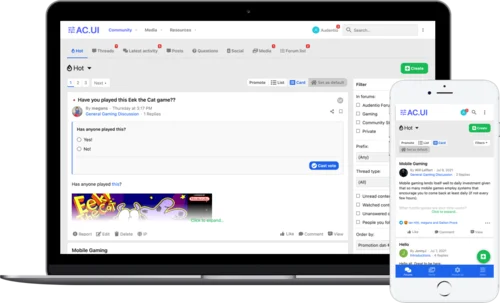
AC.UI is built with our tried-and-true UI.X framework for XenForo 2. We have deliberated and meticulously fine-tuned AC.UI until it is truly the most modern and ideal interface for communities and no detail is missed.
Every front size was optimized for legibility, every padding was considered, navigation for mobile devices was completely re-worked, and more were altered from base XenForo for the best user experience and discoverability.
- Free
- 9 Downloads
-
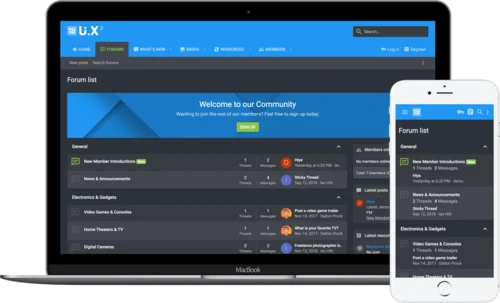
Introducing the fan favorite UI.X for XenForo 2. Based off of the tried true methodologies of its XenForo 1 predecessor, UI.X continues to push the boundaries of intelligent, performant, perfected design. Modern tools that increase user interactions, familiar user interface based on Google’s ever popular Material design, and the backing of a team well-versed in the XenForo software make UI.X a wise choice for any forum. ThemeHouse has been building products for XenForo since day one of the software’s release and we aren’t going anywhere.
Just a minute to install, a few clicks to easily change images and colors in line with your brand, and you’re off and running. And if you ever have a question, we’re here to help.
- Free
- 3 Downloads
-
This add-on will:
Add a carefully curated collection of the most useful and most requested media sites. A list of supported URLs can be found on this page.
Improve the performance and efficiency of the default media sites. Pages will load as fast whether there are no videos or 100 videos.
Improve the loading of embedded tweets. Content does not jump around while tweets are loading.
Load embedded content without injecting third-party scripts into the page. The add-on uses a small inline script for its lazy loader.
Add configurable support for Mastodon instances.
Add various quality-of-life improvements found in the add-on's options.
Add a button to supported video players (YouTube and others) to make them float in the corner of the screen like a miniplayer and allow the user to keep an eye on the video while reading the rest of the page.
- Free
- 13 Downloads
-
HuoNiu QQNotif is a QQ/TG message notification plugin designed specifically for XenForo 2.3.x, which supports automatic push notifications for site events to QQ/TG groups/users, helping site administrators achieve efficient community message linkage and automated management. The plugin adopts the native XF backend style, supports bulk log management, and is easy to operate, secure, and reliable.
This plugin is based on the NapCat QQ bot to implement the message push feature. Before use, please ensure NapCat is correctly installed and configured on the server. Please refer to the installation guide.
📢 Multi-platform Support
QQ Group Notifications: Based on NapCat (OneBot 11), perfectly adapted for domestic communities
Telegram Notifications: Official Bot API, accessible worldwide without restrictions
Independent Switch: Enable QQ, Telegram, or both platforms for notifications separately
🔔 Comprehensive Message Monitoring
✅ New Topic Publication Notifications
✅ Post Reply Notifications
✅ User Registration Notifications
✅ Resource Publication Notifications (XFRM)
✅ Resource Update Notifications
✅ Section/Resource Category Filtering (Precise Push)
🎨 Flexible Message Customization
📝 Customizable message templates
🏷️ Supports variables: {title} {username} {url} {snippet} {date}, etc.
🎯 Selective monitoring of sections and resource categories
🛡️ Enterprise-grade Security Protection
✅ XSS Protection (All HTML outputs are escaped)
✅ CSRF Protection (Delete operation verification Token)
✅ SQL Injection Protection (Parameterized queries)
✅ Input length limits (Messages up to 4000 characters, snippets up to 200 characters)
✅ Token information masking (Sensitive information hidden in logs)
✅ URL Whitelist validation (Prevents open redirection)
📊 Comprehensive Logging System
📋 Records all notification sending logs
🔍 Tracks sending status (Success/Failure/Error information)
🗑️ Bulk delete and clear logs
⏰ Automatic log cleanup (Configurable retention period)
🧪 Convenient Testing Feature
🎯 Independent test buttons for QQ and Telegram
✅ Real-time configuration verification (Format check)
📝 Detailed error prompts and configuration status display
💡 Technical Highlights
Zero performance loss
Asynchronous notification mechanism
Timeout protection (Connection 5 seconds, Response 3 seconds)
Optional logging system
Plug-and-play
QQ: Deploy NapCat → Fill in the address and group number → Done
Telegram: Create Bot → Get Chat ID → Done
No need for complex configurations like Webhooks, reverse proxies, etc.
Production-ready
Audited against XenForo official security standards
Fixes all known vulnerabilities
Complete error handling and logging
📋 Use Cases
Internal enterprise communities: Simultaneously cover domestic and international teams (QQ + Telegram dual push)
Game communities: Instant notifications for new resources/updates to QQ groups
Open-source projects: Real-time synchronization of forum dynamics to Telegram channels
E-commerce sites: Automatic push notifications for new product launches and member registrations
📦 Technical Specifications
XenForo: 2.3.0+
PHP: 8.0+
Extensions: cURL
Protocols: OneBot 11 (QQ) / Telegram Bot API
- Free
- 0 Downloads
-
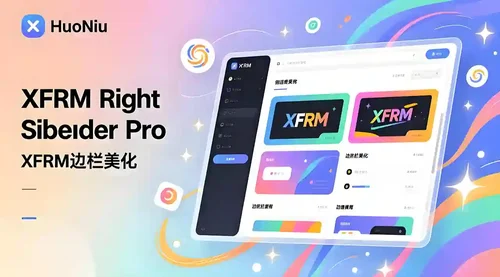
XFRM Right Sidebar Pro is an advanced sidebar enhancement plugin designed specifically for XenForo Explorer (XFRM). Through innovative download button integration technology and exquisite card style design, bring unprecedented user experience improvement to your resource page.
Please note: This plugin is released by proxy and requires registration and purchase on the developer's website.
Core Highlights
🔥 Intelligent Download Button - Automatically detects and integrates official XFRM download logic
🎨 Modern design - modular card layout, perfectly integrated into the XenForo ecosystem
🌙 Dark mode - fully supports XenForo's official dark theme
📱 Responsive design - perfectly adapted to mobile devices and various screen sizes
⚡ High performance optimization - code obfuscation compression, loading speed increased by 60%+
Multi state intelligent recognition
Our plugin can intelligently recognize different states of resources and automatically adjust button styles:
|Button Type | Color Theme | Trigger Condition | User Experience|
|----------|----------|----------|----------|
| 🔵 Normal Download | Blue | Free Resources | One click Direct Download|
| 🟠 External link | Orange | Resource redirection | Jump to external website|
| 🟢 Paid purchase | Green | Paid resources | Guided to the purchase page|
| 🟡 Login prompt | Yellow | Tourist access | Pop up login interface|
| ⚫ Insufficient permissions | Gray | Restricted permissions | Display permission description|
Official logic perfectly replicated
✅ 17 selector strategies - covering all possible button positions
✅ Complete inheritance of attributes - maintain all functionality of the original button
✅ Event Monitoring Synchronization - Supports JavaScript Interaction with XenForo
✅ Third party plugin compatibility - seamless collaboration with other XFRM extensions
- Free
- 18 Downloads
- 2 Comments
-
Core Features
Modern Grid Layout – Transforms traditional lists into visually appealing grid card displays.
HD Cover Display – Displays high-resolution images from resource detail pages, ensuring clear and sharp quality.
Flexible Column Configuration – Supports 1-6 columns with free customization (desktop/tablet/mobile configurations independent).
Responsive Design – Automatically adjusts to different screen sizes, ensuring perfect display.
Hover Animation Effects – Smooth floating + enhanced shadow for an improved interactive experience.
Comprehensive Information Display – Full visibility of title, tagline, author, date, category, rating, and download count.
Elegant Border Separation – Horizontal lines connect full width, vertical lines only appear between items for clear visual hierarchy.
Smart Placeholder – Displays FontAwesome icon when cover image is absent, maintaining aesthetics.
Edge-to-edge Filling – Grid fully fills the area with no unnecessary blank spaces.
One-click Backend Configuration – Easily set all parameters through the admin panel.
Tired of monotonous list layouts? Want a more modern look for your resource pages?
HuoNiu Grid plugin brings a brand new grid card layout to the XenForo Resource Manager, making resource display more beautiful and easy to browse! See the demo on this site!
✨ Key Highlights
📸 HD Cover Display – Say goodbye to blurry 100×100 icons. Display high-res images directly from the resource detail page, showcasing each resource in its best form.
🎯 Flexible Customization – Desktop supports 1-6 columns, with independent configurations for tablet/mobile, perfectly adapting to various screen sizes and usage scenarios.
✨ Dynamic Interaction – Cards elegantly float up with enhanced shadows on hover, offering users a smooth browsing experience.
📊 Complete Information – Each card showcases title, tagline, author, release date, category, rating, download count, and other key info.
🎨 Exquisite Design – 16:9 image ratio, rounded corners, elegant border separation—each detail is carefully crafted.
⚡ Plug and Play – One-click backend configuration with no need for code modifications; instantly effective after installation.
🌐 Perfectly Responsive – Automatically adapts to desktop, tablet, and mobile, ensuring flawless display on any device.
🎁 Applicable Scenarios
Software/Plugin resource sites
Template/Theme showcase platforms
Game MOD download sites
Asset/Resource libraries
Any resource display scenario using XFRM
- Free
- 1 Downloads
-
A number of helper utilities designed to ease add-on development, does not have any direct user-facing changes. See README.md for additional details.
Uploaded to the resource manager to aid dependency tracking and allow updating without updating every individual add-on.
- Free
- 23 Downloads
-
Features
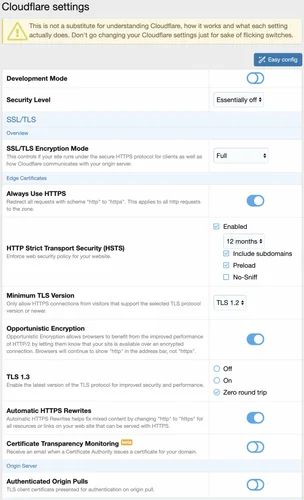
Everything is available from within XenForo (you do not need to go to Cloudflare for things) via the Cloudflare API. This allows you give admins permission to do certain things (for example block IP addresses within Cloudflare without giving them access to your Cloudflare account).
It simplifies/automates much of the configuration and usage of Cloudflare with XenForo.
Manage all Cloudflare settings/options for your zone.
Ability to purge Cloudflare cache.
Cloudflare Firewall support
You can automatically create firewall filters to block access to XenForo internal directories that are not intended to be accessed via web browser (internal_data and src). You can also delete any firewall filter.
Create/delete Firewall user agent rules.
Create/delete Firewall IP address and ASN rules. Includes the ability to optionally expire the rule in the future (for example maybe you want to block a class C for 7 days, or you want to force a challenge to a specific IP for 30 days).
Manage country-level traffic blocking (includes Tor exit nodes).
Ability to force challenge on the registration and contact forms (helps mitigate automated spam).
Cloudflare Access support
You can automatically create Access policies to allow only admins the ability to access the install and admin.php URLs. You can also delete any existing Access policy.
Cloudflare Page Rules support
You can view and delete any Page Rules on your zone.
Cloudflare Cache Rules support
You can automatically create a Page Rule that will instruct Cloudflare to cache XenForo CSS files (normally they are not cached because Cloudflare caches based on file extension, and XenForo's CSS system has .php extension).
You can automatically create a Page Rule that will instruct Cloudflare to cache images served through XenForo's image proxy (similar to XenForo's CSS, Cloudflare normally does not cache them because the image proxy uses .php extension).
Cloudflare Turnstile support (requires XF 2.2.12+)
You can automatically configure/create Turnstile site via API.
Gives direct links to Turnstile Settings and Analytics within Cloudflare account.
DMARC Management allows you to monitor third parties sending email on your behalf
Use Cloudflare Workers as proxy to hide your server's origin IP address for certain XenForo functions:
Image proxy
Unfurl
Support for Cloudflare R2(object storage) to store things like avatars and attachments in the cloud.
Includes an optional ability to use presigned URLs for attachments
Support for caching certain content at the network edge(in Cloudflare data centers):
HTML pages for guests
Media attachments (images, audio, video)
Shows Cloudflare statistics for your domain on admin index. Additionally, daily stats are kept in XenForo's normal Statistics area for:
Unique visitors
Requests
Data served
Data cached
Threats
Turnstile challenges
Turnstile interactive solves
Turnstile non-interactive solves
Turnstile unsolved
R2 class A operations
R2 class B operations
Moderators that have the ability to spam clean and view user's IPs get an extra option in the spam cleaner where they can temporarily ban the IP address(es) the spammer used in the last 30 days. The number of days to ban is an option you can set in the admin area (it defaults to 7 days).
Ability to backup and restore certain Cloudflare configuration (Access Apps, Firewall Rules, Firewall IP Access Rules, Firewall User Agent Blocking, Page Rules).
You can restore backups to a different zone (for example if you had extensive configuration for a zone, you could give another zone the same configuration through a backup restore).
Restoring a backup does not delete existing configurations (you are able to merge configuration into an existing config).
Cloudflare configuration is protected by a new admin permission, Manage Cloudflare.
In exchange for being free, this addon has a single attribution link buried on the bottom of XenForo's Help -> Cookie usage page (there are no site-wide or footer links).
- Free
- 16 Downloads
- 1 Comments
-
This add-on uses Credis with a custom cache provider for Redis (based off Cm_Cache_Backend_Redis). For best performance, install the php extension: phpredis
You must have a Redis instance installed, this is likely not possible with shared hosting
While XenForo 2 has a redis connector, it requires phpredis. This add-on does not.
Feature overview
A pure php redis connector
High availability support
Exposes redis cache object for use for use by other add-ons
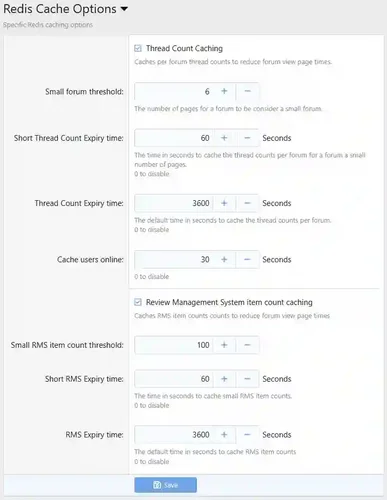
Implements some minor caching of forum thread counts
Troubleshooting
Please be aware that Redis is very sensitive to latency in a virtual environment. If repeated connection failures or protocol errors are experienced disable any Redis Persistence options.
Installation
Edit src/config.php and add:
PHP:
$config['cache']['enabled'] = true; $config['cache']['sessions'] = true; $config['cache']['provider'] = 'SV\RedisCache\Redis'; $config['cache']['config'] = [ 'server' => '127.0.0.1', 'port' => 6379, ];
Options
By default, forum thread counts are cached. In general, this is observable when moving large number of threads from one forum to another, and the total page counts are wrong.
- Free
- 2 Downloads
-
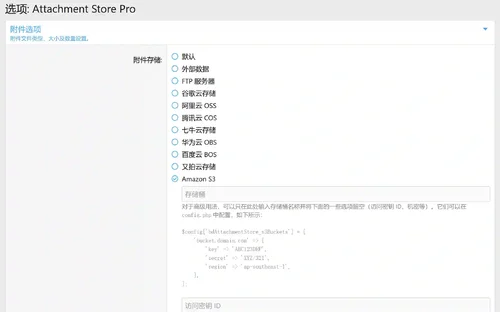
Attachment Store Pro is an enterprise level attachment storage management plugin designed for XenForo 2.3.0+, developed by HuoNiu through Attachment Store secondary development and deeply customized optimization. This plugin completely changes the traditional attachment storage method and provides diversified cloud storage solutions, making your forum attachment management more efficient, secure, and economical.
Core values
💰
Flexible selection of storage solutions - choose the most economical storage service according to your needs
CDN acceleration - reduces server bandwidth costs and enhances user experience
Pay as You Go - Only pay for actual storage and data usage
⚡
Global CDN distribution - nearby access, significantly improving download speed
Server load reduction - external file storage, freeing up server resources
Asynchronous processing - upload process does not block user operations
🔒
Multiple backups - high availability guarantee provided by cloud service providers
Permission Control - Fine file access permission management
Data Encryption - Full process encryption protection for transmission and storage procedures
- 10.00 USD
-
Introducing the premier profile music add-on for XenForo 2, bringing your profile to life!
My journey with XenForo is as long-standing as the platform itself. Over time, I've seen many requests for a profile music addon for XenForo 2. Now, with XenCustomize, I've put in my best effort to offer a solution. Hoping the XenForo community values this sincere effort.
Express Yourself with Music Elevate your XenForo 2 community profiles by adding your favorite custom music tracks. Share your musical taste with others in a fun and unique way.
Easy for Everyone You don't need to be a tech expert to use this. Just upload your music, and the Profile Audio Player will do the rest.
Admin Control, Your Way Tailor the experience to your community’s preferences with admin options. Enable or disable the Player with a single click, and choose whether audio tracks autoplay site-wide when profiles load. You’re in control.
Immersive Audio Player Experience music like never before with our stylish, HTML5, CSS3 and jQuery-based Audio Player. It’s more than just play and pause – enjoy artist names, album details, track duration, progress bars, reactions, and even a playlist button for uninterrupted listening pleasure.
Visual Brilliance The Profile Audio Player doesn’t just sound great – it looks stunning too. With album artwork integration, your users’ profiles will come alive with vibrant visuals that perfectly complement their musical choices.
Make it Yours With dozens of style properties, you can customize the Player’s appearance and design to match your community’s unique identity. Set the mood and create an immersive experience like no other.
Seamless Management Integrates well into the Player, Account wrapper and Visitor menu. Users can manage unlimited audio tracks with individual input fields, including audio uploads or URLs, artist names, song titles, album names, and even the ability to upload custom album art.
Effortless Translation If your site supports multiple languages, our product is fully phrased, making it easy to translate into different languages and connect with users from around the world.
Be a Trailblazer Be the first in your community to have this unique Profile Music add-on. Share your love for music with friends and fellow members.
Feel the Music Experience the joy of music as it fills your profile. Let your favorite tunes speak for you.
- Free
- 13 Downloads
-
XenCustomize News Publisher for XenForo!
Introducing the XenCustomize News Publisher for XenForo! This powerful, feature-rich addon creates a dynamic news section within your XenForo forum. At the heart of this addon is the innovative Categorized News Index, offering a clean, organized, and user-friendly way to display your news stories. Unlike typical mixed-content displays with pagination, the categorized index presents news in easily accessible sections, enhancing the user experience and engagement.
There are 60+ additional screenshots that cannot all be attached in this resource. If you're interested in viewing them, please follow the links provided in the features list below.
Feature List & Screenshots (v2.3.x)
Click on each feature for details and real-world examples (screenshots).
News Ticker
Enable/Disable the news ticker from the ACP to suit your preferences.
Appears prominently at the top of your site, directly above the top breadcrumb, on every page.
Displays your most recent 10 headlines.
Search News Headlines
Shows instant results as you type.
When there are multiple results, it will take you to the results page.
No result page.
Categorized News Index
Display news stories organized by categories on the index page.
Customize the appearance of each news category using 4 display modes:
Card Grid
Compact List
Expanded List
Standout Card Grid (v2.3.1)
Control the number of news stories displayed per category on the index page.
Complete control over which news categories appear on the index page.
Empty news categories (those with no news) will not be displayed on the index.
Support for sorting categories, ensuring that changes to category display order in ACP are reflected on the index page.
Optionally utilize multiple widget positions above and below the news stories for placement of Featured News and Trending News widgets.
News Story View
Title
Buttons
Comments
Watch
Share
Bookmark
More options menu
Edit news
Edit news thumbnail
Manage feature (XF 2.3+)
Move news
Reassign news
Change discussion thread
Delete news
Select for moderation
Delete
Undelete
Approve
Unapprove
Feature (XF 2.3+)
Unfeature (XF 2.3+)
Reassign
Move
Apply prefix
Discussion tab
Custom fields tab
Overview tab
Key points
Large news thumbnail
News story
Attach photos
Action bar
Reactions
Report
Edit history
Delete
Warn
Content tags
More stories in same category
Comments
Sidebar blocks
Information
Author
Publish date
Last update date
Views
Comments
News Editors
Widget position
Latest news widget
More stories by User
Share this news story
Structured Data Integration
Automatically generates NewsArticle schema markup for each news story. Improves search engine visibility and ranking. Enhances discoverability of your news content.
RSS Feed Importer
Add/edit feed
Title
URL
Fetch new entries every
Feed is active
Posting user
Post as guest, use name information from feed data.
Post as the following user
Destination category
Title template
Message template
Options
Post immediately
Import feed now
Delete feed
Enable/disable feed
Convert threads to News stories (v2.3.6)
News categories
Add/edit category
Title
Description
Parent category
Display order
Always moderate news posted in this category
Automatically feature news posted in this category (XF 2.3+)
Show category on index
Number of news
Minimum required tags
Automatically create thread in forum
Automatically created thread prefix
Display mode
Override default 'Category display mode' (Default value: Standout Card grid)
Card grid
Compact list
Expanded list
Standout card grid (v2.3.1)
Available fields
Available prefixes
Require users to select a prefix
Sort categories
Delete category
Add sibling or child category
Category permissions
Category filters
News fields
Add field
Filter fields
Delete field
Field Display location
Below news
Below sidebar information
Own tab
Applicable categories
and other standard options.
News prefixes
Add prefix
Delete prefix
Add prefix group
Delete prefix group
Select all prefixes and quick set
Filter prefix
News Key Points
Enable or disable the key points feature in your admin options.
Easy-to-use interface for adding key points to your news stories during creation or editing.
Prominent display of key points on news stories.
Quick editing interface on news story view.
News Thumbnails
Enable or disable the News Thumbnails feature in your admin options.
News creators can upload a large (740x416) thumbnail.
News thumbnail image is used extensively throughout the public-facing interface of the News Publisher.
News Thumbnail Fallback Options (v2.3.1)
Added support for external image URLs as a secondary fallback when no news thumbnail is uploaded.
Moved the default thumbnail image to the third fallback option, utilizing the default thumbnail set in style properties.
Updated various templates to ensure consistent display of images, thumbnails, and avatars across different views.
News Editors
Enable or disable the News Editors feature in your admin options.
News authors can add up to 10 other users as news editors for each news.
News editors are able to take actions against a news story as if it were their own, with the exception of deletions.
Featured News (XF 2.3+)
Category-based auto-feature option.
News author with the "Feature/unfeature news" permission can manually feature or unfeature a news story.
Ability to customize the feature title, snippet and image.
The news story content type is displayed effectively in all three display styles offered by XenForo 2.3:
Simple
Standard
Carousel
Trending News (XF 2.3+)
Included the News story content type in the Trending content widget.
The news story content type is displayed effectively in all three display styles offered by XenForo 2.3:
Simple
Standard
Carousel
Category display modes
Display Mode - Card Grid
Display Mode - Expanded List
Display Mode - Compact List
Display Mode - Standout Card Grid (v2.3.1)
Widgets
Latest News
Latest Comments
Statistics
Featured News(XF 2.3+)
Trending News(XF 2.3+)
Widget Positions
XenCustomize News Publisher: Index above news
A position inside the main content area of the index above the news stories.
XenCustomize News Publisher: Index below news
A position inside the main content area of the index below the news stories.
XenCustomize News Publisher: Index Sidenav
Displays inside the side navigation on the news publisher index page.
XenCustomize News Publisher: Category Sidenav
Displays inside the side navigation on the news publisher category page.
XenCustomize News Publisher: News Sidebar
Displays inside the sidebar block on the news story view page.
Full-Fledged Commenting System
The comment system includes the following features:
Full support for a rich text editor.
Attachment support.
The ability to reply to comments using the quote feature.
Support for multi-quoting.
Quick inline editing:
Edit silently
If selected, no "last edited" note will be added for this edit.
Clear last edit information
If selected, any existing "last edited" note will be removed.
Edit history support with the ability to view and compare previous versions.
Options to delete comments with deletion types:
Remove from public view with a reason.
Permanently delete.
Notify author of this action with Reason.
Display of IP address information for comments.
Inline moderation support with the ability to:
Delete comments.
Undelete comments.
Approve comments.
Unapprove comments.
View of soft-deleted comments and the option to undelete.
Warning support.
Report support.
Spam cleaner support.
New comments go through an approval queue before becoming visible to the public.
Support for reactions.
Receive alert notifications when someone:
Mentions you in a comment.
Quotes your comment.
Reacts to your comment.
Comments on a watched news story.
Pagination support.
Admin-defined number of comments per page.
Admin-defined maximum comment length.
Admin-defined maximum comment attachment size.
Admin-defined allowed comment attachment file types (extensions).
Fully permission-controlled, with complete sets of permissions for users and moderators.
Added search indexing support for comments' content type.
Added a new navigation link for easy access to view recent comments.
User group Permissions: News Stories
View news
View full news
View news images
React to news
Create news
Upload images with news
Upload video/audio with news
Edit own news
Tag own news
Tag any news
Manage tags by others in own news
Delete own news
Manage news editors for own news
User group Permissions: News (Moderator)
Use inline moderation on news
View deleted news
Delete any news
Undelete news
Hard-delete any news
Edit any news
Reassign news
Manage any tags
View unapproved news
Approve / unapprove news
Feature / unfeature news (XF 2.3+)
Give warnings on news
User group Permissions: News Comments
View comments
View comment attachments
React to comments
Post comments
Submit comments without approval
Upload attachments to comments
Upload videos to comments
Edit own comment
Delete own comment
Time limit on editing/deleting own comments (minutes)
User group Permissions: News Comments (Moderator)
Use inline moderation on comments
View unapproved comments
View deleted comments
Approve / unapprove comments
Edit any comment
Delete any comment
Undelete comments
Hard delete any comment
Reassign comments
Give warnings on comments
Cron entries
Update view counters
Feeder
Cache statistics
Rebuild caches
Rebuild news
Rebuild news categories
Optimize news thumbnails (XF 2.3+)
Rebuild user news counts
Rebuild news embed metadata
Attachments
Embed your News Stories anywhere! (XF2.3+)
You can now embed News Publisher stories across your site using the new EMBED BBCode. Simply paste a News story URL into any Rich Text Editor (RTE) that supports embedding.
- 8.00 USD
-
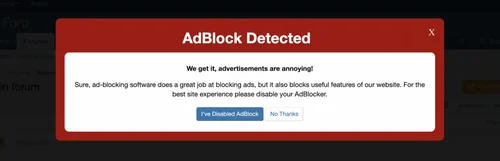
Recoup lost revenue from visitors using AdBlock Systems. Recommend AdBlocker visitors disable their AdBlocker, or force them to make a decision about Registration or Upgrade.
Separate overlays for guests and registered users so you can target registrations or user upgrades.
You decide what's best for your community and customize this addon as required. No two communities are the same, and neither should be your approach to recoup revenue.
Recoup Ad Revenue:
Force users to be inconvenienced (the frequency is up to you)
Force users to disable their AdBlock System
Or, simply nag them a little over time
Promote Upgrades:
Do you offer an ad-free experience to user's that have upgraded?
Force users to upgrade if they don't want to disable their AdBlocker
Boost Registrations:
Disable the AdBlocker for Members and target visitors using AdBlock
Provide a link to register in the Overlay
Fully featured SEO-friendly anti-AdBlock system. Supports a full page overlay or a simple notice message. The choice is yours. The overlay or notice is customizable.
Features:
Redundant detection methods
Auto-generated scripts
Scheduled updates uniquely customized to your server
Fully mobile responsive
SEO-Friendly
Granular permissions per usergroup (by permissions or catch-all)
4 overlay themes (dark, light, default and black out)
Ability to choose the primary color of the overlay using a color picker
Custom colour changes can be made in the theme.less
Override "ignore user group" for groups you NEVER want to see the anti-AdBlock
Auto minified (CSS/JS/HTML)
Ability to enable and disable the overlay
Ability to set the overlay delay timer in seconds
Ability to enable and disable the plugin
Ability to set the number of page views for nagging
Ability to set "nag on first page view always"
Ability to customize detection exclusions across XF templates
Default exclusion of common templates: login, register, error, account details, etc.
Improved responsive layout on small screen mobile devices
System includes:
All language in phrases
Supports multilingual translation
- 5.00 USD
- 28 Downloads
-
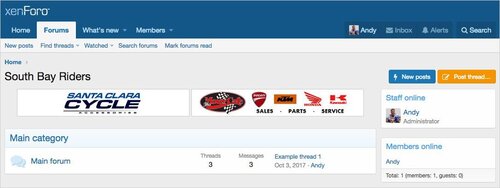
Système de gestion des bannières.
Affiche des bannières aléatoires dans votre en-tête, liste de forums, vue de forum et vue de fil.
Le module complémentaire Banner est conçu pour les bannières auto-hébergées, ces images de bannières sont servies depuis votre serveur.
Features :
Multiple banners can be displayed at the same time for each location. The number of banners to display per location is set in the Options page.
Banners are displayed in random order, each page reload displays a new set of banners.
All phrases start with banner_ for your convenience.
Installation :
Download Andy-Banner-1.4.zip and unzip it.
Copy the src/addons/Andy/Banner directory to your server.
From the Admin Control Panel Install the add-on.
How to use :
In the Admin Control Panel, go to User group permissions and set the user groups you want to display banners to.
In the banner options page, set the number of banners to show.
In the Visitor tab, click the Banner admin link.
In the Banner admin page, click the Add link.
Fill out the information and save.
Create a folder on your server to store your banner images.
Upload banner images to your banner folder.
- Free
- 1 Downloads
-
A collection of improvements to XF's Enhanced Search and some for XenForo's default MySQL search.
MySQL & Elastic Search features;
range_query search DSL
allows arbitrary range queries for numerical data
Allow users to select the default search order independent for the forum wide setting.
Re-adds the global option for the default search type
Elastic Search Only features:
Add ability to push "can view threads/tickets by other" permission(s) into ElasticSearch query, reducing php-side culling of matching content.
This improves searching forums/tickets where the user lacks these permissions.
This is gated behind the option Push "View X by others" check into XFES', as it requires a full reindex. (Default disabled)
Supports the following add-ons:
View Sticky Threads (free) add-on.
Collaborative Threads (paid) add-on.
@NixFifty's Tickets (paid) add-on.
For best results, use ElasticSearch Essentials add-on, as it simplifies this permission constraint compared to stock XenForo
Per content type weighting
Adds Elastic Search information to the AdminCP home screen.
Adds a debug option to log the search DSL queries to error log for troubleshooting
Option to extend search syntax to permit;
+ signifies AND operation
| signifies OR operation
- negates a single token
" wraps a number of tokens to signify a phrase for searching
* at the end of a term signifies a prefix query
( and ) signify precedence
~N after a word signifies edit distance (fuzziness)
~N after a phrase signifies slop amount
In order to search for any of these special characters, they will need to be escaped with \.
"Specialized index" support
Specialized search index allows generating single-purpose elastic search indexes while re-using as much XF search infrastructure as possible.
Username auto-complete powered by elasticsearch
These are examples of a "specialized index".
The username autocomplete it creates an index with just the user/email and replaces the admin quick search and front-end username autocomplete with an elasticsearch powered version.
The tag autocomplete replaces the front-end tag autocomplete with an elasticsearch powered version.
In both cases this allows non-start-of-string matching, with typo tolerance.
- Free
- 7 Downloads
-
[XenGenTr] statistics - Technical specifications
It is a widget system with Tamami.
New, recent messages.
New issues.
The subjects that received the most reply.
Most viewed topics.
Top rated topics.
You can withdraw the above data from the required forums in any number of times.
1 user statistic requested.
User names appear in user group colors.
Topic link next to Google search button.
The change in the database works without any new additions.
Of course 100% Mobile compatibility.
And it is from TURKISH
Options of the insert
User groups that can view attachments can be restricted.
Unwanted widgets such as new topics, messages, hit topics can be turned off.
Member Stats On / Off.
Open / Close in user name group color
Google search button on / off
Visual options;
You can arrange all the area colors of the insert as you like.
- Free
- 1 Downloads
-
BLOK is a clean geometric theme that is designed to be easy to use, easy to customize, and fast. Don’t like the geometric art? It can be disabled! Want a different background pattern? Easily switch between four existing presets. Would you rather use the default icon set, or one from another addon? No problem. Each element specific to BLOK can be changed, enabled, or disabled!
BLOK also works with your existing branding; Just put in your brand’s colors and all the artistic elements will change to match your brand!
- Free
- 0 Downloads
-
BLOK is a clean geometric theme that is designed to be easy to use, easy to customize, and fast. Don’t like the geometric art? It can be disabled! Want a different background pattern? Easily switch between four existing presets. Would you rather use the default icon set, or one from another addon? No problem. Each element specific to BLOK can be changed, enabled, or disabled!
BLOK also works with your existing branding; Just put in your brand’s colors and all the artistic elements will change to match your brand!
- Free
- 0 Downloads
-
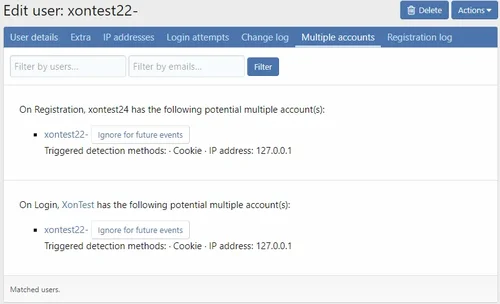
From (simple) multiple accounts detection to isp/connection fingerprinting with score-based moderating/rejecting logic. These are very effective low-hanging fruit at reducing spam.
Supports migration configuration from the following XF1 add-ons;
TPU Spam Detect
Alter ego Detector
See the FAQ Known Issues for known limitations. This is not a turn-key solution, and each site may require customization!
For multiple account detection, supports reporting to reports/threads. And will send reports to the same report/thread. To send to thread you must select the "Multi-account to thread" extra.
For connection fingerprinting more additional information is collected and recorded on the account.
Note; Configuration defaults are conservative, aimed at blocking VPNs and proxies. There are a large number of configuration options for this add-on!
Link content spam checking
Instead of adding the spam phrases http:///https:// which generate lots of false positives; this allows controlling how links are treated by the content spam checker;
Explicitly allow URLs with a given domain
Explicitly moderate URLs with a given domain
Explicitly reject URLs with a given domain
Default allow/moderate/reject for unclassified URLs
Multiple account handling permissions
Bypass multiple account checking
Can enable / disable alerting for user
Can enable / disable alerting for log
View reportings.
- Free
- 0 Downloads
-
DragonByte Shop is the most advanced shop mod to date. Giving you unprecedented control over what items you can sell, DragonByte Shop is the perfect mod to go along with virtually any points modification.
With features like overriding any usergroup permission, including those of custom modifications, DragonByte Shop raises the bar for what you will come to expect from a shop mod.
Uses
Most other shop modifications add support for overriding certain stock actions, like increased PM space, increased avatar size, super moderator permissions, etc...
DragonByte Shop takes this to the next level and offers you 100% control over every single usergroup permission conceivable, including those of modifications we've never even heard of!
Usergroup permissions is not all it can do, however. It can also let members buy styling for your user title like bold, italics and colors, user title changing, username changing, and more!
It also offers a simple points system that you can use if you do not wish to add a points modification to your forum.
Feature List
DragonByte Credits integration: All of your DragonByte Shop purchases will show up in DragonByte Credits, allowing you to fully utilise the power of the Credits mod to support your Shop! New event triggers are automatically created when an action is taken within the Shop mod.
Multiple currencies: You can create multiple different currencies, and optionally integrate all or some of them with DragonByte Credits. This allows you to sell items in a wide variety of different currencies, each with their own rate of earning.
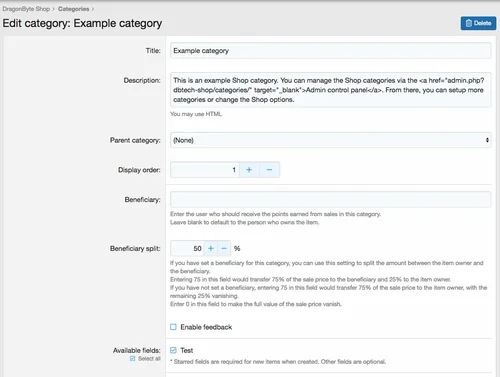
Categories: As an administrator you can create multiple categories that sells different (or the same) items. Categories can be organised in a tree structure for easy browsing. Categories can also have user group permissions, allowing you to fine-tune who can create items within each category.
Categories can also have a "Beneficiary", meaning someone other than the item owner can optionally receive all or part of the proceeds from selling each individual item. Beneficiary amounts can be split in any amount of 0-100%.
Items: A powerful item system allows you to create a wide array of different items with different configurations. Like categories, items can have their own individual user group or user permissions.
Items can have the following properties:
Giftable
Only giftable
Start conversation when gifted
Can re-gift
Unique (can only purchase one of this item)
Exclusive (can only purchase one of this item type)
Always hidden (item is not displayed in the postbit)
Stealth item (item is not displayed in a user's inventory or postbit)
Allow re-configuration
Automatically discard after configuration
Duration
Permanent
Temporary
Automatically discard after expiry
Inventory
Item price / currency
Sell-back price / currency
Sell-back time limit
Stock
Sell-back replenishes stock
Stock refill interval
Purchase notifications
Configure notifications
Reviews: Members are able to rate & review items, with optional requirements of entering review text and requiring purchase before a review can be left.
- 6.00 USD
-
This is an RSS feature disabling plugin specifically designed for XenForo forums, which can completely remove the forum's RSS subscription function.
one
✅ Automatically remove RSS icon links at the bottom of the page
✅ Clear RSS meta tags from all pages
✅ Remove RSS links from forum lists, section pages, featured content, etc
two
✅ Disable direct access to all RSS URLs
✅ Return 404 error when accessing any. rss address
✅ Including:/forums/index.RSS,/forums/section.rss,/features/index.RSS, etc
three
🛡️ Template level: Remove RSS related elements from HTML
🛡️ Controller level: Rewrite RSS method returns 404
🛡️ Event monitoring: Intercept all RSS requests
✅ Applicable scenarios
Do not want users to subscribe to forum content through RSS
Reduce server resource consumption (RSS generation)
Prevent content from being automatically captured
Simplify the page interface and remove unnecessary features
⚠️ Precautions
After installation, the RSS function will be completely unavailable
To restore RSS, you need to uninstall the plugin
Suggest notifying users of RSS feature changes before installation
🚀 User visible changes
The page is more concise - the RSS icon at the bottom disappears
Source code cleaner - no RSS meta tags
Access Protection - RSS URL Returns 404
- Free
- 0 Downloads
-
Give your users a way to further express themselves in their own personal area!
Features (as of 1.0.0 Beta 1):
Allow users to create blog(s)
Users can create blog posts which utilizes the XenForo attachment system
Blog posts will appear in search results
Planned Features:
Blog post drafts
Future Post (choose a date and time for a blog to post automatically)
A better blog post handling page for blog owners
Comments
Multiple blog owners
Admin panel for handling blogs and blog posts
Reactions
Follow a blog
Tags
- Free
- 5 Downloads
-
Screenshots are still to be added, XF1 version has similar functionality and the screenshots
This add-on introduces potentially breaking changes to moderation permissions. Please review usergroup permissions carefully to ensure moderators do not lose access to the report center!
A Collection of improvements to XF's reporting system. Fully phrased.
On install, all existing warnings are copied into a new warning change tracking log and associated with reports. This process occurs as a background task, and is non-disruptive.
Note; when reports are sent to a forum, the warning<->report links can not be created!
Feature list:
Improve performance of Report Center by reducing stock XenForo N+1 query behaviour
Permission based access to the report center:
Default permissions set for groups (global/content) for groups with warn or edit basic profile permissions.
New Permissions:
View Report center
Comment on open report
Comment on closed report
Update a report's status
Assign report
View Reporter Username
React to report comments
View User Report
View Profile Post Report
View Conversation Report
Edit own report comment
Time limit on editing/deleting own report comments (minutes)
Edit any report comment
View attachments to report comments
Upload attachments to report comments
Upload videos to report comments
Attachment Size (kb)
Maximum Attachment Count
Sends an Alert to moderators who have commented/reported on a report.
Only sends an alert if the previous alert has not been viewed
Report Alerts link to the actual comments for longer reports
Report Alerts include the title of the report
Alert moderators if a report is assigned to them
Links Warnings to reports.
Visible from the warning itself, and when issuing warnings against content.
Link reply bans to reports
Log reply bans into report system
Optional Issue a reply-ban on issuing a warning (default disabled)
Allow reply-banning through a closed threads for moderators
Link Reports to Warnings.
Logs changes to Warnings (add/edit/delete), and associates them with a report.
Automatically create a report for a warning.
When issuing a Warning, option to resolve any linked report.
Optional ability to log warnings into reports when they expire. This does not disrupt who the report was assigned to, and does not re-open the report.
Report Comment Likes.
Resolved Report Alerts are logged into Report Comments (as an explicit field).
Search report comments
Optional ability to search report comments by associated warning points, and warned user. (Requires Enhanced Search Improvements add-on)
Reverse order of report comments (default disabled)
Optional auto-reject/resolve sufficiently old reports (default disabled)
Show content date when viewing a report
Show forum for post reports in report list
Permission-based ability to join a reported conversation
- Free
- 3 Downloads










Top Downloads
-
Invision Community-Developer Tools
Free
These files are necessary for using developer mode in IPS Community Suite.- 1 Downloads
- 0 Comments
-
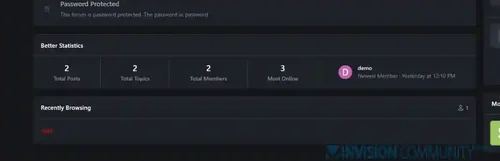
Better Statistics Pro
Free
The Better Statistics application for Invision Community 5 combines the statistics from the two widgets, "Member Statistics" and "Forum Statistics," into one. The application uses the original code from both widgets.- 1 Downloads
- 0 Comments
-
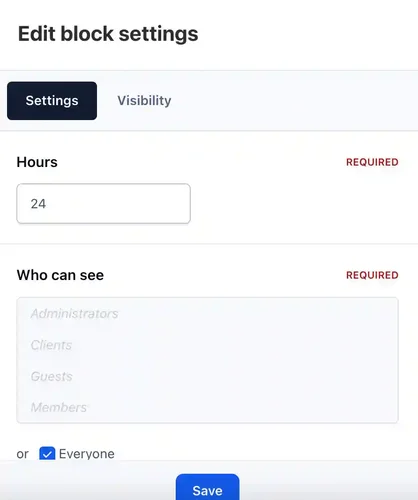
Who was online
Free
Who was online - widget that adds statistics of users who have been online for the last X hours.- 1 Downloads
- 0 Comments
-
StopForumSpam
Free
StopForumSpam - application to prevent spammers from registering on the forum. When registering a new user, the application checks the email, IP address and/or username, and if this data is in the spam database of the service https://www.stopforumspam.com/ - it bans the account.- 1 Downloads
- 0 Comments
-
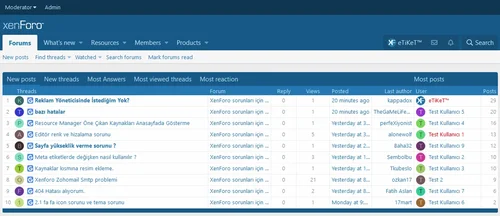
HuoNiu XFRM Grid Layout Style
Free
Core Features Modern Grid Layout – Transforms traditional lists into visually appealing grid card displays. HD Cover Display – Displays high-resolution images from resource detail pages, ensuring clear and sharp quality. Flexible Column Configuration – Supports 1-6 columns with free customization (desktop/tablet/mobile configurations independent). Responsive Design – Automatically adjusts to different screen sizes, ensuring perfect display. Hover Animation Effects – Smooth floating + enhance- 1 Downloads
- 0 Comments



-
Quick Search
Free
Quick Search is a small application that instantly brings an intuitive search form and smart autocomplete. Results are displayed with eye-catching thumbnails, providing a seamless browsing experience across all applications. Make finding content easier and faster with Quick Search! Settings: Enable/Disable. Permissions for member groups. Max results. Search incomplete words Find results in Content titles only | Content titles and body Search Mode: OR / AND Set default search type for all- 1 Downloads
- 0 Comments
-
Global Market Plus-Transaction & Auction House ⭐ Multifunctional & 99% Customizable
Free
GlobalMarketPlus is a multi-functional virtual store plugin, with Global Market as its main function. It can be used to trade items of various transaction types, and trade merchandises with other players in the server anytime and anywhere through commands and GUI. It is a highly customizable plugin. Almost all functions have corresponding commands. Management system and security system, data processing system, detailed configuration file annotations and wiki, ensure the operation of the plugi- 1 Downloads
- 0 Comments
-
Not Alone Pro
Free
Main Features of Not Alone: Fully Responsive Layout Dark and Light version Font-awsome navigation icons Font-awsome visitor menu icons Search box area Font-awsome sidebar icons Remove Sub-navigation row Show/Hide Breadcrumbs Hide Forum Title in Index Page Collapsible Categories Sticky Sidebar Collapsible Sidebar Posting Icons Modern Cross Browser Support And more...- 1 Downloads
- 0 Comments
-
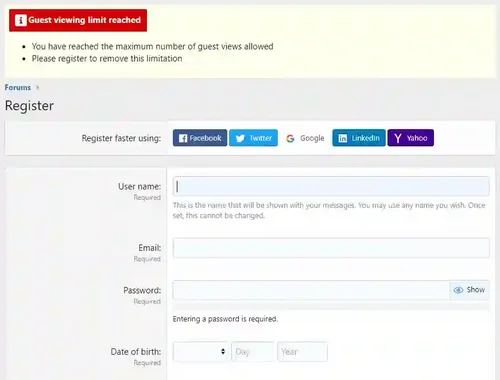
Limited Guest Viewing Pro - Boost Registrations
Free
Dramatically increase daily registrations by 200% to 300% Fully featured system to limit the number of content pages your guests can view before being forced to register. It also supports a nag system to warn users that they're on a limited number of views before having to register. Proven method of increasing forum registrations without negatively affecting SEO or annoying your visitors. You control how much a visitor can view anonymously before you force them to register! Features include:- 1 Downloads
- 0 Comments
-
XFRM Right Sidebar Pro
Free
XFRM Right Sidebar Pro is an advanced sidebar enhancement plugin designed specifically for XenForo Explorer (XFRM). Through innovative download button integration technology and exquisite card style design, bring unprecedented user experience improvement to your resource page. Please note: This plugin is released by proxy and requires registration and purchase on the developer's website. Core Highlights 🔥 Intelligent Download Button - Automatically detects and integrates official XFRM download- 1 Downloads
- 2 Comments



-
Invision Community
Free
Invision Community 5 — A Fresh New Experience! Invision Community 5 brings a modern design and powerful features to energize your community: All-New Sidebar Layout Enjoy streamlined navigation with a sidebar for quick access to apps, activity streams, search, and customizable shortcuts. Versatile Forum Views Discover the new Feed view with cover photos and featured colors, plus classic table, grid, and fluid modes for flexible content display. Compact Topic Pages & Mini Profiles Focus on c- 189 Downloads
- 3 Comments
-
Invision Community-Developer Tools
Free
These files are necessary for using developer mode in IPS Community Suite.- 41 Downloads
- 0 Comments
-
The7 - Website and eCommerce Builder for WordPress
Free
The7 features full and seamless integration with WPBakery Page Builder (formerly Visual Composer) and Ultimate Addons. Most our buyers agree that The7 is the best theme to be used with these plugins, up to date! Its 1000+ Theme Options allows to craft almost any imaginable design. And Design Wizard feature lets you create a boutique-grade website design in mere minutes. Both Wizard and advanced Theme Options can work in visual WP Theme Customizer-like and old-school backend editing modes. The7- 38 Downloads
- 0 Comments
-
MaterialXen
Free
Material design is basically a result of Google’s set of guidelines for better designing, keeping in mind mobile users. It supports better browsing by enhancing the visual and motion experience. This theme is almost Material-based to make a better user experience. RE-ME Framework Features List You don’t just get a simple theme; you’ll get settings that will change the default framework into your own. It’s your website; make it yours! Google Web font is easily configured. Node Background Avata- 34 Downloads
- 0 Comments
-
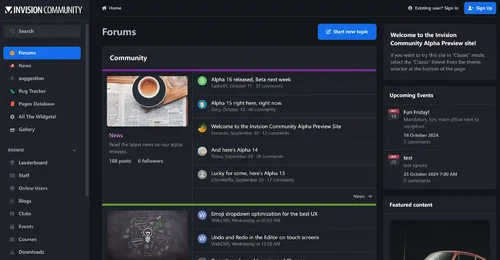
Better Statistics Pro
Free
The Better Statistics application for Invision Community 5 combines the statistics from the two widgets, "Member Statistics" and "Forum Statistics," into one. The application uses the original code from both widgets.- 34 Downloads
- 0 Comments

-
Invision Community
Free
Invision Community 5 — A Fresh New Experience! Invision Community 5 brings a modern design and powerful features to energize your community: All-New Sidebar Layout Enjoy streamlined navigation with a sidebar for quick access to apps, activity streams, search, and customizable shortcuts. Versatile Forum Views Discover the new Feed view with cover photos and featured colors, plus classic table, grid, and fluid modes for flexible content display. Compact Topic Pages & Mini Profiles Focus on c- 189 Downloads
- 3 Comments
-
Invision Community-Developer Tools
Free
These files are necessary for using developer mode in IPS Community Suite.- 41 Downloads
- 0 Comments
-
The7 - Website and eCommerce Builder for WordPress
Free
The7 features full and seamless integration with WPBakery Page Builder (formerly Visual Composer) and Ultimate Addons. Most our buyers agree that The7 is the best theme to be used with these plugins, up to date! Its 1000+ Theme Options allows to craft almost any imaginable design. And Design Wizard feature lets you create a boutique-grade website design in mere minutes. Both Wizard and advanced Theme Options can work in visual WP Theme Customizer-like and old-school backend editing modes. The7- 38 Downloads
- 0 Comments
-
MaterialXen
Free
Material design is basically a result of Google’s set of guidelines for better designing, keeping in mind mobile users. It supports better browsing by enhancing the visual and motion experience. This theme is almost Material-based to make a better user experience. RE-ME Framework Features List You don’t just get a simple theme; you’ll get settings that will change the default framework into your own. It’s your website; make it yours! Google Web font is easily configured. Node Background Avata- 34 Downloads
- 0 Comments
-
Better Statistics Pro
Free
The Better Statistics application for Invision Community 5 combines the statistics from the two widgets, "Member Statistics" and "Forum Statistics," into one. The application uses the original code from both widgets.- 34 Downloads
- 0 Comments