







XenForo
148 files
-
HuoNiu Credits System - Points System is a powerful virtual currency plugin for XenForo 2.x that provides a complete points economy system for your forum. It supports features such as multi-currency management, user-to-user transfers, file renewals, red envelopes, bounty questions, paid content viewing, resource paid downloads, and online recharges.
It helps forum administrators easily build a vibrant community economy ecosystem. International language pack support is provided! (An English language pack will be available in the future and will be included in the plugin.) You can experience the plugin's features on this site!
Features:
Four states can be set for the same file in the Resource Manager:
Free download file
Points sales file
Real currency sales file (Currency unit can be set, supporting international payment purchases)
Points and real currency sales for the same file (Users can use any payment method to purchase the file and gain download access, offering flexibility for users)
File page displays license expiration date.
Supports resource renewals.
Renewal discounts are displayed.
Premium accounts can enjoy greater discounts with flexible discount policies.
Administrators can add user licenses to individual files and set download license durations.
Administrators can revoke user download licenses at any time.
Users can view their purchase activation information and expiration duration on the file details page.
Upgrade account guidance is added to the file list.
The file list shows discounted prices in points and real currency.
Currency exchange rate and fees are added when purchasing points.
File sales support transaction fees.
Supports using PayPal and other foreign payment methods to purchase points and files.
Expired resources can allow downloading of older versions (options include permanent download of old versions, grace period download of old versions, or forbidding download of old versions).
File detail sidebar displays resource license status.
License status dynamically calculated and displayed based on purchase and expiration dates.
Withdrawal function added (including: commissions, fees, and other configurable options in the backend).
Dynamic calculation of withdrawal amounts.
User group permissions can be set for the withdrawal feature.
Migration Tool:
Data Migration from the original [BR] MJ/Credits Plugin:
User Points
User File Purchase Records (preserves original download permissions and expiration times)
Prices of files sold using points, etc.
💰 Core System
✓ Multi-currency system
✓ User transfers
✓ Currency exchange
✓ Bulk adjustment of points
✓ Transaction record queries
✓ Transaction fees and taxes
✓ Currency exchange rate management
✓ Transaction review mode
✓ Daily limit control
🎁 Social Features
✓ Private red envelope system
✓ Post tipping feature
✓ Tipping records retained
✓ Automatic expiration of red envelopes
✓ Tipping leaderboard
✓ Daily sign-in rewards
✓ Bounty Q&A system
✓ Points leaderboard
✓ Real-time notifications
💵 Content Monetization
✓ Paid content (BBCode)
✓ Attachment download fees
✓ Independent pricing for attachments
✓ Resource points sales
✓ Resource real currency sales
✓ Resource expiration renewals
✓ Renewal discount offers
✓ Online recharge points
📦 Resource Management
✓ Bulk price settings
✓ Batch pricing by category
✓ Payment type selection
✓ Automatic currency conversion
✓ Purchase limit
✓ Sales statistics reports
✓ Resource sales commission
✓ Expiration reminder notifications
⚡ 60+ Automatic Events
✓ Registration and login rewards
✓ Post and reply rewards
✓ Like and follow rewards
✓ Poll and session rewards
✓ Personal homepage interaction
✓ Resource purchase and sales
✓ Custom forum events
✓ Independent forum rules
✓ User group permission control
- 31.50 USD
-
XenForo is a powerful community forum software that provides users with a simple and easy-to-use interface and rich communication features. Users can easily communicate through posting, sending private messages, using tags, and other methods.
Its interface design is responsive, suitable for various devices, and has good customizability. Administrators can expand functionality and beautify interfaces through plugins and theme customization, while utilizing powerful management tools to manage users, content, and forum settings, ensuring order and activity in the community.
- Free
- 22 Downloads
-
Features:
Full responsive
Dark & Orange colors (default). Custom colors for main color area
Nodes custom backgrounds in forum edit
Header editable in admin panel
Custom footer editable in admin panel
Slider panel
Announcements panel
Sticky sidebar option
Collapsable categories
Custom blocks display panel
Animated effects when scrolling
Welcome panel
- Free
- 0 Downloads
-
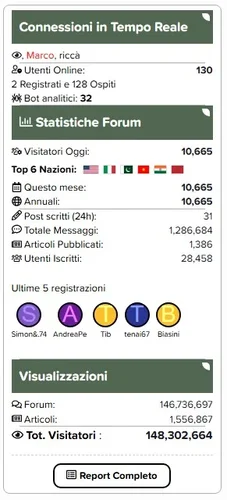
Eklenti, forum sidebara trafik ve istatistik widgeti oluşturmanıza olanak tanır.
Description:
This plugin allows you to create traffic and statistics widgets for the forum sidebar.
Features:
Monitor unique visitors with precise counters for the Last 24 Hours, Current Month, and Yearly Totals.
Daily and Monthly graphs now utilize fixed ranges (last 30 days / last 12 months), ensuring a consistent and gap-free visual experience.
Automatically detects and displays flags of the top visiting nations directly in the widget.
Highly customizable layout for new registrations. Choose between Avatar only, Username only, or a compact Avatar + Username column style.
Full support for Bob's Article Management System, displaying total articles and article views alongside forum stats.
Tracks and displays current online users, guests, and analytical bots separately.
A dedicated button links to a comprehensive statistics page featuring detailed tables and the new comparative historical graphs using Chart.js.
Optimized logic ensures minimal server load and mathematically precise visitor counting (no double-counting of archived logs).
- Free
- 0 Downloads
-
HuoNiu QQNotif is a QQ/TG message notification plugin designed specifically for XenForo 2.3.x, which supports automatic push notifications for site events to QQ/TG groups/users, helping site administrators achieve efficient community message linkage and automated management. The plugin adopts the native XF backend style, supports bulk log management, and is easy to operate, secure, and reliable.
This plugin is based on the NapCat QQ bot to implement the message push feature. Before use, please ensure NapCat is correctly installed and configured on the server. Please refer to the installation guide.
📢 Multi-platform Support
QQ Group Notifications: Based on NapCat (OneBot 11), perfectly adapted for domestic communities
Telegram Notifications: Official Bot API, accessible worldwide without restrictions
Independent Switch: Enable QQ, Telegram, or both platforms for notifications separately
🔔 Comprehensive Message Monitoring
✅ New Topic Publication Notifications
✅ Post Reply Notifications
✅ User Registration Notifications
✅ Resource Publication Notifications (XFRM)
✅ Resource Update Notifications
✅ Section/Resource Category Filtering (Precise Push)
🎨 Flexible Message Customization
📝 Customizable message templates
🏷️ Supports variables: {title} {username} {url} {snippet} {date}, etc.
🎯 Selective monitoring of sections and resource categories
🛡️ Enterprise-grade Security Protection
✅ XSS Protection (All HTML outputs are escaped)
✅ CSRF Protection (Delete operation verification Token)
✅ SQL Injection Protection (Parameterized queries)
✅ Input length limits (Messages up to 4000 characters, snippets up to 200 characters)
✅ Token information masking (Sensitive information hidden in logs)
✅ URL Whitelist validation (Prevents open redirection)
📊 Comprehensive Logging System
📋 Records all notification sending logs
🔍 Tracks sending status (Success/Failure/Error information)
🗑️ Bulk delete and clear logs
⏰ Automatic log cleanup (Configurable retention period)
🧪 Convenient Testing Feature
🎯 Independent test buttons for QQ and Telegram
✅ Real-time configuration verification (Format check)
📝 Detailed error prompts and configuration status display
💡 Technical Highlights
Zero performance loss
Asynchronous notification mechanism
Timeout protection (Connection 5 seconds, Response 3 seconds)
Optional logging system
Plug-and-play
QQ: Deploy NapCat → Fill in the address and group number → Done
Telegram: Create Bot → Get Chat ID → Done
No need for complex configurations like Webhooks, reverse proxies, etc.
Production-ready
Audited against XenForo official security standards
Fixes all known vulnerabilities
Complete error handling and logging
📋 Use Cases
Internal enterprise communities: Simultaneously cover domestic and international teams (QQ + Telegram dual push)
Game communities: Instant notifications for new resources/updates to QQ groups
Open-source projects: Real-time synchronization of forum dynamics to Telegram channels
E-commerce sites: Automatic push notifications for new product launches and member registrations
📦 Technical Specifications
XenForo: 2.3.0+
PHP: 8.0+
Extensions: cURL
Protocols: OneBot 11 (QQ) / Telegram Bot API
- 4.25 USD
-
Core Features
Modern Grid Layout – Transforms traditional lists into visually appealing grid card displays.
HD Cover Display – Displays high-resolution images from resource detail pages, ensuring clear and sharp quality.
Flexible Column Configuration – Supports 1-6 columns with free customization (desktop/tablet/mobile configurations independent).
Responsive Design – Automatically adjusts to different screen sizes, ensuring perfect display.
Hover Animation Effects – Smooth floating + enhanced shadow for an improved interactive experience.
Comprehensive Information Display – Full visibility of title, tagline, author, date, category, rating, and download count.
Elegant Border Separation – Horizontal lines connect full width, vertical lines only appear between items for clear visual hierarchy.
Smart Placeholder – Displays FontAwesome icon when cover image is absent, maintaining aesthetics.
Edge-to-edge Filling – Grid fully fills the area with no unnecessary blank spaces.
One-click Backend Configuration – Easily set all parameters through the admin panel.
Tired of monotonous list layouts? Want a more modern look for your resource pages?
HuoNiu Grid plugin brings a brand new grid card layout to the XenForo Resource Manager, making resource display more beautiful and easy to browse! See the demo on this site!
✨ Key Highlights
📸 HD Cover Display – Say goodbye to blurry 100×100 icons. Display high-res images directly from the resource detail page, showcasing each resource in its best form.
🎯 Flexible Customization – Desktop supports 1-6 columns, with independent configurations for tablet/mobile, perfectly adapting to various screen sizes and usage scenarios.
✨ Dynamic Interaction – Cards elegantly float up with enhanced shadows on hover, offering users a smooth browsing experience.
📊 Complete Information – Each card showcases title, tagline, author, release date, category, rating, download count, and other key info.
🎨 Exquisite Design – 16:9 image ratio, rounded corners, elegant border separation—each detail is carefully crafted.
⚡ Plug and Play – One-click backend configuration with no need for code modifications; instantly effective after installation.
🌐 Perfectly Responsive – Automatically adapts to desktop, tablet, and mobile, ensuring flawless display on any device.
🎁 Applicable Scenarios
Software/Plugin resource sites
Template/Theme showcase platforms
Game MOD download sites
Asset/Resource libraries
Any resource display scenario using XFRM
- Free
- 3 Downloads
-
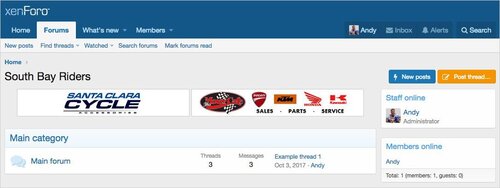
Système de gestion des bannières.
Affiche des bannières aléatoires dans votre en-tête, liste de forums, vue de forum et vue de fil.
Le module complémentaire Banner est conçu pour les bannières auto-hébergées, ces images de bannières sont servies depuis votre serveur.
Features :
Multiple banners can be displayed at the same time for each location. The number of banners to display per location is set in the Options page.
Banners are displayed in random order, each page reload displays a new set of banners.
All phrases start with banner_ for your convenience.
Installation :
Download Andy-Banner-1.4.zip and unzip it.
Copy the src/addons/Andy/Banner directory to your server.
From the Admin Control Panel Install the add-on.
How to use :
In the Admin Control Panel, go to User group permissions and set the user groups you want to display banners to.
In the banner options page, set the number of banners to show.
In the Visitor tab, click the Banner admin link.
In the Banner admin page, click the Add link.
Fill out the information and save.
Create a folder on your server to store your banner images.
Upload banner images to your banner folder.
- Free
- 1 Downloads
-
BLOK is a clean geometric theme that is designed to be easy to use, easy to customize, and fast. Don’t like the geometric art? It can be disabled! Want a different background pattern? Easily switch between four existing presets. Would you rather use the default icon set, or one from another addon? No problem. Each element specific to BLOK can be changed, enabled, or disabled!
BLOK also works with your existing branding; Just put in your brand’s colors and all the artistic elements will change to match your brand!
- Free
- 0 Downloads
-
This is an RSS feature disabling plugin specifically designed for XenForo forums, which can completely remove the forum's RSS subscription function.
one
✅ Automatically remove RSS icon links at the bottom of the page
✅ Clear RSS meta tags from all pages
✅ Remove RSS links from forum lists, section pages, featured content, etc
two
✅ Disable direct access to all RSS URLs
✅ Return 404 error when accessing any. rss address
✅ Including:/forums/index.RSS,/forums/section.rss,/features/index.RSS, etc
three
🛡️ Template level: Remove RSS related elements from HTML
🛡️ Controller level: Rewrite RSS method returns 404
🛡️ Event monitoring: Intercept all RSS requests
✅ Applicable scenarios
Do not want users to subscribe to forum content through RSS
Reduce server resource consumption (RSS generation)
Prevent content from being automatically captured
Simplify the page interface and remove unnecessary features
⚠️ Precautions
After installation, the RSS function will be completely unavailable
To restore RSS, you need to uninstall the plugin
Suggest notifying users of RSS feature changes before installation
🚀 User visible changes
The page is more concise - the RSS icon at the bottom disappears
Source code cleaner - no RSS meta tags
Access Protection - RSS URL Returns 404
- Free
- 0 Downloads
-
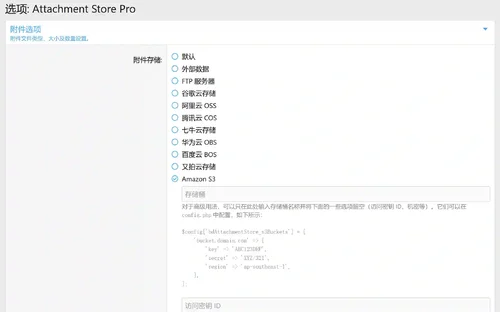
Attachment Store Pro is an enterprise level attachment storage management plugin designed for XenForo 2.3.0+, developed by HuoNiu through Attachment Store secondary development and deeply customized optimization. This plugin completely changes the traditional attachment storage method and provides diversified cloud storage solutions, making your forum attachment management more efficient, secure, and economical.
Core values
💰
Flexible selection of storage solutions - choose the most economical storage service according to your needs
CDN acceleration - reduces server bandwidth costs and enhances user experience
Pay as You Go - Only pay for actual storage and data usage
⚡
Global CDN distribution - nearby access, significantly improving download speed
Server load reduction - external file storage, freeing up server resources
Asynchronous processing - upload process does not block user operations
🔒
Multiple backups - high availability guarantee provided by cloud service providers
Permission Control - Fine file access permission management
Data Encryption - Full process encryption protection for transmission and storage procedures
- 8.50 USD
-
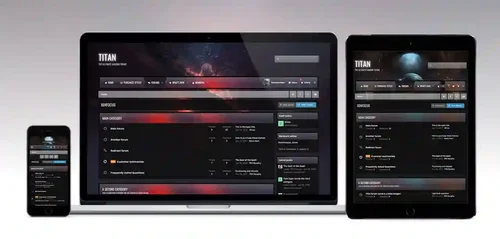
Titan for xenforo 2
Titan is the ultimate gaming theme, based upon a large wallpaper image which is blurred behind textured navigation and category bars. Assign up to 6 background images via the theme settings to completely change the colour scheme, and let your members choose their favourite from a predefined selection!
- Free
- 1 Downloads
-
This add-on uses Credis with a custom cache provider for Redis (based off Cm_Cache_Backend_Redis). For best performance, install the php extension: phpredis
You must have a Redis instance installed, this is likely not possible with shared hosting
While XenForo 2 has a redis connector, it requires phpredis. This add-on does not.
Feature overview
A pure php redis connector
High availability support
Exposes redis cache object for use for use by other add-ons
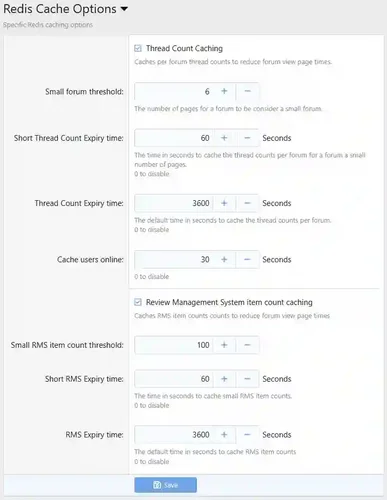
Implements some minor caching of forum thread counts
Troubleshooting
Please be aware that Redis is very sensitive to latency in a virtual environment. If repeated connection failures or protocol errors are experienced disable any Redis Persistence options.
Installation
Edit src/config.php and add:
PHP:
$config['cache']['enabled'] = true; $config['cache']['sessions'] = true; $config['cache']['provider'] = 'SV\RedisCache\Redis'; $config['cache']['config'] = [ 'server' => '127.0.0.1', 'port' => 6379, ];
Options
By default, forum thread counts are cached. In general, this is observable when moving large number of threads from one forum to another, and the total page counts are wrong.
- Free
- 2 Downloads
-
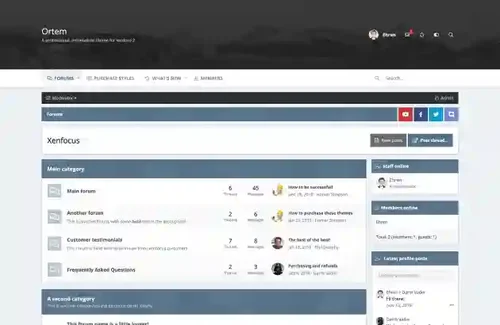
Ortem is a minimalistic design focused around a simple color picker, allowing your members to easily customize the colors of the layout by selecting from a preset array. The header area is large enough to accommodate for big logos and full width banners, and the navigation bar sticks to the top of the screen for easy access.
- Free
- 1 Downloads
-
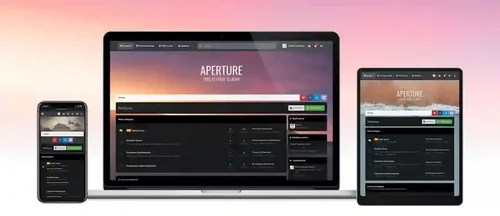
The distinctive feature of Aperture is its parallax background image which blurs once the page is scrolled. The blurred image provides a softer, less distracting background for your content and a fixed navigation bar provides easy access to all of your navigation links, user links and search bar. Perfect for a wide range of XenForo sites but especially great for gaming, sporting or movie sites!
- Free
- 1 Downloads
-
Requirements:
XenForo 2.2.0+
Description:
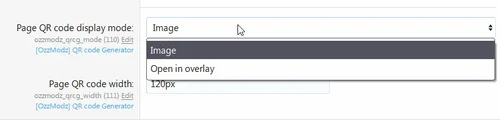
Adds QR code for current page.
- Free
- 0 Downloads
-
XFRM Right Sidebar Pro is an advanced sidebar enhancement plugin designed specifically for XenForo Explorer (XFRM). Through innovative download button integration technology and exquisite card style design, bring unprecedented user experience improvement to your resource page.
Please note: This plugin is released by proxy and requires registration and purchase on the developer's website.
Core Highlights
🔥 Intelligent Download Button - Automatically detects and integrates official XFRM download logic
🎨 Modern design - modular card layout, perfectly integrated into the XenForo ecosystem
🌙 Dark mode - fully supports XenForo's official dark theme
📱 Responsive design - perfectly adapted to mobile devices and various screen sizes
⚡ High performance optimization - code obfuscation compression, loading speed increased by 60%+
Multi state intelligent recognition
Our plugin can intelligently recognize different states of resources and automatically adjust button styles:
|Button Type | Color Theme | Trigger Condition | User Experience|
|----------|----------|----------|----------|
| 🔵 Normal Download | Blue | Free Resources | One click Direct Download|
| 🟠 External link | Orange | Resource redirection | Jump to external website|
| 🟢 Paid purchase | Green | Paid resources | Guided to the purchase page|
| 🟡 Login prompt | Yellow | Tourist access | Pop up login interface|
| ⚫ Insufficient permissions | Gray | Restricted permissions | Display permission description|
Official logic perfectly replicated
✅ 17 selector strategies - covering all possible button positions
✅ Complete inheritance of attributes - maintain all functionality of the original button
✅ Event Monitoring Synchronization - Supports JavaScript Interaction with XenForo
✅ Third party plugin compatibility - seamless collaboration with other XFRM extensions
- Free
- 18 Downloads
- 2 Comments
-
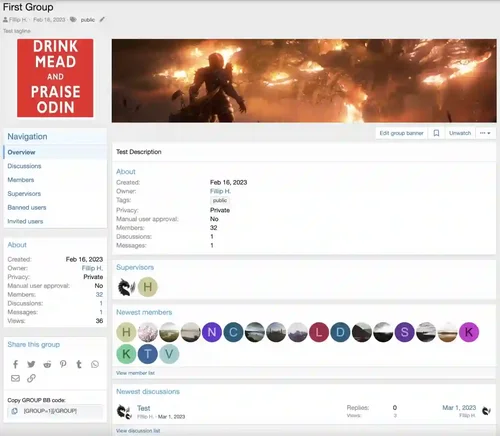
DragonByte Social Groups is a highly advanced social group management add-on for XenForo, containing advanced features such as fine-tuned permissions, a fully featured posting interface, and an invitation system.
Fully integrated with XenForo 2, DragonByte Social Groups takes advantage of all built-in XenForo 2 functionality like Reactions, Reports, Warnings and more.
Uses
DragonByte Social Groups is perfect for any forum that wants to allow members to create clubs, teams or similar special interest areas, allowing users a space where they can discuss their passion without needing the admins to manually create a forum.
Administrators control who can create social groups, how many they can create, and what permissions are accessible to the creator and the "supervisors" (moderators) of social groups.
Social group creators can upload an icon as well as a banner, set a group description as well as optionally add a list of rules any potential member will need to accept before joining.
Extended Product Information
Your social group, your way: Members can create social groups that have one of four privacy levels: Public (Anyone may view the discussion list, and the discussion content), Closed (Anyone may view the discussion list, but only members may view the discussion content), Private (Only members may view the discussion list and discussion content), and Hidden (Only members may view the social group or any of its content).
Administrator control: The ability for administrators to fine-tune who can access what part of the system is comparable to that of XenForo. All of the above social group types can be disabled via the user group permissions, either for all user groups or only for special groups. Want to make Hidden groups a premium feature that requires an active user upgrade? You can do that!
Moderator oversight: You can grant your moderators the "Edit any social group" permission, which allows them to see and change all social groups on your site, even the Hidden ones. Your staff will always be able to have the appropriate level of oversight to ensure everything is above board.
Fine-tuned permissions: Not only can you as the administrator control who can create social groups, and what privacy level they can add, but you can also control the permissions given to social group creators, and the maximum permissions they can delegate to their group supervisors. Don't want to allow hard-deleting content? Simply untick that permission from social group creators and supervisors while setting up the addon, and when it's time to go live, that permission will be closed off from them.
Customisable: Social group creators can upload icons and banners (if permitted by the user group permissions), allowing them to truly make their social group their own. Group admins can also add a description and a set of rules that must be accepted before joining. They can require all members to be manually approved by themselves or a group supervisor, or even turn off new members joining the group altogether.
Familiar user interface: Because DragonByte Social Groups uses a similar interface to XenForo's regular thread/post system, users will instantly be familiar with how to use the software. Posting to a social group will feel as natural as posting anywhere else on your site.
Import existing content: You can import your existing social groups from forum threads, [OzzModz] Social Groups, or Nobita's Social Groups add-on.
Calendar: Integration with Calendar by Naz allows social groups to have a private calendar with events.
Full XenForo 2 Integration: Features integration with the Search, Reactions, Watch system, News Feed, Inline Moderation & more!
Alerts
Approval Queue
Attachment
BB Code
Bookmarks
Edit History
Email Stop system for opting out of emails
"Find New" content handler
Inline Moderation
Moderator Log
News Feed
Permissions
Reactions
Reporting
Search engine (including ElasticSearch)
Sitemap
Tagging
Warning
Watch
Widget
- Free
- 5 Downloads
-
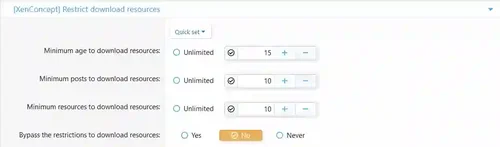
Feature Summary
Usergroup permissions
Minimum age to download resources
Minimum posts to download resources
Minimum resources to download resources
A system of ratio to download resources
Example: if you upload one resource, you can download one resource.
This add-on allows you to set a restrict to download resources!
- Free
- 0 Downloads
-
Carbon for xenforo 2
Carbon, named after the carbon texture which is used throughout the design, is a dark theme for xenforo and is especially perfect for gaming sites. Your members can customize the theme themselves by choosing their own color scheme and background image from a preset array!
If necessary, the color picker can be disabled within the theme settings and it only takes one line of code to change the entire colour scheme!
- Free
- 4 Downloads
-
[XTR] Most Followers Members
This add-on allows you to add most followers tab on notable members page of your community and Most followers widget with follower counts.
- Free
- 2 Downloads







Top Downloads
No files have been downloaded yet this week.
-
HuoNiu XFRM Grid Layout Style
Free
Core Features Modern Grid Layout – Transforms traditional lists into visually appealing grid card displays. HD Cover Display – Displays high-resolution images from resource detail pages, ensuring clear and sharp quality. Flexible Column Configuration – Supports 1-6 columns with free customization (desktop/tablet/mobile configurations independent). Responsive Design – Automatically adjusts to different screen sizes, ensuring perfect display. Hover Animation Effects – Smooth floating + enhance- 3 Downloads
- 0 Comments
-
Better Statistics Pro
Free
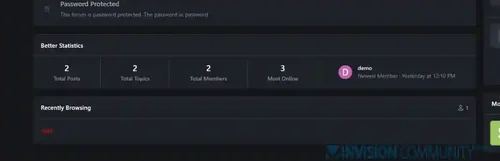
The Better Statistics application for Invision Community 5 combines the statistics from the two widgets, "Member Statistics" and "Forum Statistics," into one. The application uses the original code from both widgets.- 2 Downloads
- 0 Comments
-
Global Market Plus-Transaction & Auction House ⭐ Multifunctional & 99% Customizable
Free
GlobalMarketPlus is a multi-functional virtual store plugin, with Global Market as its main function. It can be used to trade items of various transaction types, and trade merchandises with other players in the server anytime and anywhere through commands and GUI. It is a highly customizable plugin. Almost all functions have corresponding commands. Management system and security system, data processing system, detailed configuration file annotations and wiki, ensure the operation of the plugi- 1 Downloads
- 0 Comments
-
Limited Guest Viewing Pro - Boost Registrations
Free
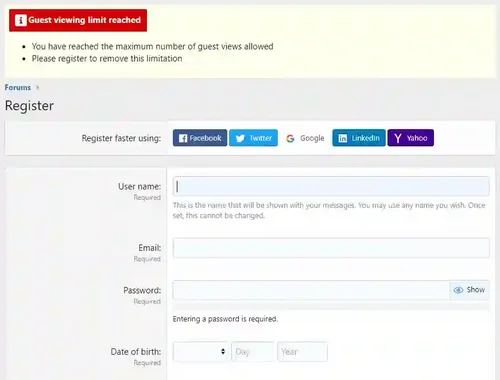
Dramatically increase daily registrations by 200% to 300% Fully featured system to limit the number of content pages your guests can view before being forced to register. It also supports a nag system to warn users that they're on a limited number of views before having to register. Proven method of increasing forum registrations without negatively affecting SEO or annoying your visitors. You control how much a visitor can view anonymously before you force them to register! Features include:- 1 Downloads
- 0 Comments
-
XFRM Right Sidebar Pro
Free
XFRM Right Sidebar Pro is an advanced sidebar enhancement plugin designed specifically for XenForo Explorer (XFRM). Through innovative download button integration technology and exquisite card style design, bring unprecedented user experience improvement to your resource page. Please note: This plugin is released by proxy and requires registration and purchase on the developer's website. Core Highlights 🔥 Intelligent Download Button - Automatically detects and integrates official XFRM download- 1 Downloads
- 2 Comments


-
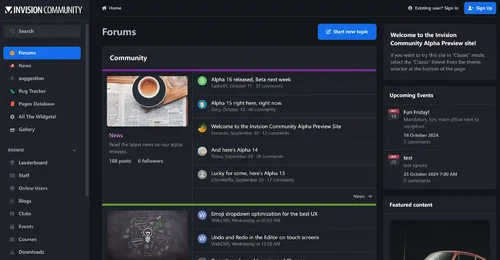
Invision Community
Free
Invision Community 5 — A Fresh New Experience! Invision Community 5 brings a modern design and powerful features to energize your community: All-New Sidebar Layout Enjoy streamlined navigation with a sidebar for quick access to apps, activity streams, search, and customizable shortcuts. Versatile Forum Views Discover the new Feed view with cover photos and featured colors, plus classic table, grid, and fluid modes for flexible content display. Compact Topic Pages & Mini Profiles Focus on c- 188 Downloads
- 3 Comments
-
Invision Community-Developer Tools
Free
These files are necessary for using developer mode in IPS Community Suite.- 41 Downloads
- 0 Comments
-
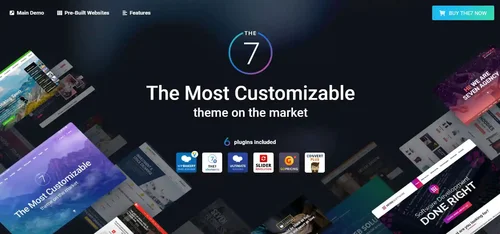
The7 - Website and eCommerce Builder for WordPress
Free
The7 features full and seamless integration with WPBakery Page Builder (formerly Visual Composer) and Ultimate Addons. Most our buyers agree that The7 is the best theme to be used with these plugins, up to date! Its 1000+ Theme Options allows to craft almost any imaginable design. And Design Wizard feature lets you create a boutique-grade website design in mere minutes. Both Wizard and advanced Theme Options can work in visual WP Theme Customizer-like and old-school backend editing modes. The7- 38 Downloads
- 0 Comments
-
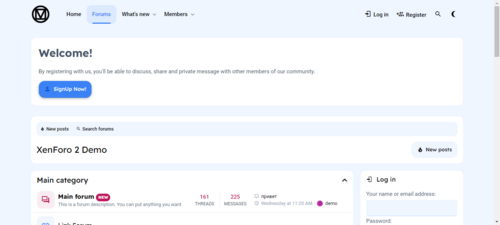
MaterialXen
Free
Material design is basically a result of Google’s set of guidelines for better designing, keeping in mind mobile users. It supports better browsing by enhancing the visual and motion experience. This theme is almost Material-based to make a better user experience. RE-ME Framework Features List You don’t just get a simple theme; you’ll get settings that will change the default framework into your own. It’s your website; make it yours! Google Web font is easily configured. Node Background Avata- 34 Downloads
- 0 Comments
-
Better Statistics Pro
Free
The Better Statistics application for Invision Community 5 combines the statistics from the two widgets, "Member Statistics" and "Forum Statistics," into one. The application uses the original code from both widgets.- 33 Downloads
- 0 Comments

-
Invision Community
Free
Invision Community 5 — A Fresh New Experience! Invision Community 5 brings a modern design and powerful features to energize your community: All-New Sidebar Layout Enjoy streamlined navigation with a sidebar for quick access to apps, activity streams, search, and customizable shortcuts. Versatile Forum Views Discover the new Feed view with cover photos and featured colors, plus classic table, grid, and fluid modes for flexible content display. Compact Topic Pages & Mini Profiles Focus on c- 189 Downloads
- 3 Comments
-
Invision Community-Developer Tools
Free
These files are necessary for using developer mode in IPS Community Suite.- 41 Downloads
- 0 Comments
-
The7 - Website and eCommerce Builder for WordPress
Free
The7 features full and seamless integration with WPBakery Page Builder (formerly Visual Composer) and Ultimate Addons. Most our buyers agree that The7 is the best theme to be used with these plugins, up to date! Its 1000+ Theme Options allows to craft almost any imaginable design. And Design Wizard feature lets you create a boutique-grade website design in mere minutes. Both Wizard and advanced Theme Options can work in visual WP Theme Customizer-like and old-school backend editing modes. The7- 38 Downloads
- 0 Comments
-
MaterialXen
Free
Material design is basically a result of Google’s set of guidelines for better designing, keeping in mind mobile users. It supports better browsing by enhancing the visual and motion experience. This theme is almost Material-based to make a better user experience. RE-ME Framework Features List You don’t just get a simple theme; you’ll get settings that will change the default framework into your own. It’s your website; make it yours! Google Web font is easily configured. Node Background Avata- 35 Downloads
- 0 Comments
-
Better Statistics Pro
Free
The Better Statistics application for Invision Community 5 combines the statistics from the two widgets, "Member Statistics" and "Forum Statistics," into one. The application uses the original code from both widgets.- 35 Downloads
- 0 Comments